

Documentation Index Fetch the complete documentation index at: https://nvd-54.mintlify.app/llms.txt
Use this file to discover all available pages before exploring further.
中断允许你在特定点暂停图执行,并在继续之前等待外部输入。这支持人机协作模式,在这种模式下你需要外部输入才能继续。当中断被触发时,LangGraph 使用其持久化 层保存图状态,并无限期等待直到你恢复执行。
中断通过在图节点中的任意位置调用 interrupt() 函数来工作。该函数接受任何 JSON 可序列化的值,并将其呈现给调用方。当你准备继续时,通过使用 Command 重新调用图来恢复执行,该值随后成为节点内部 interrupt() 调用的返回值。
与静态断点(在特定节点之前或之后暂停)不同,中断是动态的 :它们可以放置在代码中的任何位置,并且可以根据你的应用逻辑设置条件。
检查点保持你的位置: 检查点器写入精确的图状态,以便你稍后恢复,即使在错误状态下也是如此。
thread_id 是你的指针: 使用 { configurable: { thread_id: ... } } 作为 invoke 方法的选项,告诉检查点器加载哪个状态。
中断载荷以 __interrupt__ 形式呈现: 你传递给 interrupt() 的值在 __interrupt__ 字段中返回给调用方,这样你就知道图在等待什么。
你选择的 thread_id 实际上是你的持久游标。重用它会恢复同一个检查点;使用新值则开始一个全新的线程,带有空状态。
使用 interrupt 暂停
interrupt 函数暂停图执行并向调用方返回一个值。当你在节点内调用 interrupt 时,LangGraph 保存当前图状态并等待你使用输入恢复执行。
要使用 interrupt ,你需要:
一个检查点器 来持久化图状态(在生产环境中使用持久化检查点器)
配置中的线程 ID ,以便运行时知道从哪个状态恢复
在你想暂停的地方调用 interrupt()(载荷必须是 JSON 可序列化的)
import { interrupt } from "@langchain/langgraph" ;
async function approvalNode ( state : State ) {
// 暂停并请求批准
const approved = interrupt ( "Do you approve this action?" ) ;
// Command({ resume: ... }) 提供返回到此变量的值
return { approved };
}
当你调用 interrupt 时,会发生以下事情:
图执行被挂起 ,在调用 interrupt 的确切位置
状态被保存 ,使用检查点器以便稍后恢复执行。在生产环境中,这应该是一个持久化检查点器(例如由数据库支持的)
值返回 给调用方,在 __interrupt__ 下;它可以是任何 JSON 可序列化的值(字符串、对象、数组等)
图无限期等待 ,直到你使用响应恢复执行
响应被传回 节点,当你恢复时,成为 interrupt() 调用的返回值
恢复中断
在中断暂停执行后,你通过再次调用图并传入包含恢复值的 Command 来恢复图。恢复值被传回给 interrupt 调用,允许节点使用外部输入继续执行。
import { Command } from "@langchain/langgraph" ;
// 初始运行 - 遇到中断并暂停
// thread_id 是指向已保存检查点的持久指针
const config = { configurable : { thread_id : "thread-1" } };
const result = await graph . invoke ( { input : "data" }, config) ;
// 检查中断了什么
// __interrupt__ 镜像你传递给 interrupt() 的每个载荷
console . log (result . __interrupt__) ;
// [{ value: 'Do you approve this action?', ... }]
// 使用人类的响应恢复
// Command({ resume }) 从节点中的 interrupt() 返回该值
await graph . invoke ( new Command ( { resume : true } ) , config) ;
关于恢复的要点:
恢复时必须使用与中断发生时相同的线程 ID
传递给 new Command({ resume: ... }) 的值成为 interrupt 调用的返回值
恢复时节点从调用 interrupt 的节点开头重新开始,因此 interrupt 之前的任何代码都会再次运行
你可以传递任何 JSON 可序列化的值作为恢复值
new Command({ resume: ... }) 是唯一 预期作为 invoke()/stream() 输入的 Command 模式。其他 Command 参数(update、goto、graph)是为从节点函数返回 设计的。不要传递 new Command({ update: ... }) 作为输入来继续多轮对话——请传递普通输入对象。
常见模式
中断解锁的关键功能是暂停执行并等待外部输入的能力。这对于各种用例都很有用,包括:
审批工作流 :在执行关键操作(API 调用、数据库更改、金融交易)之前暂停
处理多个中断 :在单次调用中恢复多个中断时,将中断 ID 与恢复值配对
审查和编辑 :让人类在继续之前审查和修改 LLM 输出或工具调用
中断工具调用 :在执行工具调用之前暂停,以便在执行前审查和编辑工具调用
验证人类输入 :在进入下一步之前暂停以验证人类输入
使用人机协作(HITL)中断进行流式输出
在构建具有人机协作工作流的交互式智能体时,你可以同时流式传输消息块和节点更新,以在处理中断时提供实时反馈。
使用多种流式模式("messages" 和 "updates")配合 subgraphs=True(如果存在子图)来:
实时流式传输 AI 响应
检测图何时遇到中断
无缝处理用户输入并恢复执行
Command(resume=...) :使用用户提供的数据恢复图执行
处理多个中断
当并行分支同时中断时(例如,扇出到多个节点,每个节点都调用 interrupt()),你可能需要在单次调用中恢复多个中断。
在单次调用中恢复多个中断时,将每个中断 ID 映射到其恢复值。
这确保每个响应在运行时与正确的中断配对。
import {
Annotation ,
Command ,
END ,
INTERRUPT ,
MemorySaver ,
START ,
StateGraph ,
interrupt ,
isInterrupted ,
} from "@langchain/langgraph" ;
const State = Annotation . Root ( {
vals : Annotation < string [] > ( {
reducer : ( left , right ) =>
left . concat (Array . isArray (right) ? right : [right]) ,
default : () => [] ,
} ) ,
} ) ;
function nodeA ( _state : typeof State . State ) {
const answer = interrupt ( "question_a" ) as string ;
return { vals : [ `a: ${ answer } ` ] };
}
function nodeB ( _state : typeof State . State ) {
const answer = interrupt ( "question_b" ) as string ;
return { vals : [ `b: ${ answer } ` ] };
}
const graph = new StateGraph (State)
. addNode ( "a" , nodeA)
. addNode ( "b" , nodeB)
. addEdge (START , "a" )
. addEdge (START , "b" )
. addEdge ( "a" , END)
. addEdge ( "b" , END)
. compile ( { checkpointer : new MemorySaver () } ) ;
const config = { configurable : { thread_id : "1" } };
async function main () {
// 步骤 1:调用 - 两个并行节点都遇到 interrupt() 并暂停
const interruptedResult = await graph . invoke ( { vals : [] }, config) ;
console . log (interruptedResult) ;
/*
{
vals: [],
__interrupt__: [
{ id: '...', value: 'question_a' },
{ id: '...', value: 'question_b' }
]
}
*/
// 步骤 2:一次恢复所有待处理的中断
const resumeMap : Record < string , string > = {};
if ( isInterrupted (interruptedResult)) {
for ( const i of interruptedResult[INTERRUPT]) {
if (i . id != null ) {
resumeMap[i . id] = `answer for ${ i . value } ` ;
}
}
}
const result = await graph . invoke ( new Command ( { resume : resumeMap } ) , config) ;
console . log ( "Final state:" , result) ;
//> Final state: { vals: ['a:answer for question_a', 'b:answer for question_b'] }
}
main () . catch (console . error) ;
批准或拒绝
中断最常见的用途之一是在关键操作之前暂停并请求批准。例如,你可能希望要求人类批准 API 调用、数据库更改或任何其他重要决策。
import { interrupt , Command } from "@langchain/langgraph" ;
const approvalNode : typeof State . Node = ( state ) => {
// 暂停执行;载荷在 result.__interrupt__ 中呈现
const isApproved = interrupt ( {
question : "Do you want to proceed?" ,
details : state . actionDetails
} ) ;
// 根据响应路由
if (isApproved) {
return new Command ( { goto : "proceed" } ) ; // 在提供恢复载荷后运行
} else {
return new Command ( { goto : "cancel" } ) ;
}
}
当你恢复图时,传递 true 表示批准,false 表示拒绝:
// 批准
await graph . invoke ( new Command ( { resume : true } ) , config) ;
// 拒绝
await graph . invoke ( new Command ( { resume : false } ) , config) ;
import {
Command ,
MemorySaver ,
START ,
END ,
StateGraph ,
StateSchema ,
interrupt ,
} from "@langchain/langgraph" ;
import * as z from "zod" ;
const State = new StateSchema ( {
actionDetails : z . string () ,
status : z . enum ([ "pending" , "approved" , "rejected" ]) . nullable () ,
} ) ;
const graphBuilder = new StateGraph (State)
. addNode ( "approval" , async ( state ) => {
// 向调用方公开详细信息,以便在 UI 中渲染
const decision = interrupt ( {
question : "Approve this action?" ,
details : state . actionDetails ,
} ) ;
return new Command ( { goto : decision ? "proceed" : "cancel" } ) ;
}, { ends : [ 'proceed' , 'cancel' ] } )
. addNode ( "proceed" , () => ( { status : "approved" } ))
. addNode ( "cancel" , () => ( { status : "rejected" } ))
. addEdge (START , "approval" )
. addEdge ( "proceed" , END)
. addEdge ( "cancel" , END) ;
// 在生产环境中使用更持久的检查点器
const checkpointer = new MemorySaver () ;
const graph = graphBuilder . compile ( { checkpointer } ) ;
const config = { configurable : { thread_id : "approval-123" } };
const initial = await graph . invoke (
{ actionDetails : "Transfer $500" , status : "pending" },
config ,
) ;
console . log (initial . __interrupt__) ;
// [{ value: { question: ..., details: ... } }]
// 使用决定恢复;true 路由到 proceed,false 路由到 cancel
const resumed = await graph . invoke ( new Command ( { resume : true } ) , config) ;
console . log (resumed . status) ; // -> "approved"
审查和编辑状态
有时你想让人类在继续之前审查和编辑部分图状态。这对于纠正 LLM、添加缺失信息或进行调整很有用。
import { interrupt } from "@langchain/langgraph" ;
const reviewNode : typeof State . Node = ( state ) => {
// 暂停并显示当前内容以供审查(在 result.__interrupt__ 中呈现)
const editedContent = interrupt ( {
instruction : "Review and edit this content" ,
content : state . generatedText
} ) ;
// 使用编辑后的版本更新状态
return { generatedText : editedContent };
}
恢复时,提供编辑后的内容:
await graph . invoke (
new Command ( { resume : "The edited and improved text" } ) , // 值成为 interrupt() 的返回值
config
) ;
import {
Command ,
MemorySaver ,
START ,
END ,
StateGraph ,
StateSchema ,
interrupt ,
} from "@langchain/langgraph" ;
import * as z from "zod" ;
const State = new StateSchema ( {
generatedText : z . string () ,
} ) ;
const builder = new StateGraph (State)
. addNode ( "review" , async ( state ) => {
// 请求审查者编辑生成的内容
const updated = interrupt ( {
instruction : "Review and edit this content" ,
content : state . generatedText ,
} ) ;
return { generatedText : updated };
} )
. addEdge (START , "review" )
. addEdge ( "review" , END) ;
const checkpointer = new MemorySaver () ;
const graph = builder . compile ( { checkpointer } ) ;
const config = { configurable : { thread_id : "review-42" } };
const initial = await graph . invoke ( { generatedText : "Initial draft" }, config) ;
console . log (initial . __interrupt__) ;
// [{ value: { instruction: ..., content: ... } }]
// 使用审查者编辑的文本恢复
const finalState = await graph . invoke (
new Command ( { resume : "Improved draft after review" } ) ,
config ,
) ;
console . log (finalState . generatedText) ; // -> "Improved draft after review"
工具中的中断
你也可以将中断直接放置在工具函数内部。这使得工具本身在被调用时暂停以等待批准,并允许在执行之前对工具调用进行人工审查和编辑。
首先,定义一个使用 interrupt 的工具:
import { tool } from "@langchain/core/tools" ;
import { interrupt } from "@langchain/langgraph" ;
import * as z from "zod" ;
const sendEmailTool = tool (
async ({ to , subject , body }) => {
// 发送前暂停;载荷在 result.__interrupt__ 中呈现
const response = interrupt ( {
action : "send_email" ,
to ,
subject ,
body ,
message : "Approve sending this email?" ,
} ) ;
if (response ?. action === "approve" ) {
// 恢复值可以在执行前覆盖输入
const finalTo = response . to ?? to ;
const finalSubject = response . subject ?? subject ;
const finalBody = response . body ?? body ;
return `Email sent to ${ finalTo } with subject ' ${ finalSubject } '` ;
}
return "Email cancelled by user" ;
},
{
name : "send_email" ,
description : "Send an email to a recipient" ,
schema : z . object ( {
to : z . string () ,
subject : z . string () ,
body : z . string () ,
} ) ,
},
) ;
当你希望批准逻辑与工具本身绑定时,这种方法很有用,使其在图的不同部分中可重用。LLM 可以自然地调用工具,而中断会在工具被调用时暂停执行,允许你批准、编辑或取消操作。
import { tool } from "@langchain/core/tools" ;
import { ChatAnthropic } from "@langchain/anthropic" ;
import {
Command ,
MemorySaver ,
START ,
END ,
StateGraph ,
StateSchema ,
MessagesValue ,
GraphNode ,
interrupt ,
} from "@langchain/langgraph" ;
import * as z from "zod" ;
const sendEmailTool = tool (
async ({ to , subject , body }) => {
// 发送前暂停;载荷在 result.__interrupt__ 中呈现
const response = interrupt ( {
action : "send_email" ,
to ,
subject ,
body ,
message : "Approve sending this email?" ,
} ) ;
if (response ?. action === "approve" ) {
const finalTo = response . to ?? to ;
const finalSubject = response . subject ?? subject ;
const finalBody = response . body ?? body ;
console . log ( "[sendEmailTool]" , finalTo , finalSubject , finalBody) ;
return `Email sent to ${ finalTo } ` ;
}
return "Email cancelled by user" ;
},
{
name : "send_email" ,
description : "Send an email to a recipient" ,
schema : z . object ( {
to : z . string () ,
subject : z . string () ,
body : z . string () ,
} ) ,
},
) ;
const model = new ChatAnthropic ( { model : "claude-sonnet-4-6" } ) . bindTools ([sendEmailTool]) ;
const State = new StateSchema ( {
messages : MessagesValue ,
} ) ;
const agent : typeof State . Node = async ( state ) => {
// LLM 可能决定调用工具;中断在发送前暂停
const response = await model . invoke (state . messages) ;
return { messages : [response] };
};
const graphBuilder = new StateGraph (State)
. addNode ( "agent" , agent)
. addEdge (START , "agent" )
. addEdge ( "agent" , END) ;
const checkpointer = new MemorySaver () ;
const graph = graphBuilder . compile ( { checkpointer } ) ;
const config = { configurable : { thread_id : "email-workflow" } };
const initial = await graph . invoke (
{
messages : [
{ role : "user" , content : "Send an email to alice@example.com about the meeting" },
] ,
},
config ,
) ;
console . log (initial . __interrupt__) ; // -> [{ value: { action: 'send_email', ... } }]
// 使用批准和可选的编辑参数恢复
const resumed = await graph . invoke (
new Command ( {
resume : { action : "approve" , subject : "Updated subject" },
} ) ,
config ,
) ;
console . log (resumed . messages . at ( - 1 )) ; // -> send_email 返回的工具结果
验证人类输入
有时你需要验证来自人类的输入,如果无效则再次询问。你可以使用循环中的多个 interrupt 调用来实现这一点。
import { interrupt } from "@langchain/langgraph" ;
const getAgeNode : typeof State . Node = ( state ) => {
let prompt = "What is your age?" ;
while ( true ) {
const answer = interrupt (prompt) ; // 载荷在 result.__interrupt__ 中呈现
// 验证输入
if ( typeof answer === "number" && answer > 0 ) {
// 有效输入 - 继续
return { age : answer };
} else {
// 无效输入 - 使用更具体的提示再次询问
prompt = `' ${ answer } ' is not a valid age. Please enter a positive number.` ;
}
}
}
每次使用无效输入恢复图时,它都会以更清晰的消息再次询问。一旦提供了有效输入,节点完成,图继续执行。
import {
Command ,
MemorySaver ,
START ,
END ,
StateGraph ,
StateSchema ,
interrupt ,
} from "@langchain/langgraph" ;
import * as z from "zod" ;
const State = new StateSchema ( {
age : z . number () . nullable () ,
} ) ;
const builder = new StateGraph (State)
. addNode ( "collectAge" , ( state ) => {
let prompt = "What is your age?" ;
while ( true ) {
const answer = interrupt (prompt) ; // 载荷在 result.__interrupt__ 中呈现
if ( typeof answer === "number" && answer > 0 ) {
return { age : answer };
}
prompt = `' ${ answer } ' is not a valid age. Please enter a positive number.` ;
}
} )
. addEdge (START , "collectAge" )
. addEdge ( "collectAge" , END) ;
const checkpointer = new MemorySaver () ;
const graph = builder . compile ( { checkpointer } ) ;
const config = { configurable : { thread_id : "form-1" } };
const first = await graph . invoke ( { age : null }, config) ;
console . log (first . __interrupt__) ; // -> [{ value: "What is your age?", ... }]
// 提供无效数据;节点重新提示
const retry = await graph . invoke ( new Command ( { resume : "thirty" } ) , config) ;
console . log (retry . __interrupt__) ; // -> [{ value: "'thirty' is not a valid age...", ... }]
// 提供有效数据;循环退出并更新状态
const final = await graph . invoke ( new Command ( { resume : 30 } ) , config) ;
console . log (final . age) ; // -> 30
中断规则
当你在节点内调用 interrupt 时,LangGraph 通过抛出一个信号运行时暂停的特殊异常来挂起执行。此异常通过调用栈向上传播,并被运行时捕获,运行时通知图保存当前状态并等待外部输入。
当执行恢复时(在你提供请求的输入之后),运行时从节点的开头重新启动整个节点——它不会从调用 interrupt 的确切行恢复。这意味着在 interrupt 之前运行的任何代码都会再次执行。因此,在使用中断时需要遵循一些重要规则以确保它们按预期工作。
不要将 interrupt 调用包装在 try/catch 中
interrupt 在调用点暂停执行的方式是抛出一个特殊异常。如果你将 interrupt 调用包装在 try/catch 块中,你将捕获此异常,中断将不会被传回图。
const nodeA : GraphNode < typeof State > = async ( state ) => {
// ✅ 好:先中断,然后分别处理错误条件
const name = interrupt ( "What's your name?" ) ;
try {
await fetchData () ; // 这可能会失败
} catch (err) {
console . error (error) ;
}
return state ;
}
async function nodeA ( state : State ) {
// ❌ 坏:将中断包装在裸的 try/catch 中会捕获中断异常
try {
const name = interrupt ( "What's your name?" ) ;
} catch (err) {
console . error (error) ;
}
return state ;
}
不要在节点内重新排序 interrupt 调用
在单个节点中使用多个中断是常见的,但如果处理不当,可能会导致意外行为。
当一个节点包含多个中断调用时,LangGraph 会维护一个特定于执行该节点的任务的恢复值列表。每当执行恢复时,它从节点的开头开始。对于遇到的每个中断,LangGraph 检查任务的恢复列表中是否存在匹配的值。匹配是严格基于索引的 ,因此节点内中断调用的顺序很重要。
async function nodeA ( state : State ) {
// ✅ 好:中断调用每次都以相同的顺序发生
const name = interrupt ( "What's your name?" ) ;
const age = interrupt ( "What's your age?" ) ;
const city = interrupt ( "What's your city?" ) ;
return {
name ,
age ,
city
};
}
const nodeA : GraphNode < typeof State > = async ( state ) => {
// ❌ 坏:有条件地跳过中断会改变顺序
const name = interrupt ( "What's your name?" ) ;
// 第一次运行时可能跳过此中断
// 恢复时可能不会跳过 - 导致索引不匹配
if (state . needsAge) {
const age = interrupt ( "What's your age?" ) ;
}
const city = interrupt ( "What's your city?" ) ;
return { name , city };
}
不要在 interrupt 调用中返回复杂值
根据使用的检查点器,复杂值可能不可序列化(例如,你不能序列化一个函数)。为了使你的图适用于任何部署,最佳实践是仅使用可以合理序列化的值。
✅ 向 interrupt 传递简单的 JSON 可序列化类型
✅ 传递包含简单值的字典/对象
const nodeA : GraphNode < typeof State > = async ( state ) => {
// ✅ 好:传递可序列化的简单类型
const name = interrupt ( "What's your name?" ) ;
const count = interrupt ( 42 ) ;
const approved = interrupt ( true ) ;
return { name , count , approved };
}
function validateInput ( value : string ) : boolean {
return value . length > 0 ;
}
const nodeA : GraphNode < typeof State > = async ( state ) => {
// ❌ 坏:向中断传递函数
// 函数无法被序列化
const response = interrupt ( {
question : "What's your name?" ,
validator : validateInput // 这将失败
} ) ;
return { name : response };
}
interrupt 之前调用的副作用必须是幂等的
因为中断通过重新运行调用它们的节点来工作,所以在 interrupt 之前调用的副作用应该(理想情况下)是幂等的。作为背景,幂等性意味着相同的操作可以应用多次而不会改变超出初始执行的结果。
例如,你可能在节点内部有一个更新记录的 API 调用。如果在该调用之后调用了 interrupt ,那么当节点恢复时,它将被重新运行多次,可能会覆盖初始更新或创建重复记录。
const nodeA : GraphNode < typeof State > = async ( state ) => {
// ✅ 好:使用幂等的 upsert 操作
// 运行多次将产生相同的结果
await db . upsertUser ( {
userId : state . userId ,
status : "pending_approval"
} ) ;
const approved = interrupt ( "Approve this change?" ) ;
return { approved };
}
🔴 不要在 interrupt 之前执行非幂等操作
🔴 不要在不检查是否存在的情况下创建新记录
const nodeA : GraphNode < typeof State > = async ( state ) => {
// ❌ 坏:在中断之前创建新记录
// 每次恢复都会创建重复记录
const auditId = await db . createAuditLog ( {
userId : state . userId ,
action : "pending_approval" ,
timestamp : new Date ()
} ) ;
const approved = interrupt ( "Approve this change?" ) ;
return { approved , auditId };
}
与作为函数调用的子图一起使用
当在节点内调用子图时,父图将从调用子图并触发 interrupt 的节点开头 恢复执行。同样,子图 也将从调用 interrupt 的节点开头恢复。
async function nodeInParentGraph ( state : State ) {
someCode () ; // <-- 恢复时将重新执行
// 作为函数调用子图。
// 子图包含一个 `interrupt` 调用。
const subgraphResult = await subgraph . invoke (someInput) ;
// ...
}
async function nodeInSubgraph ( state : State ) {
someOtherCode () ; // <-- 恢复时也将重新执行
const result = interrupt ( "What's your name?" ) ;
// ...
}
使用中断进行调试
要调试和测试图,你可以使用静态中断作为断点逐节点逐步执行图。静态中断在节点执行之前或之后的定义点触发。你可以在编译图时通过指定 interruptBefore 和 interruptAfter 来设置这些。
const graph = builder . compile ( {
interruptBefore : [ "node_a" ] ,
interruptAfter : [ "node_b" , "node_c" ] ,
checkpointer ,
} ) ;
// 向图传递线程 ID
const config = {
configurable : {
thread_id : "some_thread"
}
};
// 运行图直到断点
await graph . invoke (inputs , config) ; # [ ! code highlight]
await graph . invoke ( null , config) ; # [ ! code highlight]
断点在 compile 时设置。
interruptBefore 指定在节点执行之前应暂停执行的节点。
interruptAfter 指定在节点执行之后应暂停执行的节点。
需要检查点器来启用断点。
图运行直到遇到第一个断点。
通过传入 null 作为输入来恢复图。这将运行图直到遇到下一个断点。
// 运行图直到断点
graph . invoke (inputs , {
interruptBefore : [ "node_a" ] ,
interruptAfter : [ "node_b" , "node_c" ] ,
configurable : {
thread_id : "some_thread"
}
} ) ;
// 恢复图
await graph . invoke ( null , config) ;
graph.invoke 使用 interruptBefore 和 interruptAfter 参数调用。这是运行时配置,可以在每次调用时更改。
interruptBefore 指定在节点执行之前应暂停执行的节点。
interruptAfter 指定在节点执行之后应暂停执行的节点。
图运行直到遇到第一个断点。
通过传入 null 作为输入来恢复图。这将运行图直到遇到下一个断点。
使用 LangSmith Studio
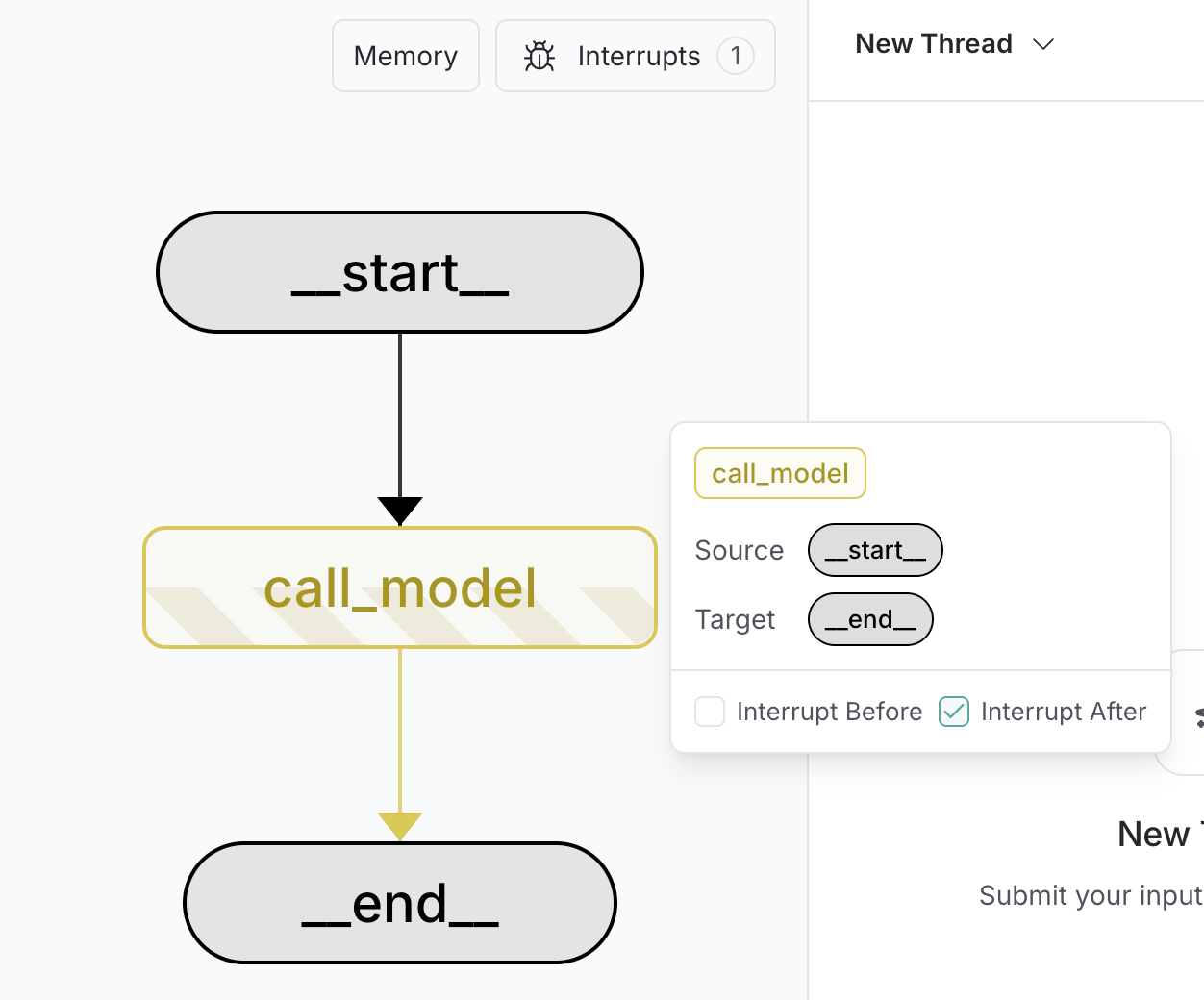
你可以使用 LangSmith Studio 在运行图之前在 UI 中设置静态中断。你也可以使用 UI 在执行的任何时刻检查图状态。
将这些文档连接 到 Claude、VSCode 等工具,通过 MCP 获取实时答案。