

添加短期记忆
短期记忆(线程级别的持久化)使智能体能够跟踪多轮对话。要添加短期记忆:import { MemorySaver, StateGraph } from "@langchain/langgraph";
const checkpointer = new MemorySaver();
const builder = new StateGraph(...);
const graph = builder.compile({ checkpointer });
await graph.invoke(
{ messages: [{ role: "user", content: "hi! i am Bob" }] },
{ configurable: { thread_id: "1" } }
);
在生产环境中使用
在生产环境中,使用数据库支持的检查点器:- Postgres
- MongoDB
import { PostgresSaver } from "@langchain/langgraph-checkpoint-postgres";

const DB_URI = "postgresql://postgres:postgres@localhost:5442/postgres?sslmode=disable";
const checkpointer = PostgresSaver.fromConnString(DB_URI);

const builder = new StateGraph(...);
const graph = builder.compile({ checkpointer });
import { MongoClient } from "mongodb";
import { MongoDBSaver } from "@langchain/langgraph-checkpoint-mongodb";

const client = new MongoClient("mongodb://user:password@localhost:27017");
const checkpointer = new MongoDBSaver({ client });

const builder = new StateGraph(...);
const graph = builder.compile({ checkpointer });
示例:使用 Postgres 检查点器
示例:使用 Postgres 检查点器
npm install @langchain/langgraph-checkpoint-postgres
首次使用 Postgres 检查点器时需要调用
checkpointer.setup()import { ChatAnthropic } from "@langchain/anthropic";
import { StateGraph, StateSchema, MessagesValue, GraphNode, START } from "@langchain/langgraph";
import { PostgresSaver } from "@langchain/langgraph-checkpoint-postgres";
const State = new StateSchema({
messages: MessagesValue,
});
const model = new ChatAnthropic({ model: "claude-haiku-4-5-20251001" });
const DB_URI = "postgresql://postgres:postgres@localhost:5442/postgres?sslmode=disable";
const checkpointer = PostgresSaver.fromConnString(DB_URI);
// await checkpointer.setup();
const callModel: GraphNode<typeof State> = async (state) => {
const response = await model.invoke(state.messages);
return { messages: [response] };
};
const builder = new StateGraph(State)
.addNode("call_model", callModel)
.addEdge(START, "call_model");
const graph = builder.compile({ checkpointer });
const config = {
configurable: {
thread_id: "1"
}
};
for await (const chunk of await graph.stream(
{ messages: [{ role: "user", content: "hi! I'm bob" }] },
{ ...config, streamMode: "values" }
)) {
console.log(chunk.messages.at(-1)?.content);
}
for await (const chunk of await graph.stream(
{ messages: [{ role: "user", content: "what's my name?" }] },
{ ...config, streamMode: "values" }
)) {
console.log(chunk.messages.at(-1)?.content);
}
示例:使用 MongoDB 检查点器
示例:使用 MongoDB 检查点器
npm install @langchain/langgraph-checkpoint-mongodb
设置
要使用
MongoDBSaver,你需要一个 MongoDB 集群。如果还没有,请按照此指南创建一个集群。import { ChatAnthropic } from "@langchain/anthropic";
import { StateGraph, StateSchema, MessagesValue, GraphNode, START } from "@langchain/langgraph";
import { MongoDBSaver } from "@langchain/langgraph-checkpoint-mongodb";
import { MongoClient } from "mongodb";
const State = new StateSchema({
messages: MessagesValue,
});
const model = new ChatAnthropic({ model: "claude-haiku-4-5-20251001" });
const client = new MongoClient("mongodb://user:password@localhost:27017");
const checkpointer = new MongoDBSaver({ client, dbName: "langgraph" });
const callModel: GraphNode<typeof State> = async (state) => {
const response = await model.invoke(state.messages);
return { messages: [response] };
};
const builder = new StateGraph(State)
.addNode("call_model", callModel)
.addEdge(START, "call_model");
const graph = builder.compile({ checkpointer });
const config = { configurable: { thread_id: "1" } };
for await (const chunk of await graph.stream(
{ messages: [{ role: "user", content: "hi! I'm bob" }] },
{ ...config, streamMode: "values" }
)) {
console.log(chunk.messages.at(-1)?.content);
}
for await (const chunk of await graph.stream(
{ messages: [{ role: "user", content: "what's my name?" }] },
{ ...config, streamMode: "values" }
)) {
console.log(chunk.messages.at(-1)?.content);
}
在子图中使用
如果你的图包含子图,你只需在编译父图时提供检查点器。LangGraph 会自动将检查点器传播到子图中。import { StateGraph, StateSchema, START, MemorySaver } from "@langchain/langgraph";
import { z } from "zod/v4";
const State = new StateSchema({ foo: z.string() });
const subgraphBuilder = new StateGraph(State)
.addNode("subgraph_node_1", (state) => {
return { foo: state.foo + "bar" };
})
.addEdge(START, "subgraph_node_1");
const subgraph = subgraphBuilder.compile();
const builder = new StateGraph(State)
.addNode("node_1", subgraph)
.addEdge(START, "node_1");
const checkpointer = new MemorySaver();
const graph = builder.compile({ checkpointer });
const subgraphBuilder = new StateGraph(...);
const subgraph = subgraphBuilder.compile({ checkpointer: true });
添加长期记忆
使用长期记忆来跨对话存储用户特定或应用特定的数据。import { InMemoryStore, StateGraph } from "@langchain/langgraph";
const store = new InMemoryStore();
const builder = new StateGraph(...);
const graph = builder.compile({ store });
在节点中访问存储
一旦你使用存储编译了图,LangGraph 会自动将存储注入到你的节点函数中。推荐通过Runtime 对象访问存储。
import { StateGraph, StateSchema, MessagesValue, GraphNode, START } from "@langchain/langgraph";
import { v4 as uuidv4 } from "uuid";

const State = new StateSchema({
  messages: MessagesValue,
});

const callModel: GraphNode<typeof State> = async (state, runtime) => {
  const userId = runtime.context?.userId;
  const namespace = [userId, "memories"];

  // 搜索相关记忆
  const memories = await runtime.store?.search(namespace, {
    query: state.messages.at(-1)?.content,
    limit: 3,
  });
  const info = memories?.map((d) => d.value.data).join("\n") || "";

  // ... 在模型调用中使用记忆

  // 存储新记忆
  await runtime.store?.put(namespace, uuidv4(), { data: "User prefers dark mode" });
};

const builder = new StateGraph(State)
  .addNode("call_model", callModel)
  .addEdge(START, "call_model");
const graph = builder.compile({ store });

// 在调用时传递上下文
await graph.invoke(
  { messages: [{ role: "user", content: "hi" }] },
  { configurable: { thread_id: "1" }, context: { userId: "1" } }
);
在生产环境中使用
在生产环境中,使用数据库支持的存储:- Postgres
- MongoDB
import { PostgresStore } from "@langchain/langgraph-checkpoint-postgres/store";

const DB_URI = "postgresql://postgres:postgres@localhost:5442/postgres?sslmode=disable";
const store = PostgresStore.fromConnString(DB_URI);

const builder = new StateGraph(...);
const graph = builder.compile({ store });
import { MongoDBStore } from "@langchain/langgraph-checkpoint-mongodb";

const MONGODB_URI = "mongodb://user:password@localhost:27017";
const store = await MongoDBStore.fromConnString(MONGODB_URI, {
  dbName: "langgraph",
  collectionName: "store",
});

const builder = new StateGraph(...);
const graph = builder.compile({ store });
示例:使用 Postgres 存储
示例:使用 Postgres 存储
npm install @langchain/langgraph-checkpoint-postgres
首次使用 Postgres 存储时需要调用
store.setup()import { ChatAnthropic } from "@langchain/anthropic";
import { StateGraph, StateSchema, MessagesValue, GraphNode, START } from "@langchain/langgraph";
import { PostgresSaver } from "@langchain/langgraph-checkpoint-postgres";
import { PostgresStore } from "@langchain/langgraph-checkpoint-postgres/store";
import { v4 as uuidv4 } from "uuid";
const State = new StateSchema({
messages: MessagesValue,
});
const model = new ChatAnthropic({ model: "claude-haiku-4-5-20251001" });
const callModel: GraphNode<typeof State> = async (state, runtime) => {
const userId = runtime.context?.userId;
const namespace = ["memories", userId];
const memories = await runtime.store?.search(namespace, { query: state.messages.at(-1)?.content });
const info = memories?.map(d => d.value.data).join("\n") || "";
const systemMsg = `You are a helpful assistant talking to the user. User info: ${info}`;
// 如果用户要求模型记住某些内容,则存储新记忆
const lastMessage = state.messages.at(-1);
if (lastMessage?.content?.toLowerCase().includes("remember")) {
const memory = "User name is Bob";
await runtime.store?.put(namespace, uuidv4(), { data: memory });
}
const response = await model.invoke([
{ role: "system", content: systemMsg },
...state.messages
]);
return { messages: [response] };
};
const DB_URI = "postgresql://postgres:postgres@localhost:5442/postgres?sslmode=disable";
const store = PostgresStore.fromConnString(DB_URI);
const checkpointer = PostgresSaver.fromConnString(DB_URI);
// await store.setup();
// await checkpointer.setup();
const builder = new StateGraph(State)
.addNode("call_model", callModel)
.addEdge(START, "call_model");
const graph = builder.compile({
checkpointer,
store,
});
for await (const chunk of await graph.stream(
{ messages: [{ role: "user", content: "Hi! Remember: my name is Bob" }] },
{ configurable: { thread_id: "1" }, context: { userId: "1" }, streamMode: "values" }
)) {
console.log(chunk.messages.at(-1)?.content);
}
for await (const chunk of await graph.stream(
{ messages: [{ role: "user", content: "what is my name?" }] },
{ configurable: { thread_id: "2" }, context: { userId: "1" }, streamMode: "values" }
)) {
console.log(chunk.messages.at(-1)?.content);
}
示例:使用 MongoDB 存储
示例:使用 MongoDB 存储
npm install @langchain/langgraph-checkpoint-mongodb
import { ChatAnthropic } from "@langchain/anthropic";
import { MemorySaver, StateGraph, StateSchema, MessagesValue, GraphNode, START } from "@langchain/langgraph";
import { MongoDBStore } from "@langchain/langgraph-checkpoint-mongodb";
import { v4 as uuidv4 } from "uuid";

const State = new StateSchema({
  messages: MessagesValue,
});

const model = new ChatAnthropic({ model: "claude-sonnet-4-6" });

const callModel: GraphNode<typeof State> = async (state, runtime) => {
  const userId = runtime.context?.userId;
  const namespace = ["memories", userId];
  const memories = await runtime.store?.search(namespace);
  const info = memories?.map(d => d.value.data).join("\n") || "n/a";
  const systemMsg = `You are a helpful assistant talking to the user. User info: ${info}`;

  // 如果用户要求模型记住某些内容,则存储新记忆
  const lastMessage = state.messages.at(-1);
  if (lastMessage?.content?.toLowerCase().includes("remember")) {
    const memory = "User name is Bob";
    await runtime.store?.put(namespace, uuidv4(), { data: memory });
  }

  const response = await model.invoke([
    { role: "system", content: systemMsg },
    ...state.messages
  ]);
  return { messages: [response] };
};

const MONGODB_URI = "mongodb://user:password@localhost:27017";

const store = await MongoDBStore.fromConnString(MONGODB_URI, {
  dbName: "langgraph",
  collectionName: "store",
});

const checkpointer = new MemorySaver();

const builder = new StateGraph(State)
  .addNode("call_model", callModel)
  .addEdge(START, "call_model");

const graph = builder.compile({ checkpointer, store });

for await (const chunk of await graph.stream(
  { messages: [{ role: "user", content: "Hi! Remember: my name is Bob" }] },
  { configurable: { thread_id: "1" }, context: { userId: "1" }, streamMode: "values" }
)) {
  console.log(chunk.messages.at(-1)?.content);
}

for await (const chunk of await graph.stream(
  { messages: [{ role: "user", content: "what is my name?" }] },
  { configurable: { thread_id: "2" }, context: { userId: "1" }, streamMode: "values" }
)) {
  console.log(chunk.messages.at(-1)?.content);
}
使用语义搜索
在图的记忆存储中启用语义搜索,让图智能体可以通过语义相似性搜索存储中的项目。import { OpenAIEmbeddings } from "@langchain/openai";
import { InMemoryStore } from "@langchain/langgraph";
// 创建启用语义搜索的存储
const embeddings = new OpenAIEmbeddings({ model: "text-embedding-3-small" });
const store = new InMemoryStore({
index: {
embeddings,
dims: 1536,
},
});
await store.put(["user_123", "memories"], "1", { text: "I love pizza" });
await store.put(["user_123", "memories"], "2", { text: "I am a plumber" });
const items = await store.search(["user_123", "memories"], {
query: "I'm hungry",
limit: 1,
});
InMemoryStore 适合开发环境。在生产环境中,请使用持久化存储,如 PostgresStore、MongoDBStore 或 RedisStore。带语义搜索的长期记忆
带语义搜索的长期记忆
- InMemoryStore
- MongoDB(手动嵌入)
- MongoDB(自动嵌入)
import { OpenAIEmbeddings, ChatOpenAI } from "@langchain/openai";
import { StateGraph, StateSchema, MessagesValue, GraphNode, START, InMemoryStore } from "@langchain/langgraph";

const State = new StateSchema({
  messages: MessagesValue,
});

const model = new ChatOpenAI({ model: "gpt-5.4-mini" });

// 创建启用语义搜索的存储
const embeddings = new OpenAIEmbeddings({ model: "text-embedding-3-small" });
const store = new InMemoryStore({
  index: {
    embeddings,
    dims: 1536,
  }
});

await store.put(["user_123", "memories"], "1", { text: "I love pizza" });
await store.put(["user_123", "memories"], "2", { text: "I am a plumber" });

const chat: GraphNode<typeof State> = async (state, runtime) => {
  // 基于用户最后一条消息进行搜索
  const items = await runtime.store.search(
    ["user_123", "memories"],
    { query: state.messages.at(-1)?.content, limit: 2 }
  );
  const memories = items.map(item => item.value.text).join("\n");
  const memoriesText = memories ? `## 用户记忆\n${memories}` : "";

  const response = await model.invoke([
    { role: "system", content: `You are a helpful assistant.\n${memoriesText}` },
    ...state.messages,
  ]);

  return { messages: [response] };
};

const builder = new StateGraph(State)
  .addNode("chat", chat)
  .addEdge(START, "chat");
const graph = builder.compile({ store });

for await (const [message, metadata] of await graph.stream(
  { messages: [{ role: "user", content: "I'm hungry" }] },
  { streamMode: "messages" }
)) {
  if (message.content) {
    console.log(message.content);
  }
}
import { ChatOpenAI, OpenAIEmbeddings } from "@langchain/openai";
import { MongoDBStore } from "@langchain/langgraph-checkpoint-mongodb";
import { StateGraph, StateSchema, MessagesValue, GraphNode, START } from "@langchain/langgraph";

const State = new StateSchema({
  messages: MessagesValue,
});

const model = new ChatOpenAI({ model: "gpt-5.4-mini" });

// 创建启用语义搜索的存储
const MONGODB_URI = "mongodb://user:password@localhost:27017";
const store = await MongoDBStore.fromConnString(MONGODB_URI, {
  dbName: "langgraph",
  collectionName: "store",
  embeddings: new OpenAIEmbeddings({ model: "text-embedding-3-small" }),
  indexConfig: {
    name: "store_vector_index",
    dims: 1536,
    embeddingKey: "text",
  },
});

await store.put(["user_123", "memories"], "1", { text: "I love pizza" });
await store.put(["user_123", "memories"], "2", { text: "I am a plumber" });

const chat: GraphNode<typeof State> = async (state, runtime) => {
  // 基于用户最后一条消息进行搜索
  const items = await runtime.store.search(
    ["user_123", "memories"],
    { query: state.messages.at(-1)?.content, limit: 2 }
  );
  const memories = items.map(item => item.value.text).join("\n");
  const memoriesText = memories ? `## 用户记忆\n${memories}` : "";

  const response = await model.invoke([
    { role: "system", content: `You are a helpful assistant.\n${memoriesText}` },
    ...state.messages,
  ]);

  return { messages: [response] };
};

const builder = new StateGraph(State)
  .addNode("chat", chat)
  .addEdge(START, "chat");
const graph = builder.compile({ store });

for await (const [message, metadata] of await graph.stream(
  { messages: [{ role: "user", content: "I'm hungry" }] },
  { streamMode: "messages" }
)) {
  if (message.content) {
    console.log(message.content);
  }
}
自动嵌入需要 MongoDB Atlas。MongoDB 通过 Voyage AI 在服务端生成嵌入。有关更多信息,请参阅自动嵌入文档。
import { StateGraph, StateSchema, MessagesValue, GraphNode, START } from "@langchain/langgraph";
import { MongoDBStore } from "@langchain/langgraph-checkpoint-mongodb";
import { ChatOpenAI } from "@langchain/openai";

const State = new StateSchema({
  messages: MessagesValue,
});

const model = new ChatOpenAI({ model: "gpt-5.4-mini" });

// 自动嵌入:不需要嵌入实例。
// 配置 Voyage AI 模型和 MongoDB 在服务端读取的字段路径。
const MONGODB_URI = "mongodb://user:password@localhost:27017";
const store = await MongoDBStore.fromConnString(MONGODB_URI, {
  dbName: "langgraph",
  collectionName: "store",
  indexConfig: {
    name: "store_vector_index",
    path: "value.content",  // MongoDB 读取此字段并在服务端进行嵌入
    model: "voyage-4",      // MongoDB Atlas 使用的 Voyage AI 模型
  },
});

// 值必须包含与配置路径(value.content)匹配的 content 字段
await store.put(["user_123", "memories"], "1", { content: "I love pizza" });
await store.put(["user_123", "memories"], "2", { content: "I am a plumber" });

const chat: GraphNode<typeof State> = async (state, runtime) => {
  // MongoDB 在服务端生成查询嵌入
  const items = await runtime.store.search(
    ["user_123", "memories"],
    { query: state.messages.at(-1)?.content, limit: 2 }
  );
  const memories = items.map(item => item.value.content).join("\n");
  const memoriesText = memories ? `## 用户记忆\n${memories}` : "";

  const response = await model.invoke([
    { role: "system", content: `You are a helpful assistant.\n${memoriesText}` },
    ...state.messages,
  ]);

  return { messages: [response] };
};

const builder = new StateGraph(State)
  .addNode("chat", chat)
  .addEdge(START, "chat");
const graph = builder.compile({ store });

for await (const [message, metadata] of await graph.stream(
  { messages: [{ role: "user", content: "I'm hungry" }] },
  { streamMode: "messages" }
)) {
  if (message.content) {
    console.log(message.content);
  }
}
管理短期记忆
启用短期记忆后,长对话可能会超出大语言模型(LLM)的上下文窗口。常见的解决方案有:- 裁剪消息:在调用大语言模型(LLM)之前移除前 N 条或后 N 条消息
- 删除消息:从 LangGraph 状态中永久删除消息
- 总结消息:总结历史中较早的消息并用摘要替换它们
- 管理检查点:存储和检索消息历史
- 自定义策略(例如消息过滤等)
裁剪消息
大多数大语言模型(LLM)有最大支持的上下文窗口(以 Token 计量)。决定何时截断消息的一种方法是计算消息历史中的 Token 数,并在接近该限制时进行截断。如果你使用的是 LangChain,可以使用 trim messages 工具并指定要从列表中保留的 Token 数,以及用于处理边界的strategy(例如保留最后 maxTokens 条)。
要裁剪消息历史,使用 trimMessages 函数:
import { trimMessages } from "@langchain/core/messages";
import { StateSchema, MessagesValue, GraphNode } from "@langchain/langgraph";

const State = new StateSchema({
  messages: MessagesValue,
});

const callModel: GraphNode<typeof State> = async (state) => {
  const messages = trimMessages(state.messages, {
    strategy: "last",
    maxTokens: 128,
    startOn: "human",
    endOn: ["human", "tool"],
  });
  const response = await model.invoke(messages);
  return { messages: [response] };
};

const builder = new StateGraph(State)
  .addNode("call_model", callModel);
  // ...
完整示例:裁剪消息
完整示例:裁剪消息
import { trimMessages } from "@langchain/core/messages";
import { ChatAnthropic } from "@langchain/anthropic";
import { StateGraph, StateSchema, MessagesValue, GraphNode, START, MemorySaver } from "@langchain/langgraph";

const State = new StateSchema({
  messages: MessagesValue,
});

const model = new ChatAnthropic({ model: "claude-3-5-sonnet-20241022" });

const callModel: GraphNode<typeof State> = async (state) => {
  const messages = trimMessages(state.messages, {
    strategy: "last",
    maxTokens: 128,
    startOn: "human",
    endOn: ["human", "tool"],
    tokenCounter: model,
  });
  const response = await model.invoke(messages);
  return { messages: [response] };
};

const checkpointer = new MemorySaver();
const builder = new StateGraph(State)
  .addNode("call_model", callModel)
  .addEdge(START, "call_model");
const graph = builder.compile({ checkpointer });

const config = { configurable: { thread_id: "1" } };
await graph.invoke({ messages: [{ role: "user", content: "hi, my name is bob" }] }, config);
await graph.invoke({ messages: [{ role: "user", content: "write a short poem about cats" }] }, config);
await graph.invoke({ messages: [{ role: "user", content: "now do the same but for dogs" }] }, config);
const finalResponse = await graph.invoke({ messages: [{ role: "user", content: "what's my name?" }] }, config);

console.log(finalResponse.messages.at(-1)?.content);
Your name is Bob, as you mentioned when you first introduced yourself.
删除消息
你可以从图状态中删除消息来管理消息历史。这在你需要移除特定消息或清除整个消息历史时很有用。 要从图状态中删除消息,可以使用RemoveMessage。为了使 RemoveMessage 生效,你需要使用带有 messagesStateReducer 归约器的状态键,比如 MessagesValue。
要移除特定消息:
import { RemoveMessage } from "@langchain/core/messages";

const deleteMessages = (state) => {
  const messages = state.messages;
  if (messages.length > 2) {
    // 移除最早的两条消息
    return {
      messages: messages
        .slice(0, 2)
        .map((m) => new RemoveMessage({ id: m.id })),
    };
  }
};
删除消息时,确保生成的消息历史是有效的。请检查你使用的大语言模型(LLM)提供商的限制。例如:
- 某些提供商要求消息历史以
user消息开头 - 大多数提供商要求带有工具调用的
assistant消息后面跟有相应的tool结果消息。
完整示例:删除消息
完整示例:删除消息
import { RemoveMessage } from "@langchain/core/messages";
import { ChatAnthropic } from "@langchain/anthropic";
import { StateGraph, StateSchema, MessagesValue, GraphNode, START, MemorySaver } from "@langchain/langgraph";

const State = new StateSchema({
  messages: MessagesValue,
});

const model = new ChatAnthropic({ model: "claude-3-5-sonnet-20241022" });

const deleteMessages: GraphNode<typeof State> = (state) => {
  const messages = state.messages;
  if (messages.length > 2) {
    // 移除最早的两条消息
    return { messages: messages.slice(0, 2).map(m => new RemoveMessage({ id: m.id })) };
  }
  return {};
};

const callModel: GraphNode<typeof State> = async (state) => {
  const response = await model.invoke(state.messages);
  return { messages: [response] };
};

const builder = new StateGraph(State)
  .addNode("call_model", callModel)
  .addNode("delete_messages", deleteMessages)
  .addEdge(START, "call_model")
  .addEdge("call_model", "delete_messages");

const checkpointer = new MemorySaver();
const app = builder.compile({ checkpointer });

const config = { configurable: { thread_id: "1" } };

for await (const event of await app.stream(
  { messages: [{ role: "user", content: "hi! I'm bob" }] },
  { ...config, streamMode: "values" }
)) {
  console.log(event.messages.map(message => [message.getType(), message.content]));
}

for await (const event of await app.stream(
  { messages: [{ role: "user", content: "what's my name?" }] },
  { ...config, streamMode: "values" }
)) {
  console.log(event.messages.map(message => [message.getType(), message.content]));
}
[['human', "hi! I'm bob"]]
[['human', "hi! I'm bob"], ['ai', 'Hi Bob! How are you doing today? Is there anything I can help you with?']]
[['human', "hi! I'm bob"], ['ai', 'Hi Bob! How are you doing today? Is there anything I can help you with?'], ['human', "what's my name?"]]
[['human', "hi! I'm bob"], ['ai', 'Hi Bob! How are you doing today? Is there anything I can help you with?'], ['human', "what's my name?"], ['ai', 'Your name is Bob.']]
[['human', "what's my name?"], ['ai', 'Your name is Bob.']]
总结消息
如上所示,裁剪或移除消息的问题在于你可能会因为消息队列的裁剪而丢失信息。因此,某些应用会受益于使用聊天模型来总结消息历史这一更复杂的方法。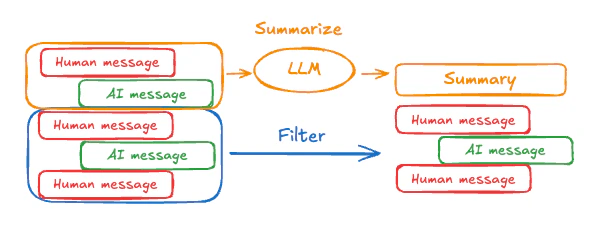
summary 键以及 messages 键:
import { StateSchema, MessagesValue, GraphNode } from "@langchain/langgraph";
import { z } from "zod/v4";

const State = new StateSchema({
  messages: MessagesValue,
  summary: z.string().optional(),
});
summarizeConversation 节点可以在 messages 状态键中累积了一定数量的消息后被调用。
import { RemoveMessage, HumanMessage } from "@langchain/core/messages";

const summarizeConversation: GraphNode<typeof State> = async (state) => {
  // 首先,获取任何现有的摘要
  const summary = state.summary || "";

  // 创建总结提示
  let summaryMessage: string;
  if (summary) {
    // 已经存在摘要
    summaryMessage =
      `This is a summary of the conversation to date: ${summary}\n\n` +
      "Extend the summary by taking into account the new messages above:";
  } else {
    summaryMessage = "Create a summary of the conversation above:";
  }

  // 将提示添加到历史记录中
  const messages = [
    ...state.messages,
    new HumanMessage({ content: summaryMessage })
  ];
  const response = await model.invoke(messages);

  // 删除除最近 2 条消息外的所有消息
  const deleteMessages = state.messages
    .slice(0, -2)
    .map(m => new RemoveMessage({ id: m.id }));

  return {
    summary: response.content,
    messages: deleteMessages
  };
};
完整示例:总结消息
完整示例:总结消息
import { ChatAnthropic } from "@langchain/anthropic";
import {
  SystemMessage,
  HumanMessage,
  RemoveMessage,
} from "@langchain/core/messages";
import {
  StateGraph,
  StateSchema,
  MessagesValue,
  GraphNode,
  ConditionalEdgeRouter,
  START,
  END,
  MemorySaver,
} from "@langchain/langgraph";
import * as z from "zod";
import { v4 as uuidv4 } from "uuid";

const memory = new MemorySaver();

// 我们将添加一个 `summary` 属性(除了 `messages` 键之外)
const GraphState = new StateSchema({
  messages: MessagesValue,
  summary: z.string().default(""),
});

// 我们将使用此模型进行对话和总结
const model = new ChatAnthropic({ model: "claude-haiku-4-5-20251001" });

// 定义调用模型的逻辑
const callModel: GraphNode<typeof GraphState> = async (state) => {
  // 如果存在摘要,我们将其作为系统消息添加
  const { summary } = state;
  let { messages } = state;
  if (summary) {
    const systemMessage = new SystemMessage({
      id: uuidv4(),
      content: `Summary of conversation earlier: ${summary}`,
    });
    messages = [systemMessage, ...messages];
  }
  const response = await model.invoke(messages);
  // 返回一个对象,因为它会被添加到现有状态中
  return { messages: [response] };
};

// 现在定义决定是结束还是总结对话的逻辑
const shouldContinue: ConditionalEdgeRouter<typeof GraphState, "summarize_conversation"> = (state) => {
  const messages = state.messages;
  // 如果消息超过六条,则总结对话
  if (messages.length > 6) {
    return "summarize_conversation";
  }
  // 否则直接结束
  return END;
};

const summarizeConversation: GraphNode<typeof GraphState> = async (state) => {
  // 首先,总结对话
  const { summary, messages } = state;
  let summaryMessage: string;
  if (summary) {
    // 如果已经存在摘要,使用不同的系统提示来总结
    summaryMessage =
      `This is summary of the conversation to date: ${summary}\n\n` +
      "Extend the summary by taking into account the new messages above:";
  } else {
    summaryMessage = "Create a summary of the conversation above:";
  }

  const allMessages = [
    ...messages,
    new HumanMessage({ id: uuidv4(), content: summaryMessage }),
  ];

  const response = await model.invoke(allMessages);

  // 现在需要删除不再需要显示的消息
  // 这里删除除最后两条消息外的所有消息,但你可以更改此设置
  const deleteMessages = messages
    .slice(0, -2)
    .map((m) => new RemoveMessage({ id: m.id! }));

  if (typeof response.content !== "string") {
    throw new Error("Expected a string response from the model");
  }

  return { summary: response.content, messages: deleteMessages };
};

// 定义新图
const workflow = new StateGraph(GraphState)
  // 定义对话节点和总结节点
  .addNode("conversation", callModel)
  .addNode("summarize_conversation", summarizeConversation)
  // 设置入口点为 conversation
  .addEdge(START, "conversation")
  // 添加条件边
  .addConditionalEdges(
    // 首先定义起始节点,使用 `conversation`。
    // 这意味着这些是在 `conversation` 节点被调用后采取的边。
    "conversation",
    // 接下来传入决定下一个调用哪个节点的函数。
    shouldContinue,
  )
  // 从 `summarize_conversation` 到 END 添加普通边。
  // 这意味着在 `summarize_conversation` 被调用后结束。
  .addEdge("summarize_conversation", END);

// 最后,编译!
const app = workflow.compile({ checkpointer: memory });
管理检查点
你可以查看和删除检查点器存储的信息。查看线程状态
const config = {
  configurable: {
    thread_id: "1",
    // 可选提供特定检查点的 ID,
    // 否则显示最新的检查点
    // checkpoint_id: "1f029ca3-1f5b-6704-8004-820c16b69a5a"
  },
};
await graph.getState(config);
{
  values: { messages: [HumanMessage(...), AIMessage(...), HumanMessage(...), AIMessage(...)] },
  next: [],
  config: { configurable: { thread_id: '1', checkpoint_ns: '', checkpoint_id: '1f029ca3-1f5b-6704-8004-820c16b69a5a' } },
  metadata: {
    source: 'loop',
    writes: { call_model: { messages: AIMessage(...) } },
    step: 4,
    parents: {},
    thread_id: '1'
  },
  createdAt: '2025-05-05T16:01:24.680462+00:00',
  parentConfig: { configurable: { thread_id: '1', checkpoint_ns: '', checkpoint_id: '1f029ca3-1790-6b0a-8003-baf965b6a38f' } },
  tasks: [],
  interrupts: []
}
查看线程历史
const config = {
  configurable: {
    thread_id: "1",
  },
};

const history = [];
for await (const state of graph.getStateHistory(config)) {
  history.push(state);
}
删除线程的所有检查点
const threadId = "1";
await checkpointer.deleteThread(threadId);
数据库管理
如果你使用任何数据库支持的持久化实现(如 Postgres 或 Redis)来存储短期和/或长期记忆,你需要在将其与数据库一起使用之前运行迁移来设置所需的模式。 按照惯例,大多数数据库特定的库在检查点器或存储实例上定义了一个setup() 方法来运行所需的迁移。但是,你应该检查你的特定 BaseCheckpointSaver 或 BaseStore 实现以确认确切的方法名称和用法。
我们建议将迁移作为专门的部署步骤运行,或者确保它们作为服务器启动的一部分运行。
将这些文档连接到 Claude、VSCode 等,通过 MCP 获取实时答案。