> ## Documentation Index
> Fetch the complete documentation index at: https://nvd-54.mintlify.site/llms.txt
> Use this file to discover all available pages before exploring further.
# 使用时间旅行
> 在 LangGraph 中重放过去的执行并分叉以探索替代路径
## 概览
LangGraph 通过[检查点](/oss/python/langgraph/persistence#checkpoints)支持时间旅行:
* **[重放](#replay)**:从先前的检查点重试。
* **[分叉](#fork)**:从先前的检查点分支,使用修改后的状态来探索替代路径。
两者都通过从先前的检查点恢复来工作。检查点之前的节点不会重新执行(结果已经保存)。检查点之后的节点会重新执行,包括任何大语言模型(LLM)调用、API 请求和[中断](/oss/python/langgraph/interrupts)(可能产生不同的结果)。
## 重放
使用先前检查点的配置调用图,从该点进行重放。
重放会重新执行节点——它不仅仅是从缓存中读取。大语言模型(LLM)调用、API 请求和[中断](/oss/python/langgraph/interrupts)会再次触发,可能返回不同的结果。从最终检查点(没有 `next` 节点)重放是无操作的。
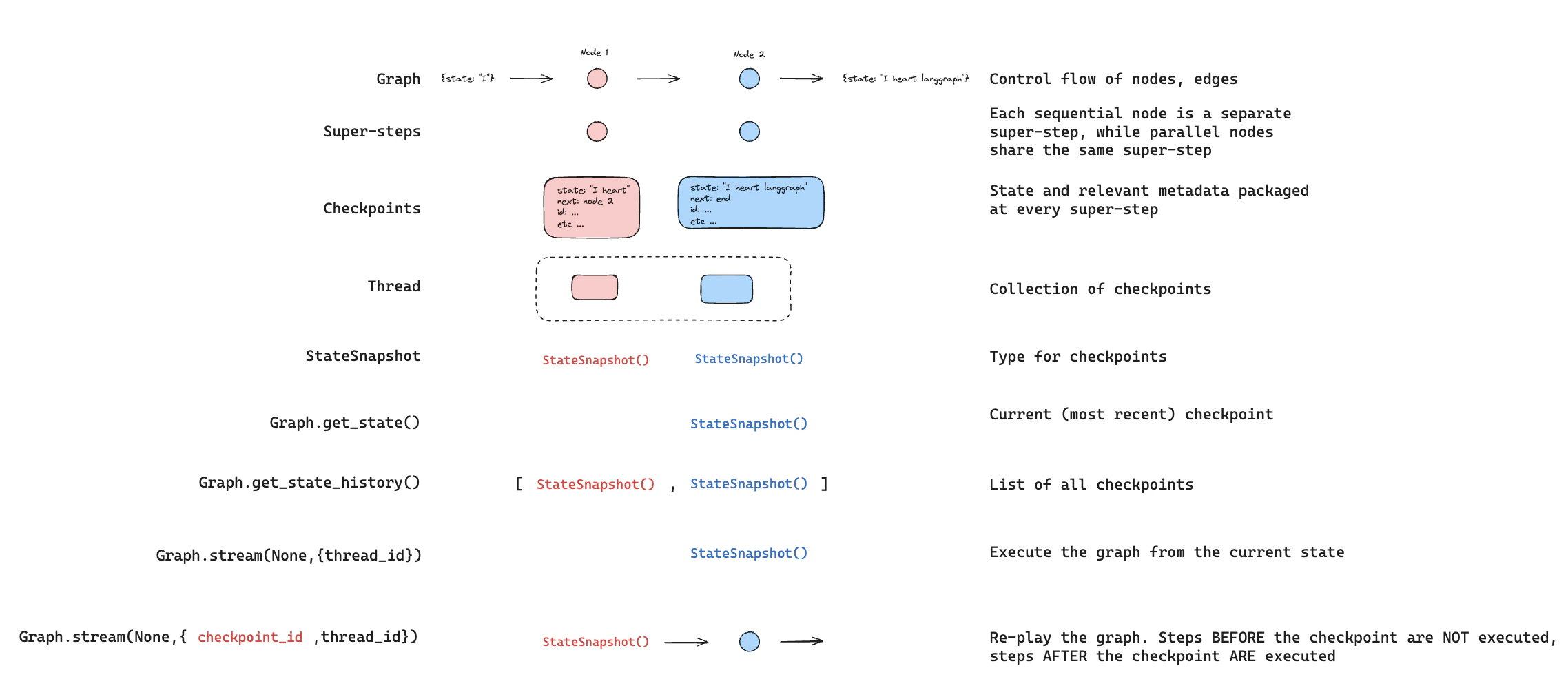 使用 [`get_state_history`](https://reference.langchain.com/python/langgraph/graphs/#langgraph.graph.state.CompiledStateGraph.get_state_history) 找到你想要重放的检查点,然后使用该检查点的配置调用 [`invoke`](https://reference.langchain.com/python/langgraph/graphs/#langgraph.graph.state.CompiledStateGraph.invoke):
```python theme={"theme":{"light":"catppuccin-latte","dark":"catppuccin-mocha"}}
from langgraph.graph import StateGraph, START
from langgraph.checkpoint.memory import InMemorySaver
from typing_extensions import TypedDict, NotRequired
from langchain_core.utils.uuid import uuid7
class State(TypedDict):
topic: NotRequired[str]
joke: NotRequired[str]
def generate_topic(state: State):
return {"topic": "socks in the dryer"}
def write_joke(state: State):
return {"joke": f"Why do {state['topic']} disappear? They elope!"}
checkpointer = InMemorySaver()
graph = (
StateGraph(State)
.add_node("generate_topic", generate_topic)
.add_node("write_joke", write_joke)
.add_edge(START, "generate_topic")
.add_edge("generate_topic", "write_joke")
.compile(checkpointer=checkpointer)
)
# 第 1 步:运行图
config = {"configurable": {"thread_id": str(uuid7())}}
result = graph.invoke({}, config)
# 第 2 步:找到要重放的检查点
history = list(graph.get_state_history(config))
# 历史按时间倒序排列
for state in history:
print(f"next={state.next}, checkpoint_id={state.config['configurable']['checkpoint_id']}")
# 第 3 步:从特定检查点重放
# 找到 write_joke 之前的检查点
before_joke = next(s for s in history if s.next == ("write_joke",))
replay_result = graph.invoke(None, before_joke.config)
# write_joke 重新执行(再次运行),generate_topic 不会
```
## 分叉
分叉从过去的检查点创建一个具有修改状态的新分支。在先前的检查点上调用 [`update_state`](https://reference.langchain.com/python/langgraph/graphs/#langgraph.graph.state.CompiledStateGraph.update_state) 来创建分叉,然后使用 `None` 调用 [`invoke`](https://reference.langchain.com/python/langgraph/graphs/#langgraph.graph.state.CompiledStateGraph.invoke) 来继续执行。
使用 [`get_state_history`](https://reference.langchain.com/python/langgraph/graphs/#langgraph.graph.state.CompiledStateGraph.get_state_history) 找到你想要重放的检查点,然后使用该检查点的配置调用 [`invoke`](https://reference.langchain.com/python/langgraph/graphs/#langgraph.graph.state.CompiledStateGraph.invoke):
```python theme={"theme":{"light":"catppuccin-latte","dark":"catppuccin-mocha"}}
from langgraph.graph import StateGraph, START
from langgraph.checkpoint.memory import InMemorySaver
from typing_extensions import TypedDict, NotRequired
from langchain_core.utils.uuid import uuid7
class State(TypedDict):
topic: NotRequired[str]
joke: NotRequired[str]
def generate_topic(state: State):
return {"topic": "socks in the dryer"}
def write_joke(state: State):
return {"joke": f"Why do {state['topic']} disappear? They elope!"}
checkpointer = InMemorySaver()
graph = (
StateGraph(State)
.add_node("generate_topic", generate_topic)
.add_node("write_joke", write_joke)
.add_edge(START, "generate_topic")
.add_edge("generate_topic", "write_joke")
.compile(checkpointer=checkpointer)
)
# 第 1 步:运行图
config = {"configurable": {"thread_id": str(uuid7())}}
result = graph.invoke({}, config)
# 第 2 步:找到要重放的检查点
history = list(graph.get_state_history(config))
# 历史按时间倒序排列
for state in history:
print(f"next={state.next}, checkpoint_id={state.config['configurable']['checkpoint_id']}")
# 第 3 步:从特定检查点重放
# 找到 write_joke 之前的检查点
before_joke = next(s for s in history if s.next == ("write_joke",))
replay_result = graph.invoke(None, before_joke.config)
# write_joke 重新执行(再次运行),generate_topic 不会
```
## 分叉
分叉从过去的检查点创建一个具有修改状态的新分支。在先前的检查点上调用 [`update_state`](https://reference.langchain.com/python/langgraph/graphs/#langgraph.graph.state.CompiledStateGraph.update_state) 来创建分叉,然后使用 `None` 调用 [`invoke`](https://reference.langchain.com/python/langgraph/graphs/#langgraph.graph.state.CompiledStateGraph.invoke) 来继续执行。
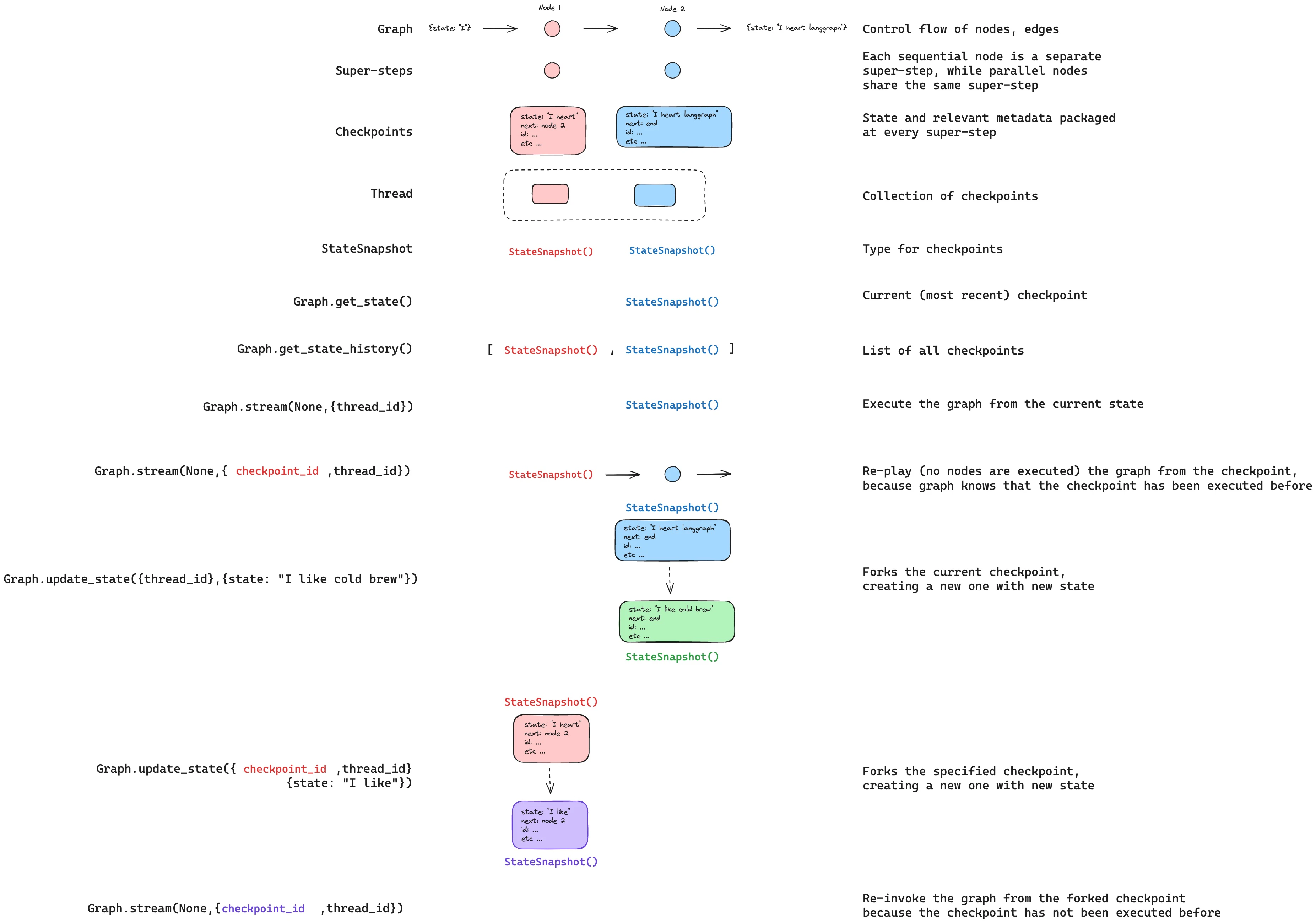 `update_state` **不会**回滚线程。它创建一个从指定点分支的新检查点。原始执行历史保持不变。
```python theme={"theme":{"light":"catppuccin-latte","dark":"catppuccin-mocha"}}
# 找到 write_joke 之前的检查点
history = list(graph.get_state_history(config))
before_joke = next(s for s in history if s.next == ("write_joke",))
# 分叉:更新状态以更改主题
fork_config = graph.update_state(
before_joke.config,
values={"topic": "chickens"},
)
# 从分叉处恢复 - write_joke 使用新主题重新执行
fork_result = graph.invoke(None, fork_config)
print(fork_result["joke"]) # 关于鸡的笑话,而不是袜子
```
### 从特定节点
当你调用 [`update_state`](https://reference.langchain.com/python/langgraph/graphs/#langgraph.graph.state.CompiledStateGraph.update_state) 时,值使用指定节点的写入器(包括[归约器](/oss/python/langgraph/graph-api#reducers))来应用。检查点记录该节点产生了更新,执行从该节点的后继节点恢复。
默认情况下,LangGraph 从检查点的版本历史中推断 `as_node`。从特定检查点分叉时,这种推断几乎总是正确的。
在以下情况下需要显式指定 `as_node`:
* **并行分支**:多个节点在同一步骤中更新了状态,LangGraph 无法确定哪个是最后一个(`InvalidUpdateError`)。
* **没有执行历史**:在新线程上设置状态(在[测试](/oss/python/langgraph/test)中很常见)。
* **跳过节点**:将 `as_node` 设置为后面的节点,使图认为该节点已经运行。
```python theme={"theme":{"light":"catppuccin-latte","dark":"catppuccin-mocha"}}
# 图:generate_topic -> write_joke
# 将此更新视为 generate_topic 产生的。
# 执行从 write_joke(generate_topic 的后继节点)恢复。
fork_config = graph.update_state(
before_joke.config,
values={"topic": "chickens"},
as_node="generate_topic",
)
```
## 中断
如果你的图使用 [`interrupt`](https://reference.langchain.com/python/langgraph/types/interrupt) 进行[人机协作](/oss/python/langgraph/interrupts)工作流,中断在时间旅行期间总是会被重新触发。包含中断的节点会重新执行,`interrupt()` 会暂停等待新的 `Command(resume=...)`。
```python theme={"theme":{"light":"catppuccin-latte","dark":"catppuccin-mocha"}}
from langgraph.types import interrupt, Command
class State(TypedDict):
value: list[str]
def ask_human(state: State):
answer = interrupt("What is your name?")
return {"value": [f"Hello, {answer}!"]}
def final_step(state: State):
return {"value": ["Done"]}
graph = (
StateGraph(State)
.add_node("ask_human", ask_human)
.add_node("final_step", final_step)
.add_edge(START, "ask_human")
.add_edge("ask_human", "final_step")
.compile(checkpointer=InMemorySaver())
)
config = {"configurable": {"thread_id": "1"}}
# 首次运行:触发中断
graph.invoke({"value": []}, config)
# 使用回答恢复
graph.invoke(Command(resume="Alice"), config)
# 从 ask_human 之前重放
history = list(graph.get_state_history(config))
before_ask = [s for s in history if s.next == ("ask_human",)][-1]
replay_result = graph.invoke(None, before_ask.config)
# 在中断处暂停 - 等待新的 Command(resume=...)
# 从 ask_human 之前分叉
fork_config = graph.update_state(before_ask.config, {"value": ["forked"]})
fork_result = graph.invoke(None, fork_config)
# 在中断处暂停 - 等待新的 Command(resume=...)
# 使用不同的回答恢复分叉的中断
graph.invoke(Command(resume="Bob"), fork_config)
# 结果:{"value": ["forked", "Hello, Bob!", "Done"]}
```
### 多个中断
如果你的图在多个点收集输入(例如多步表单),你可以从中断之间分叉,在不重新询问早期问题的情况下更改后面的回答。
```python theme={"theme":{"light":"catppuccin-latte","dark":"catppuccin-mocha"}}
def ask_name(state):
name = interrupt("What is your name?")
return {"value": [f"name:{name}"]}
def ask_age(state):
age = interrupt("How old are you?")
return {"value": [f"age:{age}"]}
# 图:ask_name -> ask_age -> final
# 完成两个中断后:
# 从两个中断之间分叉(在 ask_name 之后、ask_age 之前)
history = list(graph.get_state_history(config))
between = [s for s in history if s.next == ("ask_age",)][-1]
fork_config = graph.update_state(between.config, {"value": ["modified"]})
result = graph.invoke(None, fork_config)
# ask_name 的结果被保留("name:Alice")
# ask_age 在中断处暂停 - 等待新的回答
```
## 子图
使用[子图](/oss/python/langgraph/use-subgraphs)进行时间旅行取决于子图是否有自己的检查点器。这决定了你可以从中进行时间旅行的检查点的粒度。
默认情况下,子图继承父图的检查点器。父图将整个子图视为**单个超步**——整个子图执行只有一个父级检查点。从子图之前进行时间旅行会从头重新执行它。
你不能在默认子图中时间旅行到节点*之间*的某个点——你只能从父级进行时间旅行。
```python theme={"theme":{"light":"catppuccin-latte","dark":"catppuccin-mocha"}}
# 没有自己检查点器的子图(默认)
subgraph = (
StateGraph(State)
.add_node("step_a", step_a) # 包含 interrupt()
.add_node("step_b", step_b) # 包含 interrupt()
.add_edge(START, "step_a")
.add_edge("step_a", "step_b")
.compile() # 没有检查点器 - 从父图继承
)
graph = (
StateGraph(State)
.add_node("subgraph_node", subgraph)
.add_edge(START, "subgraph_node")
.compile(checkpointer=InMemorySaver())
)
config = {"configurable": {"thread_id": "1"}}
# 完成两个中断
graph.invoke({"value": []}, config) # 触发 step_a 中断
graph.invoke(Command(resume="Alice"), config) # 触发 step_b 中断
graph.invoke(Command(resume="30"), config) # 完成
# 从子图之前进行时间旅行
history = list(graph.get_state_history(config))
before_sub = [s for s in history if s.next == ("subgraph_node",)][-1]
fork_config = graph.update_state(before_sub.config, {"value": ["forked"]})
result = graph.invoke(None, fork_config)
# 整个子图从头重新执行
# 你不能时间旅行到 step_a 和 step_b 之间
```
在子图上设置 `checkpointer=True` 以给它自己的检查点历史。这会在子图**内部**的每个步骤创建检查点,允许你从其内部的特定点进行时间旅行——例如,在两个中断之间。
使用带有 `subgraphs=True` 的 [`get_state`](https://reference.langchain.com/python/langgraph/graphs/#langgraph.graph.state.CompiledStateGraph.get_state) 访问子图自己的检查点配置,然后从中分叉:
```python theme={"theme":{"light":"catppuccin-latte","dark":"catppuccin-mocha"}}
# 有自己检查点器的子图
subgraph = (
StateGraph(State)
.add_node("step_a", step_a) # 包含 interrupt()
.add_node("step_b", step_b) # 包含 interrupt()
.add_edge(START, "step_a")
.add_edge("step_a", "step_b")
.compile(checkpointer=True) # 自己的检查点历史
)
graph = (
StateGraph(State)
.add_node("subgraph_node", subgraph)
.add_edge(START, "subgraph_node")
.compile(checkpointer=InMemorySaver())
)
config = {"configurable": {"thread_id": "1"}}
# 运行到 step_a 中断
graph.invoke({"value": []}, config)
# 恢复 step_a -> 触发 step_b 中断
graph.invoke(Command(resume="Alice"), config)
# 获取子图自己的检查点(在 step_a 和 step_b 之间)
parent_state = graph.get_state(config, subgraphs=True)
sub_config = parent_state.tasks[0].state.config
# 从子图检查点分叉
fork_config = graph.update_state(sub_config, {"value": ["forked"]})
result = graph.invoke(None, fork_config)
# step_b 重新执行,step_a 的结果被保留
```
有关配置子图检查点器的更多信息,请参阅[子图持久化](/oss/python/langgraph/use-subgraphs#subgraph-persistence)。
***
`update_state` **不会**回滚线程。它创建一个从指定点分支的新检查点。原始执行历史保持不变。
```python theme={"theme":{"light":"catppuccin-latte","dark":"catppuccin-mocha"}}
# 找到 write_joke 之前的检查点
history = list(graph.get_state_history(config))
before_joke = next(s for s in history if s.next == ("write_joke",))
# 分叉:更新状态以更改主题
fork_config = graph.update_state(
before_joke.config,
values={"topic": "chickens"},
)
# 从分叉处恢复 - write_joke 使用新主题重新执行
fork_result = graph.invoke(None, fork_config)
print(fork_result["joke"]) # 关于鸡的笑话,而不是袜子
```
### 从特定节点
当你调用 [`update_state`](https://reference.langchain.com/python/langgraph/graphs/#langgraph.graph.state.CompiledStateGraph.update_state) 时,值使用指定节点的写入器(包括[归约器](/oss/python/langgraph/graph-api#reducers))来应用。检查点记录该节点产生了更新,执行从该节点的后继节点恢复。
默认情况下,LangGraph 从检查点的版本历史中推断 `as_node`。从特定检查点分叉时,这种推断几乎总是正确的。
在以下情况下需要显式指定 `as_node`:
* **并行分支**:多个节点在同一步骤中更新了状态,LangGraph 无法确定哪个是最后一个(`InvalidUpdateError`)。
* **没有执行历史**:在新线程上设置状态(在[测试](/oss/python/langgraph/test)中很常见)。
* **跳过节点**:将 `as_node` 设置为后面的节点,使图认为该节点已经运行。
```python theme={"theme":{"light":"catppuccin-latte","dark":"catppuccin-mocha"}}
# 图:generate_topic -> write_joke
# 将此更新视为 generate_topic 产生的。
# 执行从 write_joke(generate_topic 的后继节点)恢复。
fork_config = graph.update_state(
before_joke.config,
values={"topic": "chickens"},
as_node="generate_topic",
)
```
## 中断
如果你的图使用 [`interrupt`](https://reference.langchain.com/python/langgraph/types/interrupt) 进行[人机协作](/oss/python/langgraph/interrupts)工作流,中断在时间旅行期间总是会被重新触发。包含中断的节点会重新执行,`interrupt()` 会暂停等待新的 `Command(resume=...)`。
```python theme={"theme":{"light":"catppuccin-latte","dark":"catppuccin-mocha"}}
from langgraph.types import interrupt, Command
class State(TypedDict):
value: list[str]
def ask_human(state: State):
answer = interrupt("What is your name?")
return {"value": [f"Hello, {answer}!"]}
def final_step(state: State):
return {"value": ["Done"]}
graph = (
StateGraph(State)
.add_node("ask_human", ask_human)
.add_node("final_step", final_step)
.add_edge(START, "ask_human")
.add_edge("ask_human", "final_step")
.compile(checkpointer=InMemorySaver())
)
config = {"configurable": {"thread_id": "1"}}
# 首次运行:触发中断
graph.invoke({"value": []}, config)
# 使用回答恢复
graph.invoke(Command(resume="Alice"), config)
# 从 ask_human 之前重放
history = list(graph.get_state_history(config))
before_ask = [s for s in history if s.next == ("ask_human",)][-1]
replay_result = graph.invoke(None, before_ask.config)
# 在中断处暂停 - 等待新的 Command(resume=...)
# 从 ask_human 之前分叉
fork_config = graph.update_state(before_ask.config, {"value": ["forked"]})
fork_result = graph.invoke(None, fork_config)
# 在中断处暂停 - 等待新的 Command(resume=...)
# 使用不同的回答恢复分叉的中断
graph.invoke(Command(resume="Bob"), fork_config)
# 结果:{"value": ["forked", "Hello, Bob!", "Done"]}
```
### 多个中断
如果你的图在多个点收集输入(例如多步表单),你可以从中断之间分叉,在不重新询问早期问题的情况下更改后面的回答。
```python theme={"theme":{"light":"catppuccin-latte","dark":"catppuccin-mocha"}}
def ask_name(state):
name = interrupt("What is your name?")
return {"value": [f"name:{name}"]}
def ask_age(state):
age = interrupt("How old are you?")
return {"value": [f"age:{age}"]}
# 图:ask_name -> ask_age -> final
# 完成两个中断后:
# 从两个中断之间分叉(在 ask_name 之后、ask_age 之前)
history = list(graph.get_state_history(config))
between = [s for s in history if s.next == ("ask_age",)][-1]
fork_config = graph.update_state(between.config, {"value": ["modified"]})
result = graph.invoke(None, fork_config)
# ask_name 的结果被保留("name:Alice")
# ask_age 在中断处暂停 - 等待新的回答
```
## 子图
使用[子图](/oss/python/langgraph/use-subgraphs)进行时间旅行取决于子图是否有自己的检查点器。这决定了你可以从中进行时间旅行的检查点的粒度。
默认情况下,子图继承父图的检查点器。父图将整个子图视为**单个超步**——整个子图执行只有一个父级检查点。从子图之前进行时间旅行会从头重新执行它。
你不能在默认子图中时间旅行到节点*之间*的某个点——你只能从父级进行时间旅行。
```python theme={"theme":{"light":"catppuccin-latte","dark":"catppuccin-mocha"}}
# 没有自己检查点器的子图(默认)
subgraph = (
StateGraph(State)
.add_node("step_a", step_a) # 包含 interrupt()
.add_node("step_b", step_b) # 包含 interrupt()
.add_edge(START, "step_a")
.add_edge("step_a", "step_b")
.compile() # 没有检查点器 - 从父图继承
)
graph = (
StateGraph(State)
.add_node("subgraph_node", subgraph)
.add_edge(START, "subgraph_node")
.compile(checkpointer=InMemorySaver())
)
config = {"configurable": {"thread_id": "1"}}
# 完成两个中断
graph.invoke({"value": []}, config) # 触发 step_a 中断
graph.invoke(Command(resume="Alice"), config) # 触发 step_b 中断
graph.invoke(Command(resume="30"), config) # 完成
# 从子图之前进行时间旅行
history = list(graph.get_state_history(config))
before_sub = [s for s in history if s.next == ("subgraph_node",)][-1]
fork_config = graph.update_state(before_sub.config, {"value": ["forked"]})
result = graph.invoke(None, fork_config)
# 整个子图从头重新执行
# 你不能时间旅行到 step_a 和 step_b 之间
```
在子图上设置 `checkpointer=True` 以给它自己的检查点历史。这会在子图**内部**的每个步骤创建检查点,允许你从其内部的特定点进行时间旅行——例如,在两个中断之间。
使用带有 `subgraphs=True` 的 [`get_state`](https://reference.langchain.com/python/langgraph/graphs/#langgraph.graph.state.CompiledStateGraph.get_state) 访问子图自己的检查点配置,然后从中分叉:
```python theme={"theme":{"light":"catppuccin-latte","dark":"catppuccin-mocha"}}
# 有自己检查点器的子图
subgraph = (
StateGraph(State)
.add_node("step_a", step_a) # 包含 interrupt()
.add_node("step_b", step_b) # 包含 interrupt()
.add_edge(START, "step_a")
.add_edge("step_a", "step_b")
.compile(checkpointer=True) # 自己的检查点历史
)
graph = (
StateGraph(State)
.add_node("subgraph_node", subgraph)
.add_edge(START, "subgraph_node")
.compile(checkpointer=InMemorySaver())
)
config = {"configurable": {"thread_id": "1"}}
# 运行到 step_a 中断
graph.invoke({"value": []}, config)
# 恢复 step_a -> 触发 step_b 中断
graph.invoke(Command(resume="Alice"), config)
# 获取子图自己的检查点(在 step_a 和 step_b 之间)
parent_state = graph.get_state(config, subgraphs=True)
sub_config = parent_state.tasks[0].state.config
# 从子图检查点分叉
fork_config = graph.update_state(sub_config, {"value": ["forked"]})
result = graph.invoke(None, fork_config)
# step_b 重新执行,step_a 的结果被保留
```
有关配置子图检查点器的更多信息,请参阅[子图持久化](/oss/python/langgraph/use-subgraphs#subgraph-persistence)。
***
[将这些文档连接](/use-these-docs)到 Claude、VSCode 等工具,通过 MCP 获取实时答案。
[在 GitHub 上编辑此页面](https://github.com/langchain-ai/docs/edit/main/src/oss/langgraph/use-time-travel.mdx)或[提交 issue](https://github.com/langchain-ai/docs/issues/new/choose)。