> ## Documentation Index
> Fetch the complete documentation index at: https://nvd-54.mintlify.site/llms.txt
> Use this file to discover all available pages before exploring further.
# 持久化
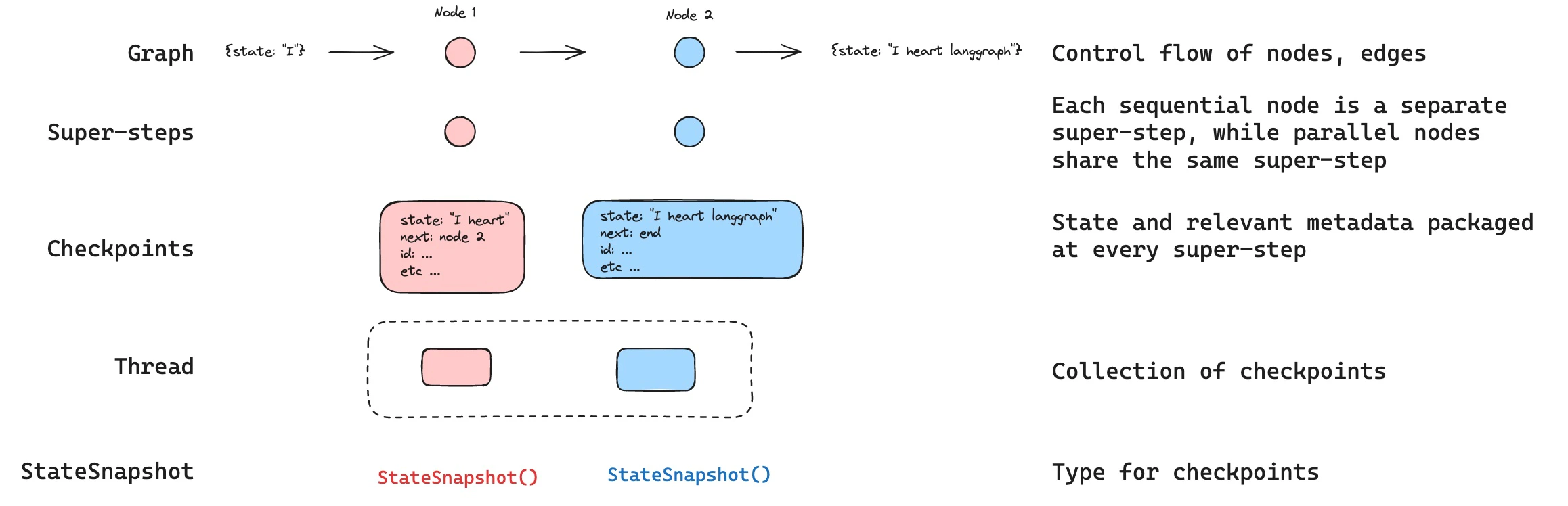
LangGraph 内置了持久化层,将图状态保存为检查点。当你使用检查点器编译图时,图状态的快照会在每个执行步骤保存,并按线程组织。这启用了人机协作工作流、会话记忆、时间旅行调试和容错执行。
 **Agent Server 自动处理检查点**
使用 [Agent Server](/langsmith/agent-server) 时,你不需要手动实现或配置检查点器。服务器在后台自动处理所有持久化基础设施。
使用 [LangSmith](https://smith.langchain.com?utm_source=docs\&utm_medium=cta\&utm_campaign=langsmith-signup\&utm_content=oss-langgraph-persistence) 追踪检查点状态并调试你的智能体如何跨会话恢复。按照[追踪快速入门](/langsmith/trace-with-langgraph)开始设置。
## 为什么使用持久化
以下功能需要持久化:
* **人机协作**:检查点器支持[人机协作工作流](/oss/python/langgraph/interrupts),允许人类检查、中断和批准图步骤。检查点器对这些工作流是必需的,因为人员需要能够在任何时间点查看图状态,并且图需要在人员更新状态后恢复执行。参见[中断](/oss/python/langgraph/interrupts)获取示例。
* **记忆**:检查点器允许交互间的["记忆"](/oss/python/concepts/memory)。在重复人类交互(如对话)的情况下,任何后续消息都可以发送到该线程,该线程将保留之前的记忆。参见[添加记忆](/oss/python/langgraph/add-memory)了解如何使用检查点器添加和管理会话记忆。
* **时间旅行**:检查点器允许["时间旅行"](/oss/python/langgraph/use-time-travel),允许用户重放之前的图执行以审查和/或调试特定图步骤。此外,检查点器使得在任意检查点分叉图状态以探索替代轨迹成为可能。
* **容错**:检查点提供容错和错误恢复:如果一个或多个节点在给定超级步骤失败,你可以从最后一个成功步骤重启图。
* **待处理写入**:当图节点在给定[超级步骤](#super-steps)中执行失败时,LangGraph 存储该超级步骤中成功完成的其他节点的待处理检查点写入。当你从该超级步骤恢复图执行时,不需要重新运行成功的节点。
## 核心概念
### 线程
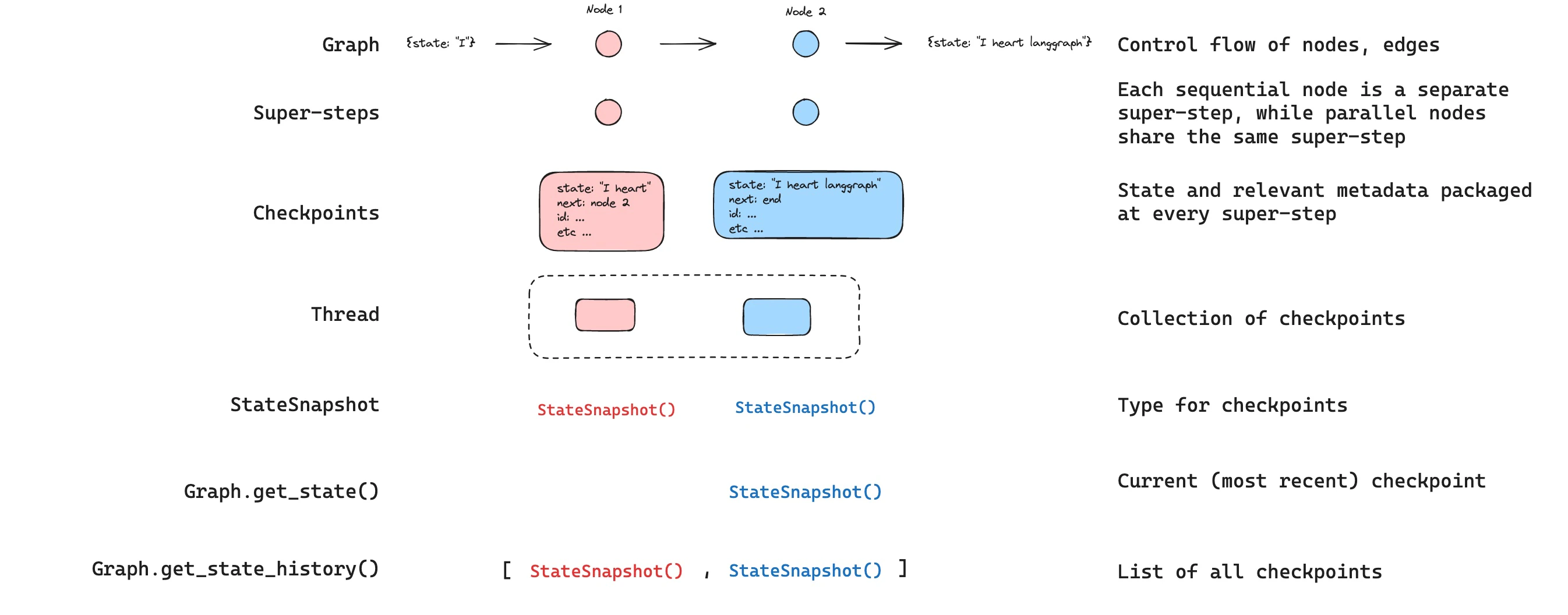
线程是分配给检查点器保存的每个检查点的唯一 ID 或线程标识符。它包含一系列[运行](/langsmith/runs)的累积状态。当运行执行时,助手底层图的[状态](/oss/python/langgraph/graph-api#state)将持久化到线程中。
使用检查点器调用图时,你**必须**在配置的 `configurable` 部分指定 `thread_id`:
```python theme={"theme":{"light":"catppuccin-latte","dark":"catppuccin-mocha"}}
{"configurable": {"thread_id": "1"}}
```
线程的当前和历史状态可以被检索。要持久化状态,必须在执行运行之前创建线程。LangSmith API 提供了多个用于创建和管理线程及线程状态的端点。详见 [API 参考](https://reference.langchain.com/python/langsmith/)。
检查点器使用 `thread_id` 作为存储和检索检查点的主键。没有它,检查点器无法保存状态或在[中断](/oss/python/langgraph/interrupts)后恢复执行,因为检查点器使用 `thread_id` 加载保存的状态。
### 检查点
线程在特定时间点的状态称为检查点。检查点是在每个[超级步骤](#super-steps)保存的图状态快照,由 `StateSnapshot` 对象表示(完整字段参考见 [StateSnapshot 字段](#statesnapshot-fields))。
#### 超级步骤
LangGraph 在每个**超级步骤**边界创建检查点。超级步骤是图的一个"滴答",其中该步骤计划的所有节点执行(可能并行)。对于像 `START -> A -> B -> END` 这样的顺序图,输入、节点 A 和节点 B 有各自独立的超级步骤——每个之后都会产生一个检查点。理解超级步骤边界对[时间旅行](/oss/python/langgraph/use-time-travel)很重要,因为你只能从检查点(即超级步骤边界)恢复执行。
除了超级步骤检查点外,LangGraph 还在**节点(任务)级别**持久化写入。当超级步骤内的每个节点完成时,其输出作为与进行中检查点关联的任务条目写入检查点器的 `checkpoint_writes` 表。这些按任务的写入支持[待处理写入](#pending-writes)恢复:如果同一超级步骤中的另一个节点失败,成功节点的写入已经是持久的,恢复时不需要重新运行。完整的状态快照在超级步骤完成后提交。
LangGraph 还持久化超级步骤内各个节点执行的写入。这些写入作为任务存储,用于容错:如果同一超级步骤中的另一个节点失败,成功节点的写入不需要重新计算。这些任务写入不是完整的 `StateSnapshot` 检查点,因此时间旅行从超级步骤边界的完整检查点恢复。
检查点被持久化,可用于在以后恢复线程状态。
让我们看看当一个简单图被如下调用时保存了哪些检查点:
```python theme={"theme":{"light":"catppuccin-latte","dark":"catppuccin-mocha"}}
from langgraph.graph import StateGraph, START, END
from langgraph.checkpoint.memory import InMemorySaver
from langchain_core.runnables import RunnableConfig
from typing import Annotated
from typing_extensions import TypedDict
from operator import add
class State(TypedDict):
foo: str
bar: Annotated[list[str], add]
def node_a(state: State):
return {"foo": "a", "bar": ["a"]}
def node_b(state: State):
return {"foo": "b", "bar": ["b"]}
workflow = StateGraph(State)
workflow.add_node(node_a)
workflow.add_node(node_b)
workflow.add_edge(START, "node_a")
workflow.add_edge("node_a", "node_b")
workflow.add_edge("node_b", END)
checkpointer = InMemorySaver()
graph = workflow.compile(checkpointer=checkpointer)
config: RunnableConfig = {"configurable": {"thread_id": "1"}}
graph.invoke({"foo": "", "bar":[]}, config)
```
运行图后,我们预期看到恰好 4 个检查点:
* 空检查点,以 [`START`](https://reference.langchain.com/python/langgraph/constants/START) 作为下一个要执行的节点
* 包含用户输入 `{'foo': '', 'bar': []}` 且 `node_a` 为下一个要执行节点的检查点
* 包含 `node_a` 输出 `{'foo': 'a', 'bar': ['a']}` 且 `node_b` 为下一个要执行节点的检查点
* 包含 `node_b` 输出 `{'foo': 'b', 'bar': ['a', 'b']}` 且没有下一个要执行节点的检查点
注意 `bar` 通道值包含两个节点的输出,因为我们为 `bar` 通道设置了 reducer。
#### 检查点命名空间
每个检查点有一个 `checkpoint_ns`(检查点命名空间)字段,标识它属于哪个图或子图:
* **`""`**(空字符串):检查点属于父(根)图。
* **`"node_name:uuid"`**:检查点属于作为给定节点调用的子图。对于嵌套子图,命名空间用 `|` 分隔符连接(例如 `"outer_node:uuid|inner_node:uuid"`)。
你可以通过配置从节点内部访问检查点命名空间:
```python theme={"theme":{"light":"catppuccin-latte","dark":"catppuccin-mocha"}}
from langchain_core.runnables import RunnableConfig
def my_node(state: State, config: RunnableConfig):
checkpoint_ns = config["configurable"]["checkpoint_ns"]
# 父图为 "",子图为 "node_name:uuid"
```
参见[子图](/oss/python/langgraph/use-subgraphs)了解更多关于子图状态和检查点的详情。
## 获取和更新状态
### 获取状态
与保存的图状态交互时,你**必须**指定[线程标识符](#threads)。你可以通过调用 `graph.get_state(config)` 查看图的\_最新\_状态。这将返回一个对应于配置中提供的线程 ID 或该线程特定检查点 ID(如果提供的话)关联的最新检查点的 `StateSnapshot` 对象。
```python theme={"theme":{"light":"catppuccin-latte","dark":"catppuccin-mocha"}}
# 获取最新状态快照
config = {"configurable": {"thread_id": "1"}}
graph.get_state(config)
# 获取特定 checkpoint_id 的状态快照
config = {"configurable": {"thread_id": "1", "checkpoint_id": "1ef663ba-28fe-6528-8002-5a559208592c"}}
graph.get_state(config)
```
在我们的示例中,`get_state` 的输出如下所示:
```
StateSnapshot(
values={'foo': 'b', 'bar': ['a', 'b']},
next=(),
config={'configurable': {'thread_id': '1', 'checkpoint_ns': '', 'checkpoint_id': '1ef663ba-28fe-6528-8002-5a559208592c'}},
metadata={'source': 'loop', 'writes': {'node_b': {'foo': 'b', 'bar': ['b']}}, 'step': 2},
created_at='2024-08-29T19:19:38.821749+00:00',
parent_config={'configurable': {'thread_id': '1', 'checkpoint_ns': '', 'checkpoint_id': '1ef663ba-28f9-6ec4-8001-31981c2c39f8'}}, tasks=()
)
```
#### StateSnapshot 字段
| 字段 | 类型 | 描述 |
| --------------- | ------------------------ | ------------------------------------------------------------------------------------------- |
| `values` | `dict` | 此检查点的状态通道值。 |
| `next` | `tuple[str, ...]` | 接下来要执行的节点名称。空 `()` 表示图已完成。 |
| `config` | `dict` | 包含 `thread_id`、`checkpoint_ns` 和 `checkpoint_id`。 |
| `metadata` | `dict` | 执行元数据。包含 `source`(`"input"`、`"loop"` 或 `"update"`)、`writes`(节点输出)和 `step`(超级步骤计数器)。 |
| `created_at` | `str` | 此检查点创建的 ISO 8601 时间戳。 |
| `parent_config` | `dict \| None` | 前一个检查点的配置。第一个检查点为 `None`。 |
| `tasks` | `tuple[PregelTask, ...]` | 此步骤要执行的任务。每个任务有 `id`、`name`、`error`、`interrupts`,以及可选的 `state`(使用 `subgraphs=True` 时的子图快照)。 |
### 获取状态历史
你可以通过调用 [`graph.get_state_history(config)`](https://reference.langchain.com/python/langgraph/graphs/#langgraph.graph.state.CompiledStateGraph.get_state_history) 获取给定线程的完整图执行历史。这将返回与配置中提供的线程 ID 关联的 `StateSnapshot` 对象列表。重要的是,检查点将按时间倒序排列,最新的检查点/`StateSnapshot` 在列表的第一个。
```python theme={"theme":{"light":"catppuccin-latte","dark":"catppuccin-mocha"}}
config = {"configurable": {"thread_id": "1"}}
list(graph.get_state_history(config))
```
在我们的示例中,[`get_state_history`](https://reference.langchain.com/python/langgraph/graphs/#langgraph.graph.state.CompiledStateGraph.get_state_history) 的输出如下所示:
```
[
StateSnapshot(
values={'foo': 'b', 'bar': ['a', 'b']},
next=(),
config={'configurable': {'thread_id': '1', 'checkpoint_ns': '', 'checkpoint_id': '1ef663ba-28fe-6528-8002-5a559208592c'}},
metadata={'source': 'loop', 'writes': {'node_b': {'foo': 'b', 'bar': ['b']}}, 'step': 2},
created_at='2024-08-29T19:19:38.821749+00:00',
parent_config={'configurable': {'thread_id': '1', 'checkpoint_ns': '', 'checkpoint_id': '1ef663ba-28f9-6ec4-8001-31981c2c39f8'}},
tasks=(),
),
StateSnapshot(
values={'foo': 'a', 'bar': ['a']},
next=('node_b',),
config={'configurable': {'thread_id': '1', 'checkpoint_ns': '', 'checkpoint_id': '1ef663ba-28f9-6ec4-8001-31981c2c39f8'}},
metadata={'source': 'loop', 'writes': {'node_a': {'foo': 'a', 'bar': ['a']}}, 'step': 1},
created_at='2024-08-29T19:19:38.819946+00:00',
parent_config={'configurable': {'thread_id': '1', 'checkpoint_ns': '', 'checkpoint_id': '1ef663ba-28f4-6b4a-8000-ca575a13d36a'}},
tasks=(PregelTask(id='6fb7314f-f114-5413-a1f3-d37dfe98ff44', name='node_b', error=None, interrupts=()),),
),
StateSnapshot(
values={'foo': '', 'bar': []},
next=('node_a',),
config={'configurable': {'thread_id': '1', 'checkpoint_ns': '', 'checkpoint_id': '1ef663ba-28f4-6b4a-8000-ca575a13d36a'}},
metadata={'source': 'loop', 'writes': None, 'step': 0},
created_at='2024-08-29T19:19:38.817813+00:00',
parent_config={'configurable': {'thread_id': '1', 'checkpoint_ns': '', 'checkpoint_id': '1ef663ba-28f0-6c66-bfff-6723431e8481'}},
tasks=(PregelTask(id='f1b14528-5ee5-579c-949b-23ef9bfbed58', name='node_a', error=None, interrupts=()),),
),
StateSnapshot(
values={'bar': []},
next=('__start__',),
config={'configurable': {'thread_id': '1', 'checkpoint_ns': '', 'checkpoint_id': '1ef663ba-28f0-6c66-bfff-6723431e8481'}},
metadata={'source': 'input', 'writes': {'foo': ''}, 'step': -1},
created_at='2024-08-29T19:19:38.816205+00:00',
parent_config=None,
tasks=(PregelTask(id='6d27aa2e-d72b-5504-a36f-8620e54a76dd', name='__start__', error=None, interrupts=()),),
)
]
```
**Agent Server 自动处理检查点**
使用 [Agent Server](/langsmith/agent-server) 时,你不需要手动实现或配置检查点器。服务器在后台自动处理所有持久化基础设施。
使用 [LangSmith](https://smith.langchain.com?utm_source=docs\&utm_medium=cta\&utm_campaign=langsmith-signup\&utm_content=oss-langgraph-persistence) 追踪检查点状态并调试你的智能体如何跨会话恢复。按照[追踪快速入门](/langsmith/trace-with-langgraph)开始设置。
## 为什么使用持久化
以下功能需要持久化:
* **人机协作**:检查点器支持[人机协作工作流](/oss/python/langgraph/interrupts),允许人类检查、中断和批准图步骤。检查点器对这些工作流是必需的,因为人员需要能够在任何时间点查看图状态,并且图需要在人员更新状态后恢复执行。参见[中断](/oss/python/langgraph/interrupts)获取示例。
* **记忆**:检查点器允许交互间的["记忆"](/oss/python/concepts/memory)。在重复人类交互(如对话)的情况下,任何后续消息都可以发送到该线程,该线程将保留之前的记忆。参见[添加记忆](/oss/python/langgraph/add-memory)了解如何使用检查点器添加和管理会话记忆。
* **时间旅行**:检查点器允许["时间旅行"](/oss/python/langgraph/use-time-travel),允许用户重放之前的图执行以审查和/或调试特定图步骤。此外,检查点器使得在任意检查点分叉图状态以探索替代轨迹成为可能。
* **容错**:检查点提供容错和错误恢复:如果一个或多个节点在给定超级步骤失败,你可以从最后一个成功步骤重启图。
* **待处理写入**:当图节点在给定[超级步骤](#super-steps)中执行失败时,LangGraph 存储该超级步骤中成功完成的其他节点的待处理检查点写入。当你从该超级步骤恢复图执行时,不需要重新运行成功的节点。
## 核心概念
### 线程
线程是分配给检查点器保存的每个检查点的唯一 ID 或线程标识符。它包含一系列[运行](/langsmith/runs)的累积状态。当运行执行时,助手底层图的[状态](/oss/python/langgraph/graph-api#state)将持久化到线程中。
使用检查点器调用图时,你**必须**在配置的 `configurable` 部分指定 `thread_id`:
```python theme={"theme":{"light":"catppuccin-latte","dark":"catppuccin-mocha"}}
{"configurable": {"thread_id": "1"}}
```
线程的当前和历史状态可以被检索。要持久化状态,必须在执行运行之前创建线程。LangSmith API 提供了多个用于创建和管理线程及线程状态的端点。详见 [API 参考](https://reference.langchain.com/python/langsmith/)。
检查点器使用 `thread_id` 作为存储和检索检查点的主键。没有它,检查点器无法保存状态或在[中断](/oss/python/langgraph/interrupts)后恢复执行,因为检查点器使用 `thread_id` 加载保存的状态。
### 检查点
线程在特定时间点的状态称为检查点。检查点是在每个[超级步骤](#super-steps)保存的图状态快照,由 `StateSnapshot` 对象表示(完整字段参考见 [StateSnapshot 字段](#statesnapshot-fields))。
#### 超级步骤
LangGraph 在每个**超级步骤**边界创建检查点。超级步骤是图的一个"滴答",其中该步骤计划的所有节点执行(可能并行)。对于像 `START -> A -> B -> END` 这样的顺序图,输入、节点 A 和节点 B 有各自独立的超级步骤——每个之后都会产生一个检查点。理解超级步骤边界对[时间旅行](/oss/python/langgraph/use-time-travel)很重要,因为你只能从检查点(即超级步骤边界)恢复执行。
除了超级步骤检查点外,LangGraph 还在**节点(任务)级别**持久化写入。当超级步骤内的每个节点完成时,其输出作为与进行中检查点关联的任务条目写入检查点器的 `checkpoint_writes` 表。这些按任务的写入支持[待处理写入](#pending-writes)恢复:如果同一超级步骤中的另一个节点失败,成功节点的写入已经是持久的,恢复时不需要重新运行。完整的状态快照在超级步骤完成后提交。
LangGraph 还持久化超级步骤内各个节点执行的写入。这些写入作为任务存储,用于容错:如果同一超级步骤中的另一个节点失败,成功节点的写入不需要重新计算。这些任务写入不是完整的 `StateSnapshot` 检查点,因此时间旅行从超级步骤边界的完整检查点恢复。
检查点被持久化,可用于在以后恢复线程状态。
让我们看看当一个简单图被如下调用时保存了哪些检查点:
```python theme={"theme":{"light":"catppuccin-latte","dark":"catppuccin-mocha"}}
from langgraph.graph import StateGraph, START, END
from langgraph.checkpoint.memory import InMemorySaver
from langchain_core.runnables import RunnableConfig
from typing import Annotated
from typing_extensions import TypedDict
from operator import add
class State(TypedDict):
foo: str
bar: Annotated[list[str], add]
def node_a(state: State):
return {"foo": "a", "bar": ["a"]}
def node_b(state: State):
return {"foo": "b", "bar": ["b"]}
workflow = StateGraph(State)
workflow.add_node(node_a)
workflow.add_node(node_b)
workflow.add_edge(START, "node_a")
workflow.add_edge("node_a", "node_b")
workflow.add_edge("node_b", END)
checkpointer = InMemorySaver()
graph = workflow.compile(checkpointer=checkpointer)
config: RunnableConfig = {"configurable": {"thread_id": "1"}}
graph.invoke({"foo": "", "bar":[]}, config)
```
运行图后,我们预期看到恰好 4 个检查点:
* 空检查点,以 [`START`](https://reference.langchain.com/python/langgraph/constants/START) 作为下一个要执行的节点
* 包含用户输入 `{'foo': '', 'bar': []}` 且 `node_a` 为下一个要执行节点的检查点
* 包含 `node_a` 输出 `{'foo': 'a', 'bar': ['a']}` 且 `node_b` 为下一个要执行节点的检查点
* 包含 `node_b` 输出 `{'foo': 'b', 'bar': ['a', 'b']}` 且没有下一个要执行节点的检查点
注意 `bar` 通道值包含两个节点的输出,因为我们为 `bar` 通道设置了 reducer。
#### 检查点命名空间
每个检查点有一个 `checkpoint_ns`(检查点命名空间)字段,标识它属于哪个图或子图:
* **`""`**(空字符串):检查点属于父(根)图。
* **`"node_name:uuid"`**:检查点属于作为给定节点调用的子图。对于嵌套子图,命名空间用 `|` 分隔符连接(例如 `"outer_node:uuid|inner_node:uuid"`)。
你可以通过配置从节点内部访问检查点命名空间:
```python theme={"theme":{"light":"catppuccin-latte","dark":"catppuccin-mocha"}}
from langchain_core.runnables import RunnableConfig
def my_node(state: State, config: RunnableConfig):
checkpoint_ns = config["configurable"]["checkpoint_ns"]
# 父图为 "",子图为 "node_name:uuid"
```
参见[子图](/oss/python/langgraph/use-subgraphs)了解更多关于子图状态和检查点的详情。
## 获取和更新状态
### 获取状态
与保存的图状态交互时,你**必须**指定[线程标识符](#threads)。你可以通过调用 `graph.get_state(config)` 查看图的\_最新\_状态。这将返回一个对应于配置中提供的线程 ID 或该线程特定检查点 ID(如果提供的话)关联的最新检查点的 `StateSnapshot` 对象。
```python theme={"theme":{"light":"catppuccin-latte","dark":"catppuccin-mocha"}}
# 获取最新状态快照
config = {"configurable": {"thread_id": "1"}}
graph.get_state(config)
# 获取特定 checkpoint_id 的状态快照
config = {"configurable": {"thread_id": "1", "checkpoint_id": "1ef663ba-28fe-6528-8002-5a559208592c"}}
graph.get_state(config)
```
在我们的示例中,`get_state` 的输出如下所示:
```
StateSnapshot(
values={'foo': 'b', 'bar': ['a', 'b']},
next=(),
config={'configurable': {'thread_id': '1', 'checkpoint_ns': '', 'checkpoint_id': '1ef663ba-28fe-6528-8002-5a559208592c'}},
metadata={'source': 'loop', 'writes': {'node_b': {'foo': 'b', 'bar': ['b']}}, 'step': 2},
created_at='2024-08-29T19:19:38.821749+00:00',
parent_config={'configurable': {'thread_id': '1', 'checkpoint_ns': '', 'checkpoint_id': '1ef663ba-28f9-6ec4-8001-31981c2c39f8'}}, tasks=()
)
```
#### StateSnapshot 字段
| 字段 | 类型 | 描述 |
| --------------- | ------------------------ | ------------------------------------------------------------------------------------------- |
| `values` | `dict` | 此检查点的状态通道值。 |
| `next` | `tuple[str, ...]` | 接下来要执行的节点名称。空 `()` 表示图已完成。 |
| `config` | `dict` | 包含 `thread_id`、`checkpoint_ns` 和 `checkpoint_id`。 |
| `metadata` | `dict` | 执行元数据。包含 `source`(`"input"`、`"loop"` 或 `"update"`)、`writes`(节点输出)和 `step`(超级步骤计数器)。 |
| `created_at` | `str` | 此检查点创建的 ISO 8601 时间戳。 |
| `parent_config` | `dict \| None` | 前一个检查点的配置。第一个检查点为 `None`。 |
| `tasks` | `tuple[PregelTask, ...]` | 此步骤要执行的任务。每个任务有 `id`、`name`、`error`、`interrupts`,以及可选的 `state`(使用 `subgraphs=True` 时的子图快照)。 |
### 获取状态历史
你可以通过调用 [`graph.get_state_history(config)`](https://reference.langchain.com/python/langgraph/graphs/#langgraph.graph.state.CompiledStateGraph.get_state_history) 获取给定线程的完整图执行历史。这将返回与配置中提供的线程 ID 关联的 `StateSnapshot` 对象列表。重要的是,检查点将按时间倒序排列,最新的检查点/`StateSnapshot` 在列表的第一个。
```python theme={"theme":{"light":"catppuccin-latte","dark":"catppuccin-mocha"}}
config = {"configurable": {"thread_id": "1"}}
list(graph.get_state_history(config))
```
在我们的示例中,[`get_state_history`](https://reference.langchain.com/python/langgraph/graphs/#langgraph.graph.state.CompiledStateGraph.get_state_history) 的输出如下所示:
```
[
StateSnapshot(
values={'foo': 'b', 'bar': ['a', 'b']},
next=(),
config={'configurable': {'thread_id': '1', 'checkpoint_ns': '', 'checkpoint_id': '1ef663ba-28fe-6528-8002-5a559208592c'}},
metadata={'source': 'loop', 'writes': {'node_b': {'foo': 'b', 'bar': ['b']}}, 'step': 2},
created_at='2024-08-29T19:19:38.821749+00:00',
parent_config={'configurable': {'thread_id': '1', 'checkpoint_ns': '', 'checkpoint_id': '1ef663ba-28f9-6ec4-8001-31981c2c39f8'}},
tasks=(),
),
StateSnapshot(
values={'foo': 'a', 'bar': ['a']},
next=('node_b',),
config={'configurable': {'thread_id': '1', 'checkpoint_ns': '', 'checkpoint_id': '1ef663ba-28f9-6ec4-8001-31981c2c39f8'}},
metadata={'source': 'loop', 'writes': {'node_a': {'foo': 'a', 'bar': ['a']}}, 'step': 1},
created_at='2024-08-29T19:19:38.819946+00:00',
parent_config={'configurable': {'thread_id': '1', 'checkpoint_ns': '', 'checkpoint_id': '1ef663ba-28f4-6b4a-8000-ca575a13d36a'}},
tasks=(PregelTask(id='6fb7314f-f114-5413-a1f3-d37dfe98ff44', name='node_b', error=None, interrupts=()),),
),
StateSnapshot(
values={'foo': '', 'bar': []},
next=('node_a',),
config={'configurable': {'thread_id': '1', 'checkpoint_ns': '', 'checkpoint_id': '1ef663ba-28f4-6b4a-8000-ca575a13d36a'}},
metadata={'source': 'loop', 'writes': None, 'step': 0},
created_at='2024-08-29T19:19:38.817813+00:00',
parent_config={'configurable': {'thread_id': '1', 'checkpoint_ns': '', 'checkpoint_id': '1ef663ba-28f0-6c66-bfff-6723431e8481'}},
tasks=(PregelTask(id='f1b14528-5ee5-579c-949b-23ef9bfbed58', name='node_a', error=None, interrupts=()),),
),
StateSnapshot(
values={'bar': []},
next=('__start__',),
config={'configurable': {'thread_id': '1', 'checkpoint_ns': '', 'checkpoint_id': '1ef663ba-28f0-6c66-bfff-6723431e8481'}},
metadata={'source': 'input', 'writes': {'foo': ''}, 'step': -1},
created_at='2024-08-29T19:19:38.816205+00:00',
parent_config=None,
tasks=(PregelTask(id='6d27aa2e-d72b-5504-a36f-8620e54a76dd', name='__start__', error=None, interrupts=()),),
)
]
```
 #### 查找特定检查点
你可以过滤状态历史以查找匹配特定条件的检查点:
```python theme={"theme":{"light":"catppuccin-latte","dark":"catppuccin-mocha"}}
history = list(graph.get_state_history(config))
# 查找特定节点执行前的检查点
before_node_b = next(s for s in history if s.next == ("node_b",))
# 按步骤号查找检查点
step_2 = next(s for s in history if s.metadata["step"] == 2)
# 查找由 update_state 创建的检查点
forks = [s for s in history if s.metadata["source"] == "update"]
# 查找发生中断的检查点
interrupted = next(
s for s in history
if s.tasks and any(t.interrupts for t in s.tasks)
)
```
### 重放
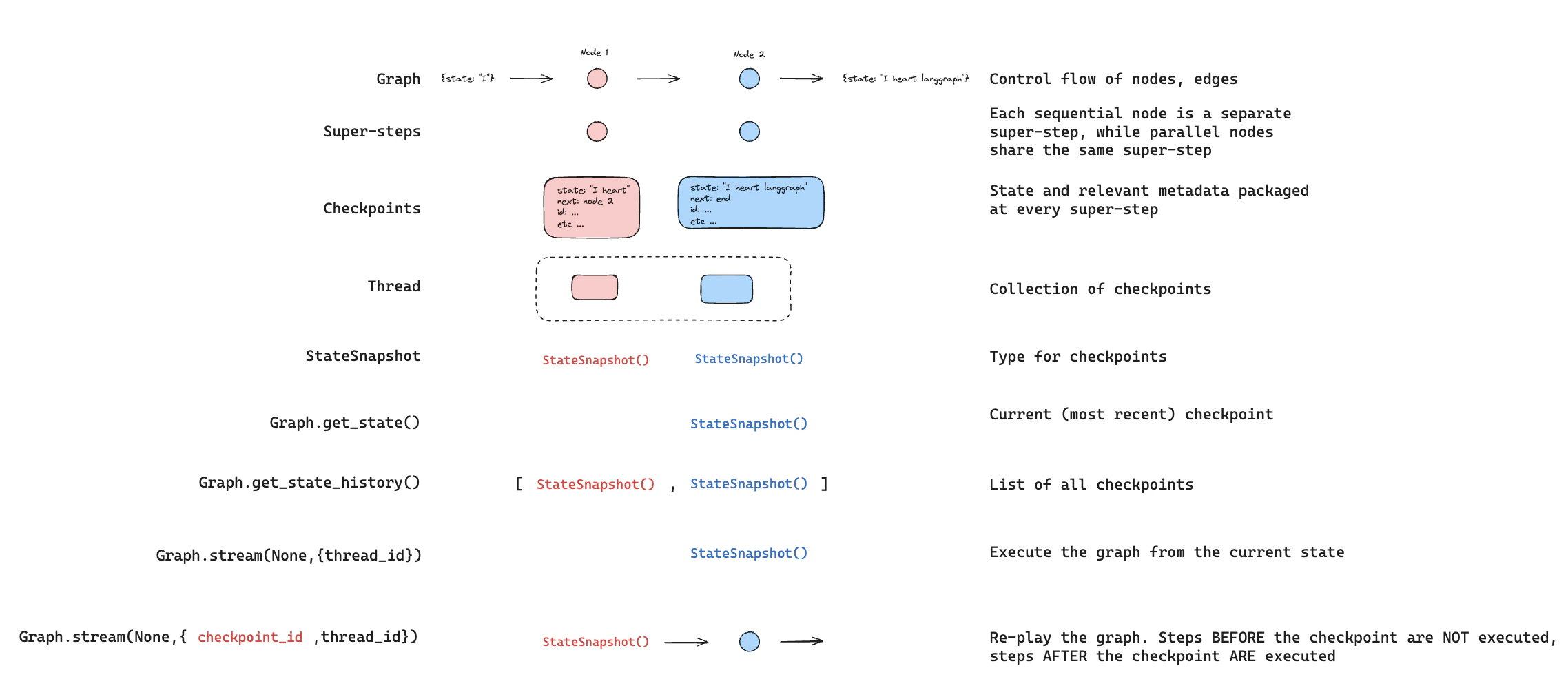
重放从先前的检查点重新执行步骤。使用先前的 `checkpoint_id` 调用图以重新运行该检查点之后的节点。检查点之前的节点被跳过(其结果已保存)。检查点之后的节点重新执行,包括任何 LLM 调用、API 请求或[中断](/oss/python/langgraph/interrupts)——这些在重放期间总是会被重新触发。
参见[时间旅行](/oss/python/langgraph/use-time-travel)获取关于重放过去执行的完整详情和代码示例。
#### 查找特定检查点
你可以过滤状态历史以查找匹配特定条件的检查点:
```python theme={"theme":{"light":"catppuccin-latte","dark":"catppuccin-mocha"}}
history = list(graph.get_state_history(config))
# 查找特定节点执行前的检查点
before_node_b = next(s for s in history if s.next == ("node_b",))
# 按步骤号查找检查点
step_2 = next(s for s in history if s.metadata["step"] == 2)
# 查找由 update_state 创建的检查点
forks = [s for s in history if s.metadata["source"] == "update"]
# 查找发生中断的检查点
interrupted = next(
s for s in history
if s.tasks and any(t.interrupts for t in s.tasks)
)
```
### 重放
重放从先前的检查点重新执行步骤。使用先前的 `checkpoint_id` 调用图以重新运行该检查点之后的节点。检查点之前的节点被跳过(其结果已保存)。检查点之后的节点重新执行,包括任何 LLM 调用、API 请求或[中断](/oss/python/langgraph/interrupts)——这些在重放期间总是会被重新触发。
参见[时间旅行](/oss/python/langgraph/use-time-travel)获取关于重放过去执行的完整详情和代码示例。
 ### 更新状态
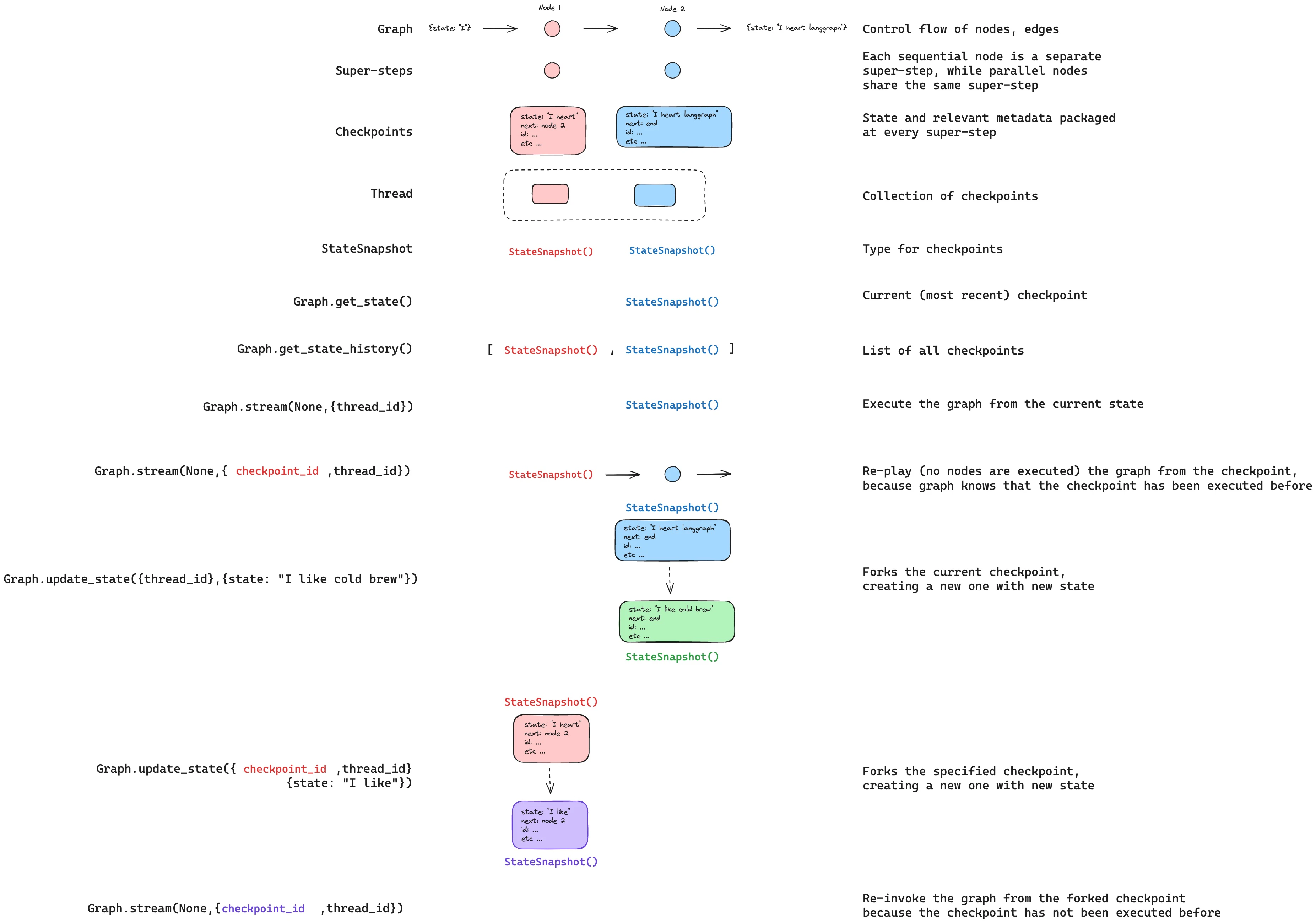
你可以使用 [`update_state`](https://reference.langchain.com/python/langgraph/graphs/#langgraph.graph.state.CompiledStateGraph.update_state) 编辑图状态。这会创建一个具有更新值的新检查点——它不会修改原始检查点。更新与节点更新的处理方式相同:值通过 [reducer](/oss/python/langgraph/graph-api#reducers) 函数传递(当定义了时),因此带有 reducer 的通道会\_累积\_值而非覆盖。
你可以选择性地指定 `as_node` 来控制更新被视为来自哪个节点,这会影响下一个执行的节点。详见[时间旅行:`as_node`](/oss/python/langgraph/use-time-travel#from-a-specific-node)。
### 更新状态
你可以使用 [`update_state`](https://reference.langchain.com/python/langgraph/graphs/#langgraph.graph.state.CompiledStateGraph.update_state) 编辑图状态。这会创建一个具有更新值的新检查点——它不会修改原始检查点。更新与节点更新的处理方式相同:值通过 [reducer](/oss/python/langgraph/graph-api#reducers) 函数传递(当定义了时),因此带有 reducer 的通道会\_累积\_值而非覆盖。
你可以选择性地指定 `as_node` 来控制更新被视为来自哪个节点,这会影响下一个执行的节点。详见[时间旅行:`as_node`](/oss/python/langgraph/use-time-travel#from-a-specific-node)。
 ## 记忆存储
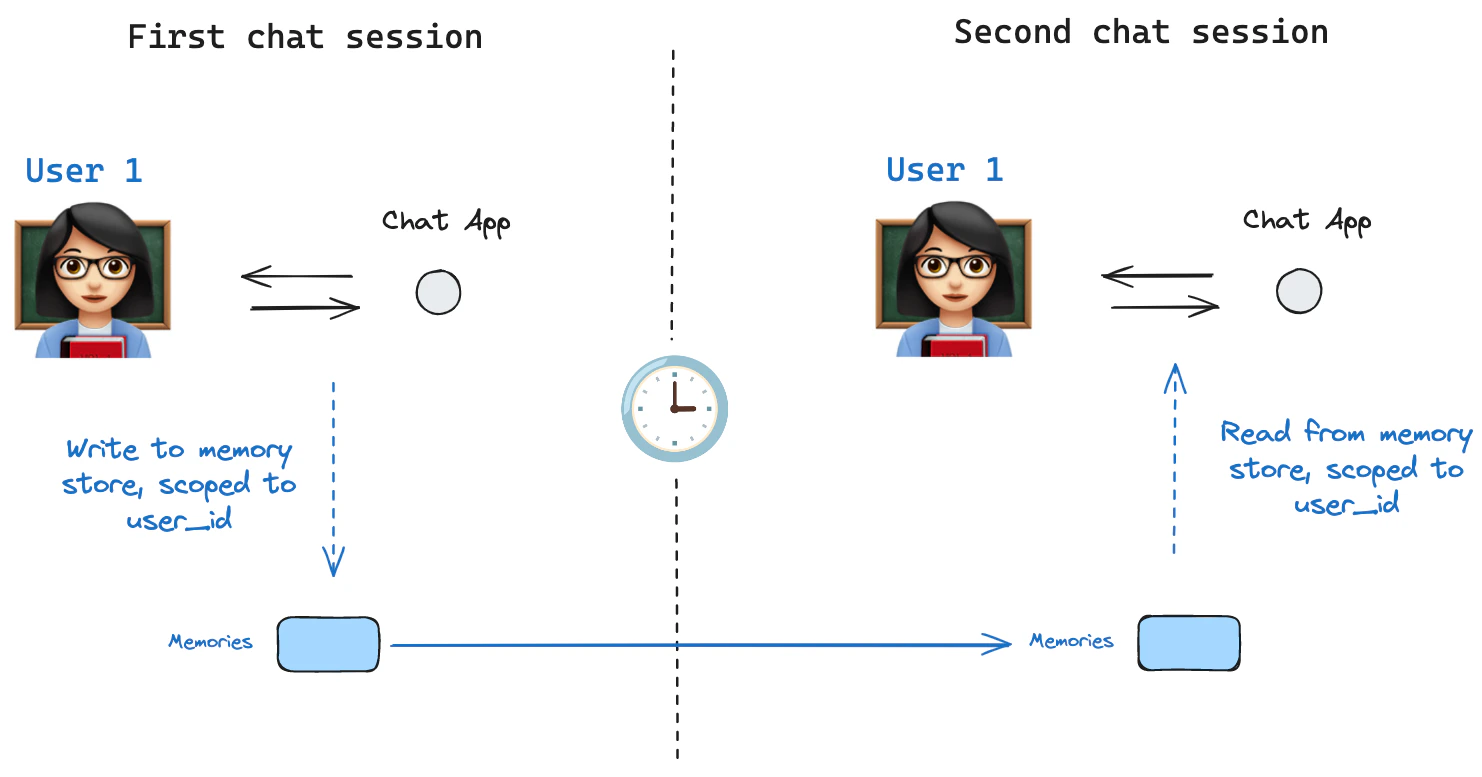 [状态 schema](/oss/python/langgraph/graph-api#schema) 指定一组在图执行时填充的键。如上所述,状态可以由检查点器在每个图步骤写入线程,实现状态持久化。
如果我们想在\_线程间\_保留某些信息怎么办?考虑聊天机器人的情况,我们希望在用户的\_所有\_聊天对话(即线程)中保留关于用户的特定信息!
仅使用检查点器,我们无法跨线程共享信息。这促使了 [`Store`](https://reference.langchain.com/python/langgraph/store/) 接口的需求。作为示例,我们可以定义一个 `InMemoryStore` 来跨线程存储用户信息。我们只需像之前一样使用检查点器编译图,并传入 store。
**LangGraph API 自动处理存储**
使用 LangGraph API 时,你不需要手动实现或配置存储。API 在后台自动处理所有存储基础设施。
[InMemoryStore](https://reference.langchain.com/python/langchain-core/stores/InMemoryStore) 适用于开发和测试。生产环境中,使用持久化存储如 `PostgresStore`、`MongoDBStore` 或 `RedisStore`。所有实现都扩展了 [BaseStore](https://reference.langchain.com/python/langchain-core/stores/BaseStore),这是在节点函数签名中使用的类型注解。
### 基本用法
首先,让我们在不使用 LangGraph 的情况下单独展示。
```python theme={"theme":{"light":"catppuccin-latte","dark":"catppuccin-mocha"}}
from langgraph.store.memory import InMemoryStore
store = InMemoryStore()
```
记忆按 `tuple` 进行命名空间划分,在此示例中为 `(, "memories")`。命名空间可以是任意长度,代表任何内容,不必是用户特定的。
```python theme={"theme":{"light":"catppuccin-latte","dark":"catppuccin-mocha"}}
user_id = "1"
namespace_for_memory = (user_id, "memories")
```
我们使用 `store.put` 方法将记忆保存到存储中的命名空间。执行此操作时,我们指定如上定义的命名空间,以及记忆的键值对:键只是记忆的唯一标识符(`memory_id`),值(一个字典)是记忆本身。
```python theme={"theme":{"light":"catppuccin-latte","dark":"catppuccin-mocha"}}
memory_id = str(uuid.uuid4())
memory = {"food_preference" : "I like pizza"}
store.put(namespace_for_memory, memory_id, memory)
```
我们可以使用 `store.search` 方法读取命名空间中的记忆,该方法将返回给定用户的记忆列表,最多到 `limit` 参数(默认 `10`)。使用 `InMemoryStore` 时,项目按插入顺序返回,最近的记忆在列表最后;其他后端可能排序不同(参见[列出命名空间中的项目](#listing-items-in-a-namespace))。
```python theme={"theme":{"light":"catppuccin-latte","dark":"catppuccin-mocha"}}
memories = store.search(namespace_for_memory)
memories[-1].dict()
{'value': {'food_preference': 'I like pizza'},
'key': '07e0caf4-1631-47b7-b15f-65515d4c1843',
'namespace': ['1', 'memories'],
'created_at': '2024-10-02T17:22:31.590602+00:00',
'updated_at': '2024-10-02T17:22:31.590605+00:00'}
```
每种记忆类型是一个 Python 类([`Item`](https://langchain-ai.github.io/langgraph/reference/store/#langgraph.store.base.Item)),具有特定属性。我们可以通过如上 `.dict` 将其转换为字典来访问。
它具有的属性:
* `value`:此记忆的值(本身是一个字典)
* `key`:此命名空间中此记忆的唯一键
* `namespace`:字符串元组,此记忆类型的命名空间
虽然类型是 `tuple[str, ...]`,但转换为 JSON 时可能被序列化为列表(例如 `['1', 'memories']`)。
* `created_at`:此记忆创建的时间戳
* `updated_at`:此记忆更新的时间戳
### 列出命名空间中的项目
调用 [`store.search`](https://reference.langchain.com/python/langgraph/store/#langgraph.store.base.BaseStore.search)(或异步 [`store.asearch`](https://reference.langchain.com/python/langgraph/store/#langgraph.store.base.BaseStore.asearch))时不带 `query` 和 `filter`,将返回 `namespace_prefix` 下存储的项目,最多到 `limit`。当你不需要语义排序时,使用此方法枚举命名空间中的所有内容。
```python theme={"theme":{"light":"catppuccin-latte","dark":"catppuccin-mocha"}}
# Return up to 100 items stored under ("alice", "memories").
items = store.search(("alice", "memories"), limit=100)
```
需要注意的三个行为:
* **`namespace_prefix` 按前缀匹配,不是精确匹配。** `("alice",)` 也会返回 `("alice", "memories")`、`("alice", "preferences")` 等下的项目。要限制到单一层级,传递完整命名空间或在客户端按 `item.namespace` 过滤返回的项目。
* **超过 `limit` 的结果会被静默截断。** 没有溢出信号——将 `limit` 设置为高于预期最大值,或使用 `offset` 分页。
* **默认排序取决于存储后端。** `PostgresStore` 和 `AsyncPostgresStore` 按 `updated_at` 降序返回结果(最近更新的在前)。`InMemoryStore` 按插入顺序返回结果(最近插入的在后)。不要依赖跨实现的特定顺序——如果顺序重要,在客户端按 `item.updated_at` 排序。
要翻页浏览大型命名空间:
```python theme={"theme":{"light":"catppuccin-latte","dark":"catppuccin-mocha"}}
page_size = 50
offset = 0
while True:
page = store.search(("alice", "memories"), limit=page_size, offset=offset)
if not page:
break
for item in page:
pass
offset += page_size
```
要发现存在哪些命名空间(例如,在列出记忆前遍历每个用户),使用 [`store.list_namespaces`](https://reference.langchain.com/python/langgraph/store/#langgraph.store.base.BaseStore.list_namespaces) 或 [`store.alist_namespaces`](https://reference.langchain.com/python/langgraph/store/#langgraph.store.base.BaseStore.alist_namespaces):
```python theme={"theme":{"light":"catppuccin-latte","dark":"catppuccin-mocha"}}
# All namespaces that start with ("alice",), truncated to two levels deep.
namespaces = store.list_namespaces(prefix=("alice",), max_depth=2)
```
### 语义搜索
除了简单检索外,存储还支持语义搜索,允许你基于含义而非精确匹配查找记忆。要启用此功能,使用嵌入模型配置存储:
```python theme={"theme":{"light":"catppuccin-latte","dark":"catppuccin-mocha"}}
from langchain.embeddings import init_embeddings
store = InMemoryStore(
index={
"embed": init_embeddings("openai:text-embedding-3-small"), # 嵌入提供者
"dims": 1536, # 嵌入维度
"fields": ["food_preference", "$"] # 要嵌入的字段
}
)
```
现在搜索时,你可以使用自然语言查询来找到相关记忆:
```python theme={"theme":{"light":"catppuccin-latte","dark":"catppuccin-mocha"}}
# 查找关于食物偏好的记忆
# (这可以在将记忆放入存储后完成)
memories = store.search(
namespace_for_memory,
query="What does the user like to eat?",
limit=3 # 返回前 3 个匹配结果
)
```
你可以通过配置 `fields` 参数或在存储记忆时指定 `index` 参数来控制记忆的哪些部分被嵌入:
```python theme={"theme":{"light":"catppuccin-latte","dark":"catppuccin-mocha"}}
# 使用特定字段进行嵌入存储
store.put(
namespace_for_memory,
str(uuid.uuid4()),
{
"food_preference": "I love Italian cuisine",
"context": "Discussing dinner plans"
},
index=["food_preference"] # 只嵌入 "food_preferences" 字段
)
# 不使用嵌入存储(仍可检索,但不可搜索)
store.put(
namespace_for_memory,
str(uuid.uuid4()),
{"system_info": "Last updated: 2024-01-01"},
index=False
)
```
### 在 LangGraph 中使用
有了这些准备,我们在 LangGraph 中使用存储。存储与检查点器配合使用:如上所述,检查点器将状态保存到线程,而存储允许我们存储任意信息以\_跨\_线程访问。我们如下使用检查点器和存储编译图。
```python theme={"theme":{"light":"catppuccin-latte","dark":"catppuccin-mocha"}}
from dataclasses import dataclass
from langgraph.checkpoint.memory import InMemorySaver
@dataclass
class Context:
user_id: str
# 我们需要这个因为我们想启用线程(对话)
checkpointer = InMemorySaver()
# ... 定义图 ...
# 使用检查点器和存储编译图
builder = StateGraph(MessagesState, context_schema=Context)
# ... 添加节点和边 ...
graph = builder.compile(checkpointer=checkpointer, store=store)
```
我们像之前一样使用 `thread_id` 调用图,还使用 `user_id`,我们将用它来命名空间化该特定用户的记忆,如上所示。
```python theme={"theme":{"light":"catppuccin-latte","dark":"catppuccin-mocha"}}
# 调用图
config = {"configurable": {"thread_id": "1"}}
# 首先向 AI 打个招呼
for update in graph.stream(
{"messages": [{"role": "user", "content": "hi"}]},
config,
stream_mode="updates",
context=Context(user_id="1"),
):
print(update)
```
你可以在\_任何节点\_中通过 `Runtime` 对象访问存储和 `user_id`。当你将 `Runtime` 作为参数添加到节点函数时,LangGraph 会自动注入它。以下是你可能用它保存记忆的方式:
```python theme={"theme":{"light":"catppuccin-latte","dark":"catppuccin-mocha"}}
from langgraph.runtime import Runtime
from dataclasses import dataclass
@dataclass
class Context:
user_id: str
async def update_memory(state: MessagesState, runtime: Runtime[Context]):
# 从运行时上下文获取用户 ID
user_id = runtime.context.user_id
# 命名空间化记忆
namespace = (user_id, "memories")
# ... 分析对话并创建新记忆
# 创建新记忆 ID
memory_id = str(uuid.uuid4())
# 创建新记忆
await runtime.store.aput(namespace, memory_id, {"memory": memory})
```
如上所示,我们还可以在任何节点中访问存储并使用 `store.search` 方法获取记忆。回忆记忆作为可转换为字典的对象列表返回。
```python theme={"theme":{"light":"catppuccin-latte","dark":"catppuccin-mocha"}}
memories[-1].dict()
{'value': {'food_preference': 'I like pizza'},
'key': '07e0caf4-1631-47b7-b15f-65515d4c1843',
'namespace': ['1', 'memories'],
'created_at': '2024-10-02T17:22:31.590602+00:00',
'updated_at': '2024-10-02T17:22:31.590605+00:00'}
```
我们可以访问记忆并在模型调用中使用它们。
```python theme={"theme":{"light":"catppuccin-latte","dark":"catppuccin-mocha"}}
from dataclasses import dataclass
from langgraph.runtime import Runtime
@dataclass
class Context:
user_id: str
async def call_model(state: MessagesState, runtime: Runtime[Context]):
# 从运行时上下文获取用户 ID
user_id = runtime.context.user_id
# 命名空间化记忆
namespace = (user_id, "memories")
# 基于最近的消息搜索
memories = await runtime.store.asearch(
namespace,
query=state["messages"][-1].content,
limit=3
)
info = "\n".join([d.value["memory"] for d in memories])
# ... 在模型调用中使用记忆
```
如果我们创建新线程,只要 `user_id` 相同,仍然可以访问相同的记忆。
```python theme={"theme":{"light":"catppuccin-latte","dark":"catppuccin-mocha"}}
# 在新线程上调用图
config = {"configurable": {"thread_id": "2"}}
# 再次打招呼
for update in graph.stream(
{"messages": [{"role": "user", "content": "hi, tell me about my memories"}]},
config,
stream_mode="updates",
context=Context(user_id="1"),
):
print(update)
```
当我们使用 LangSmith 时,无论是本地(例如在 [Studio](/langsmith/studio) 中)还是[使用 LangSmith 托管](/langsmith/platform-setup),基础存储默认可用,不需要在图编译期间指定。但是要启用语义搜索,你**确实**需要在 `langgraph.json` 文件中配置索引设置。例如:
```json theme={"theme":{"light":"catppuccin-latte","dark":"catppuccin-mocha"}}
{
...
"store": {
"index": {
"embed": "openai:text-embeddings-3-small",
"dims": 1536,
"fields": ["$"]
}
}
}
```
参见[部署指南](/langsmith/semantic-search)获取更多详情和配置选项。
## 优化检查点存储
默认情况下,LangGraph 检查点在每个超级步骤写入每个状态通道的完整值。对于具有大量累积的长时间运行线程(如多轮对话),这可能随时间产生显著的存储增长。
[`DeltaChannel`](https://reference.langchain.com/python/langgraph/channels/delta/DeltaChannel) 只存储增量差异而非完整累积值,大大减少了追加密集型通道的检查点大小。参见 [DeltaChannel](/oss/python/langgraph/pregel#deltachannel-beta) 了解用法和存储与延迟的权衡。
`DeltaChannel` 需要 `langgraph>=1.2`,目前处于 beta 阶段。API 可能在未来版本中更改。
## 检查点器库
底层检查点由符合 [`BaseCheckpointSaver`](https://reference.langchain.com/python/langgraph/checkpoints/#langgraph.checkpoint.base.BaseCheckpointSaver) 接口的检查点器对象驱动。LangGraph 提供了多个检查点器实现,都通过独立的、可安装的库实现。
参见[检查点器集成](/oss/python/integrations/checkpointers/index)了解可用的提供者。
* `langgraph-checkpoint`:检查点保存器的基础接口([`BaseCheckpointSaver`](https://reference.langchain.com/python/langgraph/checkpoints/#langgraph.checkpoint.base.BaseCheckpointSaver))和序列化/反序列化接口([`SerializerProtocol`](https://reference.langchain.com/python/langgraph/checkpoints/#langgraph.checkpoint.serde.base.SerializerProtocol))。包含内存检查点器实现([`InMemorySaver`](https://reference.langchain.com/python/langgraph/checkpoints/#langgraph.checkpoint.memory.InMemorySaver))用于实验。LangGraph 自带 `langgraph-checkpoint`。
* `langgraph-checkpoint-sqlite`:使用 SQLite 数据库的 LangGraph 检查点器实现([`SqliteSaver`](https://reference.langchain.com/python/langgraph/checkpoints/#langgraph.checkpoint.sqlite.SqliteSaver) / [`AsyncSqliteSaver`](https://reference.langchain.com/python/langgraph/checkpoints/#langgraph.checkpoint.sqlite.aio.AsyncSqliteSaver))。适合实验和本地工作流。需要单独安装。
* `langgraph-checkpoint-postgres`:使用 Postgres 数据库的高级检查点器([`PostgresSaver`](https://reference.langchain.com/python/langgraph/checkpoints/#langgraph.checkpoint.postgres.PostgresSaver) / [`AsyncPostgresSaver`](https://reference.langchain.com/python/langgraph/checkpoints/#langgraph.checkpoint.postgres.aio.AsyncPostgresSaver)),在 LangSmith 中使用。适合生产环境使用。需要单独安装。
* `langchain-azure-cosmosdb`:使用 Azure Cosmos DB for NoSQL 的 LangGraph 检查点器实现([`CosmosDBSaverSync`](https://reference.langchain.com/python/langchain-azure-cosmosdb/) / [`CosmosDBSaver`](https://reference.langchain.com/python/langchain-azure-cosmosdb/))。适合在 Azure 上的生产环境使用。支持同步和异步操作,带有 Microsoft Entra ID 认证。需要单独安装。
### 检查点器接口
每个检查点器符合 [`BaseCheckpointSaver`](https://reference.langchain.com/python/langgraph/checkpoints/#langgraph.checkpoint.base.BaseCheckpointSaver) 接口并实现以下方法:
* `.put` - 存储检查点及其配置和元数据。
* `.put_writes` - 存储与检查点关联的中间写入(即[待处理写入](#pending-writes))。
* `.get_tuple` - 使用给定配置(`thread_id` 和 `checkpoint_id`)获取检查点元组。用于在 `graph.get_state()` 中填充 `StateSnapshot`。
* `.list` - 列出匹配给定配置和过滤条件的检查点。用于在 `graph.get_state_history()` 中填充状态历史。
如果检查点器与异步图执行一起使用(即通过 `.ainvoke`、`.astream`、`.abatch` 执行图),将使用上述方法的异步版本(`.aput`、`.aput_writes`、`.aget_tuple`、`.alist`)。
对于异步运行图,你可以使用 [`InMemorySaver`](https://reference.langchain.com/python/langgraph/checkpoints/#langgraph.checkpoint.memory.InMemorySaver),或 Sqlite/Postgres 检查点器的异步版本——[`AsyncSqliteSaver`](https://reference.langchain.com/python/langgraph/checkpoints/#langgraph.checkpoint.sqlite.aio.AsyncSqliteSaver) / [`AsyncPostgresSaver`](https://reference.langchain.com/python/langgraph/checkpoints/#langgraph.checkpoint.postgres.aio.AsyncPostgresSaver) 检查点器。
### 序列化器
当检查点器保存图状态时,它们需要序列化状态中的通道值。这通过序列化器对象完成。
`langgraph_checkpoint` 定义了实现序列化器的[协议](https://reference.langchain.com/python/langgraph/checkpoints/#langgraph.checkpoint.serde.base.SerializerProtocol)并提供了默认实现([`JsonPlusSerializer`](https://reference.langchain.com/python/langgraph/checkpoints/#langgraph.checkpoint.serde.jsonplus.JsonPlusSerializer)),处理各种类型,包括 LangChain 和 LangGraph 原语、日期时间、枚举等。
#### 使用 `pickle` 序列化
默认序列化器 [`JsonPlusSerializer`](https://reference.langchain.com/python/langgraph/checkpoints/#langgraph.checkpoint.serde.jsonplus.JsonPlusSerializer) 底层使用 ormsgpack 和 JSON,不适用于所有类型的对象。
如果你想对当前 msgpack 编码器不支持的对象(如 Pandas 数据帧)回退到 pickle,你可以使用 [`JsonPlusSerializer`](https://reference.langchain.com/python/langgraph/checkpoints/#langgraph.checkpoint.serde.jsonplus.JsonPlusSerializer) 的 `pickle_fallback` 参数:
```python theme={"theme":{"light":"catppuccin-latte","dark":"catppuccin-mocha"}}
from langgraph.checkpoint.memory import InMemorySaver
from langgraph.checkpoint.serde.jsonplus import JsonPlusSerializer
# ... 定义图 ...
graph.compile(
checkpointer=InMemorySaver(serde=JsonPlusSerializer(pickle_fallback=True))
)
```
#### 加密
检查点器可以选择性地加密所有持久化状态。要启用此功能,将 [`EncryptedSerializer`](https://reference.langchain.com/python/langgraph/checkpoints/#langgraph.checkpoint.serde.encrypted.EncryptedSerializer) 实例传递给任何 [`BaseCheckpointSaver`](https://reference.langchain.com/python/langgraph/checkpoints/#langgraph.checkpoint.base.BaseCheckpointSaver) 实现的 `serde` 参数。创建加密序列化器的最简单方式是通过 [`from_pycryptodome_aes`](https://reference.langchain.com/python/langgraph/checkpoints/#langgraph.checkpoint.serde.encrypted.EncryptedSerializer.from_pycryptodome_aes),它从 `LANGGRAPH_AES_KEY` 环境变量读取 AES 密钥(或接受 `key` 参数):
```python theme={"theme":{"light":"catppuccin-latte","dark":"catppuccin-mocha"}}
import sqlite3
from langgraph.checkpoint.serde.encrypted import EncryptedSerializer
from langgraph.checkpoint.sqlite import SqliteSaver
serde = EncryptedSerializer.from_pycryptodome_aes() # 读取 LANGGRAPH_AES_KEY
checkpointer = SqliteSaver(sqlite3.connect("checkpoint.db"), serde=serde)
```
```python theme={"theme":{"light":"catppuccin-latte","dark":"catppuccin-mocha"}}
from langgraph.checkpoint.serde.encrypted import EncryptedSerializer
from langgraph.checkpoint.postgres import PostgresSaver
serde = EncryptedSerializer.from_pycryptodome_aes()
checkpointer = PostgresSaver.from_conn_string("postgresql://...", serde=serde)
checkpointer.setup()
```
在 LangSmith 上运行时,只要存在 `LANGGRAPH_AES_KEY`,加密会自动启用,因此你只需要提供环境变量。其他加密方案可以通过实现 [`CipherProtocol`](https://reference.langchain.com/python/langgraph/checkpoints/#langgraph.checkpoint.serde.base.CipherProtocol) 并将其提供给 [`EncryptedSerializer`](https://reference.langchain.com/python/langgraph/checkpoints/#langgraph.checkpoint.serde.encrypted.EncryptedSerializer) 来使用。
***
[状态 schema](/oss/python/langgraph/graph-api#schema) 指定一组在图执行时填充的键。如上所述,状态可以由检查点器在每个图步骤写入线程,实现状态持久化。
如果我们想在\_线程间\_保留某些信息怎么办?考虑聊天机器人的情况,我们希望在用户的\_所有\_聊天对话(即线程)中保留关于用户的特定信息!
仅使用检查点器,我们无法跨线程共享信息。这促使了 [`Store`](https://reference.langchain.com/python/langgraph/store/) 接口的需求。作为示例,我们可以定义一个 `InMemoryStore` 来跨线程存储用户信息。我们只需像之前一样使用检查点器编译图,并传入 store。
**LangGraph API 自动处理存储**
使用 LangGraph API 时,你不需要手动实现或配置存储。API 在后台自动处理所有存储基础设施。
[InMemoryStore](https://reference.langchain.com/python/langchain-core/stores/InMemoryStore) 适用于开发和测试。生产环境中,使用持久化存储如 `PostgresStore`、`MongoDBStore` 或 `RedisStore`。所有实现都扩展了 [BaseStore](https://reference.langchain.com/python/langchain-core/stores/BaseStore),这是在节点函数签名中使用的类型注解。
### 基本用法
首先,让我们在不使用 LangGraph 的情况下单独展示。
```python theme={"theme":{"light":"catppuccin-latte","dark":"catppuccin-mocha"}}
from langgraph.store.memory import InMemoryStore
store = InMemoryStore()
```
记忆按 `tuple` 进行命名空间划分,在此示例中为 `(, "memories")`。命名空间可以是任意长度,代表任何内容,不必是用户特定的。
```python theme={"theme":{"light":"catppuccin-latte","dark":"catppuccin-mocha"}}
user_id = "1"
namespace_for_memory = (user_id, "memories")
```
我们使用 `store.put` 方法将记忆保存到存储中的命名空间。执行此操作时,我们指定如上定义的命名空间,以及记忆的键值对:键只是记忆的唯一标识符(`memory_id`),值(一个字典)是记忆本身。
```python theme={"theme":{"light":"catppuccin-latte","dark":"catppuccin-mocha"}}
memory_id = str(uuid.uuid4())
memory = {"food_preference" : "I like pizza"}
store.put(namespace_for_memory, memory_id, memory)
```
我们可以使用 `store.search` 方法读取命名空间中的记忆,该方法将返回给定用户的记忆列表,最多到 `limit` 参数(默认 `10`)。使用 `InMemoryStore` 时,项目按插入顺序返回,最近的记忆在列表最后;其他后端可能排序不同(参见[列出命名空间中的项目](#listing-items-in-a-namespace))。
```python theme={"theme":{"light":"catppuccin-latte","dark":"catppuccin-mocha"}}
memories = store.search(namespace_for_memory)
memories[-1].dict()
{'value': {'food_preference': 'I like pizza'},
'key': '07e0caf4-1631-47b7-b15f-65515d4c1843',
'namespace': ['1', 'memories'],
'created_at': '2024-10-02T17:22:31.590602+00:00',
'updated_at': '2024-10-02T17:22:31.590605+00:00'}
```
每种记忆类型是一个 Python 类([`Item`](https://langchain-ai.github.io/langgraph/reference/store/#langgraph.store.base.Item)),具有特定属性。我们可以通过如上 `.dict` 将其转换为字典来访问。
它具有的属性:
* `value`:此记忆的值(本身是一个字典)
* `key`:此命名空间中此记忆的唯一键
* `namespace`:字符串元组,此记忆类型的命名空间
虽然类型是 `tuple[str, ...]`,但转换为 JSON 时可能被序列化为列表(例如 `['1', 'memories']`)。
* `created_at`:此记忆创建的时间戳
* `updated_at`:此记忆更新的时间戳
### 列出命名空间中的项目
调用 [`store.search`](https://reference.langchain.com/python/langgraph/store/#langgraph.store.base.BaseStore.search)(或异步 [`store.asearch`](https://reference.langchain.com/python/langgraph/store/#langgraph.store.base.BaseStore.asearch))时不带 `query` 和 `filter`,将返回 `namespace_prefix` 下存储的项目,最多到 `limit`。当你不需要语义排序时,使用此方法枚举命名空间中的所有内容。
```python theme={"theme":{"light":"catppuccin-latte","dark":"catppuccin-mocha"}}
# Return up to 100 items stored under ("alice", "memories").
items = store.search(("alice", "memories"), limit=100)
```
需要注意的三个行为:
* **`namespace_prefix` 按前缀匹配,不是精确匹配。** `("alice",)` 也会返回 `("alice", "memories")`、`("alice", "preferences")` 等下的项目。要限制到单一层级,传递完整命名空间或在客户端按 `item.namespace` 过滤返回的项目。
* **超过 `limit` 的结果会被静默截断。** 没有溢出信号——将 `limit` 设置为高于预期最大值,或使用 `offset` 分页。
* **默认排序取决于存储后端。** `PostgresStore` 和 `AsyncPostgresStore` 按 `updated_at` 降序返回结果(最近更新的在前)。`InMemoryStore` 按插入顺序返回结果(最近插入的在后)。不要依赖跨实现的特定顺序——如果顺序重要,在客户端按 `item.updated_at` 排序。
要翻页浏览大型命名空间:
```python theme={"theme":{"light":"catppuccin-latte","dark":"catppuccin-mocha"}}
page_size = 50
offset = 0
while True:
page = store.search(("alice", "memories"), limit=page_size, offset=offset)
if not page:
break
for item in page:
pass
offset += page_size
```
要发现存在哪些命名空间(例如,在列出记忆前遍历每个用户),使用 [`store.list_namespaces`](https://reference.langchain.com/python/langgraph/store/#langgraph.store.base.BaseStore.list_namespaces) 或 [`store.alist_namespaces`](https://reference.langchain.com/python/langgraph/store/#langgraph.store.base.BaseStore.alist_namespaces):
```python theme={"theme":{"light":"catppuccin-latte","dark":"catppuccin-mocha"}}
# All namespaces that start with ("alice",), truncated to two levels deep.
namespaces = store.list_namespaces(prefix=("alice",), max_depth=2)
```
### 语义搜索
除了简单检索外,存储还支持语义搜索,允许你基于含义而非精确匹配查找记忆。要启用此功能,使用嵌入模型配置存储:
```python theme={"theme":{"light":"catppuccin-latte","dark":"catppuccin-mocha"}}
from langchain.embeddings import init_embeddings
store = InMemoryStore(
index={
"embed": init_embeddings("openai:text-embedding-3-small"), # 嵌入提供者
"dims": 1536, # 嵌入维度
"fields": ["food_preference", "$"] # 要嵌入的字段
}
)
```
现在搜索时,你可以使用自然语言查询来找到相关记忆:
```python theme={"theme":{"light":"catppuccin-latte","dark":"catppuccin-mocha"}}
# 查找关于食物偏好的记忆
# (这可以在将记忆放入存储后完成)
memories = store.search(
namespace_for_memory,
query="What does the user like to eat?",
limit=3 # 返回前 3 个匹配结果
)
```
你可以通过配置 `fields` 参数或在存储记忆时指定 `index` 参数来控制记忆的哪些部分被嵌入:
```python theme={"theme":{"light":"catppuccin-latte","dark":"catppuccin-mocha"}}
# 使用特定字段进行嵌入存储
store.put(
namespace_for_memory,
str(uuid.uuid4()),
{
"food_preference": "I love Italian cuisine",
"context": "Discussing dinner plans"
},
index=["food_preference"] # 只嵌入 "food_preferences" 字段
)
# 不使用嵌入存储(仍可检索,但不可搜索)
store.put(
namespace_for_memory,
str(uuid.uuid4()),
{"system_info": "Last updated: 2024-01-01"},
index=False
)
```
### 在 LangGraph 中使用
有了这些准备,我们在 LangGraph 中使用存储。存储与检查点器配合使用:如上所述,检查点器将状态保存到线程,而存储允许我们存储任意信息以\_跨\_线程访问。我们如下使用检查点器和存储编译图。
```python theme={"theme":{"light":"catppuccin-latte","dark":"catppuccin-mocha"}}
from dataclasses import dataclass
from langgraph.checkpoint.memory import InMemorySaver
@dataclass
class Context:
user_id: str
# 我们需要这个因为我们想启用线程(对话)
checkpointer = InMemorySaver()
# ... 定义图 ...
# 使用检查点器和存储编译图
builder = StateGraph(MessagesState, context_schema=Context)
# ... 添加节点和边 ...
graph = builder.compile(checkpointer=checkpointer, store=store)
```
我们像之前一样使用 `thread_id` 调用图,还使用 `user_id`,我们将用它来命名空间化该特定用户的记忆,如上所示。
```python theme={"theme":{"light":"catppuccin-latte","dark":"catppuccin-mocha"}}
# 调用图
config = {"configurable": {"thread_id": "1"}}
# 首先向 AI 打个招呼
for update in graph.stream(
{"messages": [{"role": "user", "content": "hi"}]},
config,
stream_mode="updates",
context=Context(user_id="1"),
):
print(update)
```
你可以在\_任何节点\_中通过 `Runtime` 对象访问存储和 `user_id`。当你将 `Runtime` 作为参数添加到节点函数时,LangGraph 会自动注入它。以下是你可能用它保存记忆的方式:
```python theme={"theme":{"light":"catppuccin-latte","dark":"catppuccin-mocha"}}
from langgraph.runtime import Runtime
from dataclasses import dataclass
@dataclass
class Context:
user_id: str
async def update_memory(state: MessagesState, runtime: Runtime[Context]):
# 从运行时上下文获取用户 ID
user_id = runtime.context.user_id
# 命名空间化记忆
namespace = (user_id, "memories")
# ... 分析对话并创建新记忆
# 创建新记忆 ID
memory_id = str(uuid.uuid4())
# 创建新记忆
await runtime.store.aput(namespace, memory_id, {"memory": memory})
```
如上所示,我们还可以在任何节点中访问存储并使用 `store.search` 方法获取记忆。回忆记忆作为可转换为字典的对象列表返回。
```python theme={"theme":{"light":"catppuccin-latte","dark":"catppuccin-mocha"}}
memories[-1].dict()
{'value': {'food_preference': 'I like pizza'},
'key': '07e0caf4-1631-47b7-b15f-65515d4c1843',
'namespace': ['1', 'memories'],
'created_at': '2024-10-02T17:22:31.590602+00:00',
'updated_at': '2024-10-02T17:22:31.590605+00:00'}
```
我们可以访问记忆并在模型调用中使用它们。
```python theme={"theme":{"light":"catppuccin-latte","dark":"catppuccin-mocha"}}
from dataclasses import dataclass
from langgraph.runtime import Runtime
@dataclass
class Context:
user_id: str
async def call_model(state: MessagesState, runtime: Runtime[Context]):
# 从运行时上下文获取用户 ID
user_id = runtime.context.user_id
# 命名空间化记忆
namespace = (user_id, "memories")
# 基于最近的消息搜索
memories = await runtime.store.asearch(
namespace,
query=state["messages"][-1].content,
limit=3
)
info = "\n".join([d.value["memory"] for d in memories])
# ... 在模型调用中使用记忆
```
如果我们创建新线程,只要 `user_id` 相同,仍然可以访问相同的记忆。
```python theme={"theme":{"light":"catppuccin-latte","dark":"catppuccin-mocha"}}
# 在新线程上调用图
config = {"configurable": {"thread_id": "2"}}
# 再次打招呼
for update in graph.stream(
{"messages": [{"role": "user", "content": "hi, tell me about my memories"}]},
config,
stream_mode="updates",
context=Context(user_id="1"),
):
print(update)
```
当我们使用 LangSmith 时,无论是本地(例如在 [Studio](/langsmith/studio) 中)还是[使用 LangSmith 托管](/langsmith/platform-setup),基础存储默认可用,不需要在图编译期间指定。但是要启用语义搜索,你**确实**需要在 `langgraph.json` 文件中配置索引设置。例如:
```json theme={"theme":{"light":"catppuccin-latte","dark":"catppuccin-mocha"}}
{
...
"store": {
"index": {
"embed": "openai:text-embeddings-3-small",
"dims": 1536,
"fields": ["$"]
}
}
}
```
参见[部署指南](/langsmith/semantic-search)获取更多详情和配置选项。
## 优化检查点存储
默认情况下,LangGraph 检查点在每个超级步骤写入每个状态通道的完整值。对于具有大量累积的长时间运行线程(如多轮对话),这可能随时间产生显著的存储增长。
[`DeltaChannel`](https://reference.langchain.com/python/langgraph/channels/delta/DeltaChannel) 只存储增量差异而非完整累积值,大大减少了追加密集型通道的检查点大小。参见 [DeltaChannel](/oss/python/langgraph/pregel#deltachannel-beta) 了解用法和存储与延迟的权衡。
`DeltaChannel` 需要 `langgraph>=1.2`,目前处于 beta 阶段。API 可能在未来版本中更改。
## 检查点器库
底层检查点由符合 [`BaseCheckpointSaver`](https://reference.langchain.com/python/langgraph/checkpoints/#langgraph.checkpoint.base.BaseCheckpointSaver) 接口的检查点器对象驱动。LangGraph 提供了多个检查点器实现,都通过独立的、可安装的库实现。
参见[检查点器集成](/oss/python/integrations/checkpointers/index)了解可用的提供者。
* `langgraph-checkpoint`:检查点保存器的基础接口([`BaseCheckpointSaver`](https://reference.langchain.com/python/langgraph/checkpoints/#langgraph.checkpoint.base.BaseCheckpointSaver))和序列化/反序列化接口([`SerializerProtocol`](https://reference.langchain.com/python/langgraph/checkpoints/#langgraph.checkpoint.serde.base.SerializerProtocol))。包含内存检查点器实现([`InMemorySaver`](https://reference.langchain.com/python/langgraph/checkpoints/#langgraph.checkpoint.memory.InMemorySaver))用于实验。LangGraph 自带 `langgraph-checkpoint`。
* `langgraph-checkpoint-sqlite`:使用 SQLite 数据库的 LangGraph 检查点器实现([`SqliteSaver`](https://reference.langchain.com/python/langgraph/checkpoints/#langgraph.checkpoint.sqlite.SqliteSaver) / [`AsyncSqliteSaver`](https://reference.langchain.com/python/langgraph/checkpoints/#langgraph.checkpoint.sqlite.aio.AsyncSqliteSaver))。适合实验和本地工作流。需要单独安装。
* `langgraph-checkpoint-postgres`:使用 Postgres 数据库的高级检查点器([`PostgresSaver`](https://reference.langchain.com/python/langgraph/checkpoints/#langgraph.checkpoint.postgres.PostgresSaver) / [`AsyncPostgresSaver`](https://reference.langchain.com/python/langgraph/checkpoints/#langgraph.checkpoint.postgres.aio.AsyncPostgresSaver)),在 LangSmith 中使用。适合生产环境使用。需要单独安装。
* `langchain-azure-cosmosdb`:使用 Azure Cosmos DB for NoSQL 的 LangGraph 检查点器实现([`CosmosDBSaverSync`](https://reference.langchain.com/python/langchain-azure-cosmosdb/) / [`CosmosDBSaver`](https://reference.langchain.com/python/langchain-azure-cosmosdb/))。适合在 Azure 上的生产环境使用。支持同步和异步操作,带有 Microsoft Entra ID 认证。需要单独安装。
### 检查点器接口
每个检查点器符合 [`BaseCheckpointSaver`](https://reference.langchain.com/python/langgraph/checkpoints/#langgraph.checkpoint.base.BaseCheckpointSaver) 接口并实现以下方法:
* `.put` - 存储检查点及其配置和元数据。
* `.put_writes` - 存储与检查点关联的中间写入(即[待处理写入](#pending-writes))。
* `.get_tuple` - 使用给定配置(`thread_id` 和 `checkpoint_id`)获取检查点元组。用于在 `graph.get_state()` 中填充 `StateSnapshot`。
* `.list` - 列出匹配给定配置和过滤条件的检查点。用于在 `graph.get_state_history()` 中填充状态历史。
如果检查点器与异步图执行一起使用(即通过 `.ainvoke`、`.astream`、`.abatch` 执行图),将使用上述方法的异步版本(`.aput`、`.aput_writes`、`.aget_tuple`、`.alist`)。
对于异步运行图,你可以使用 [`InMemorySaver`](https://reference.langchain.com/python/langgraph/checkpoints/#langgraph.checkpoint.memory.InMemorySaver),或 Sqlite/Postgres 检查点器的异步版本——[`AsyncSqliteSaver`](https://reference.langchain.com/python/langgraph/checkpoints/#langgraph.checkpoint.sqlite.aio.AsyncSqliteSaver) / [`AsyncPostgresSaver`](https://reference.langchain.com/python/langgraph/checkpoints/#langgraph.checkpoint.postgres.aio.AsyncPostgresSaver) 检查点器。
### 序列化器
当检查点器保存图状态时,它们需要序列化状态中的通道值。这通过序列化器对象完成。
`langgraph_checkpoint` 定义了实现序列化器的[协议](https://reference.langchain.com/python/langgraph/checkpoints/#langgraph.checkpoint.serde.base.SerializerProtocol)并提供了默认实现([`JsonPlusSerializer`](https://reference.langchain.com/python/langgraph/checkpoints/#langgraph.checkpoint.serde.jsonplus.JsonPlusSerializer)),处理各种类型,包括 LangChain 和 LangGraph 原语、日期时间、枚举等。
#### 使用 `pickle` 序列化
默认序列化器 [`JsonPlusSerializer`](https://reference.langchain.com/python/langgraph/checkpoints/#langgraph.checkpoint.serde.jsonplus.JsonPlusSerializer) 底层使用 ormsgpack 和 JSON,不适用于所有类型的对象。
如果你想对当前 msgpack 编码器不支持的对象(如 Pandas 数据帧)回退到 pickle,你可以使用 [`JsonPlusSerializer`](https://reference.langchain.com/python/langgraph/checkpoints/#langgraph.checkpoint.serde.jsonplus.JsonPlusSerializer) 的 `pickle_fallback` 参数:
```python theme={"theme":{"light":"catppuccin-latte","dark":"catppuccin-mocha"}}
from langgraph.checkpoint.memory import InMemorySaver
from langgraph.checkpoint.serde.jsonplus import JsonPlusSerializer
# ... 定义图 ...
graph.compile(
checkpointer=InMemorySaver(serde=JsonPlusSerializer(pickle_fallback=True))
)
```
#### 加密
检查点器可以选择性地加密所有持久化状态。要启用此功能,将 [`EncryptedSerializer`](https://reference.langchain.com/python/langgraph/checkpoints/#langgraph.checkpoint.serde.encrypted.EncryptedSerializer) 实例传递给任何 [`BaseCheckpointSaver`](https://reference.langchain.com/python/langgraph/checkpoints/#langgraph.checkpoint.base.BaseCheckpointSaver) 实现的 `serde` 参数。创建加密序列化器的最简单方式是通过 [`from_pycryptodome_aes`](https://reference.langchain.com/python/langgraph/checkpoints/#langgraph.checkpoint.serde.encrypted.EncryptedSerializer.from_pycryptodome_aes),它从 `LANGGRAPH_AES_KEY` 环境变量读取 AES 密钥(或接受 `key` 参数):
```python theme={"theme":{"light":"catppuccin-latte","dark":"catppuccin-mocha"}}
import sqlite3
from langgraph.checkpoint.serde.encrypted import EncryptedSerializer
from langgraph.checkpoint.sqlite import SqliteSaver
serde = EncryptedSerializer.from_pycryptodome_aes() # 读取 LANGGRAPH_AES_KEY
checkpointer = SqliteSaver(sqlite3.connect("checkpoint.db"), serde=serde)
```
```python theme={"theme":{"light":"catppuccin-latte","dark":"catppuccin-mocha"}}
from langgraph.checkpoint.serde.encrypted import EncryptedSerializer
from langgraph.checkpoint.postgres import PostgresSaver
serde = EncryptedSerializer.from_pycryptodome_aes()
checkpointer = PostgresSaver.from_conn_string("postgresql://...", serde=serde)
checkpointer.setup()
```
在 LangSmith 上运行时,只要存在 `LANGGRAPH_AES_KEY`,加密会自动启用,因此你只需要提供环境变量。其他加密方案可以通过实现 [`CipherProtocol`](https://reference.langchain.com/python/langgraph/checkpoints/#langgraph.checkpoint.serde.base.CipherProtocol) 并将其提供给 [`EncryptedSerializer`](https://reference.langchain.com/python/langgraph/checkpoints/#langgraph.checkpoint.serde.encrypted.EncryptedSerializer) 来使用。
***
[连接这些文档](/use-these-docs)到 Claude、VSCode 等工具,通过 MCP 获取实时回答。
[在 GitHub 上编辑此页面](https://github.com/langchain-ai/docs/edit/main/src/oss/langgraph/persistence.mdx)或[提交问题](https://github.com/langchain-ai/docs/issues/new/choose)。