> ## Documentation Index
> Fetch the complete documentation index at: https://nvd-54.mintlify.site/llms.txt
> Use this file to discover all available pages before exploring further.
# 短期记忆
## 概述
记忆是一个能够记住先前交互信息的系统。对于 AI 智能体来说,记忆至关重要,因为它让智能体能够记住先前的交互、从反馈中学习并适应用户偏好。随着智能体处理越来越复杂的任务和大量用户交互,这种能力对于效率和用户满意度变得不可或缺。
短期记忆让你的应用程序能够记住单个线程或对话中的先前交互。
线程组织单个会话中的多次交互,类似于电子邮件将消息分组在单个对话中。
对话历史是短期记忆最常见的形式。长对话对当今的 LLM 构成挑战;完整的历史可能无法放入 LLM 的上下文窗口,导致上下文丢失或错误。
即使你的模型支持完整的上下文长度,大多数 LLM 在长上下文中仍然表现不佳。它们会被陈旧或偏离主题的内容"分散注意力",同时响应时间更慢、成本更高。
聊天模型使用[消息](/oss/python/langchain/messages)接受上下文,包括指令(系统消息)和输入(人类消息)。在聊天应用程序中,消息在人类输入和模型响应之间交替,导致消息列表随时间增长。由于上下文窗口有限,许多应用程序可以从使用技术来移除或"遗忘"陈旧信息中受益。
需要**跨**对话记住信息?使用[长期记忆](/oss/python/langchain/long-term-memory)跨不同线程和会话存储和召回用户特定或应用程序级别的数据。
## 用法
要为智能体添加短期记忆(线程级持久化),你需要在创建智能体时指定一个 `checkpointer`。
LangChain 的智能体将短期记忆作为智能体状态的一部分进行管理。
通过将这些存储在图的状态中,智能体可以访问给定对话的完整上下文,同时保持不同线程之间的隔离。
状态使用检查点持久化到数据库(或内存),以便线程可以在任何时候恢复。
短期记忆在智能体被调用或步骤(如工具调用)完成时更新,状态在每个步骤开始时读取。
```python theme={"theme":{"light":"catppuccin-latte","dark":"catppuccin-mocha"}}
from langchain.agents import create_agent
from langgraph.checkpoint.memory import InMemorySaver # [!code highlight]
agent = create_agent(
"gpt-5.4",
tools=[get_user_info],
checkpointer=InMemorySaver(), # [!code highlight]
)
agent.invoke(
{"messages": [{"role": "user", "content": "Hi! My name is Bob."}]},
{"configurable": {"thread_id": "1"}}, # [!code highlight]
)
```
### 在生产环境中
在生产环境中,使用由数据库支持的检查点:
```shell theme={"theme":{"light":"catppuccin-latte","dark":"catppuccin-mocha"}}
pip install langgraph-checkpoint-postgres
```
```python theme={"theme":{"light":"catppuccin-latte","dark":"catppuccin-mocha"}}
from langchain.agents import create_agent
from langgraph.checkpoint.postgres import PostgresSaver # [!code highlight]
DB_URI = "postgresql://postgres:postgres@localhost:5432/postgres?sslmode=disable"
with PostgresSaver.from_conn_string(DB_URI) as checkpointer:
checkpointer.setup() # 在 PostgreSQL 中自动创建表
agent = create_agent(
"gpt-5.4",
tools=[get_user_info],
checkpointer=checkpointer, # [!code highlight]
)
```
有关更多检查点选项,包括 SQLite、Postgres 和 Azure Cosmos DB,请参阅持久化文档中的[检查点库列表](/oss/python/langgraph/persistence#checkpointer-libraries)。
## 自定义智能体记忆
默认情况下,智能体使用 [`AgentState`](https://reference.langchain.com/python/langchain/agents/middleware/types/AgentState) 来管理短期记忆,特别是通过 `messages` 键管理对话历史。
你可以扩展 [`AgentState`](https://reference.langchain.com/python/langchain/agents/middleware/types/AgentState) 来添加额外的字段。自定义状态模式通过 [`state_schema`](https://reference.langchain.com/python/langchain/middleware/#langchain.agents.middleware.AgentMiddleware.state_schema) 参数传递给 [`create_agent`](https://reference.langchain.com/python/langchain/agents/factory/create_agent)。
```python theme={"theme":{"light":"catppuccin-latte","dark":"catppuccin-mocha"}}
from langchain.agents import create_agent, AgentState
from langgraph.checkpoint.memory import InMemorySaver
class CustomAgentState(AgentState): # [!code highlight]
user_id: str # [!code highlight]
preferences: dict # [!code highlight]
agent = create_agent(
"gpt-5.4",
tools=[get_user_info],
state_schema=CustomAgentState, # [!code highlight]
checkpointer=InMemorySaver(),
)
# 自定义状态可以在 invoke 中传递
result = agent.invoke(
{
"messages": [{"role": "user", "content": "Hello"}],
"user_id": "user_123", # [!code highlight]
"preferences": {"theme": "dark"} # [!code highlight]
},
{"configurable": {"thread_id": "1"}})
```
## 常见模式
启用[短期记忆](#usage)后,长对话可能会超出 LLM 的上下文窗口。常见的解决方案有:
移除前 N 条或后 N 条消息(在调用 LLM 之前)
从 LangGraph 状态中永久删除消息
对历史中较早的消息进行摘要并用摘要替换它们
自定义策略(例如消息过滤等)
这允许智能体在不超出 LLM 上下文窗口的情况下跟踪对话。
### 修剪消息
大多数 LLM 有一个最大支持的上下文窗口(以 Token 为单位)。
一种决定何时截断消息的方式是计算消息历史中的 Token 数,并在接近该限制时截断。如果你使用 LangChain,你可以使用修剪消息工具并指定要从列表中保留的 Token 数以及处理边界的 `strategy`(例如保留最后 `max_tokens` 条)。
要在智能体中修剪消息历史,使用 [`@before_model`](https://reference.langchain.com/python/langchain/agents/middleware/types/before_model) 中间件装饰器:
```python theme={"theme":{"light":"catppuccin-latte","dark":"catppuccin-mocha"}}
from langchain.messages import RemoveMessage
from langgraph.graph.message import REMOVE_ALL_MESSAGES
from langgraph.checkpoint.memory import InMemorySaver
from langchain.agents import create_agent, AgentState
from langchain.agents.middleware import before_model
from langgraph.runtime import Runtime
from langchain_core.runnables import RunnableConfig
from typing import Any
@before_model
def trim_messages(state: AgentState, runtime: Runtime) -> dict[str, Any] | None:
"""仅保留最近几条消息以适应上下文窗口。"""
messages = state["messages"]
if len(messages) <= 3:
return None # 无需更改
first_msg = messages[0]
recent_messages = messages[-3:] if len(messages) % 2 == 0 else messages[-4:]
new_messages = [first_msg] + recent_messages
return {
"messages": [
RemoveMessage(id=REMOVE_ALL_MESSAGES),
*new_messages
]
}
agent = create_agent(
your_model_here,
tools=your_tools_here,
middleware=[trim_messages],
checkpointer=InMemorySaver(),
)
config: RunnableConfig = {"configurable": {"thread_id": "1"}}
agent.invoke({"messages": "hi, my name is bob"}, config)
agent.invoke({"messages": "write a short poem about cats"}, config)
agent.invoke({"messages": "now do the same but for dogs"}, config)
final_response = agent.invoke({"messages": "what's my name?"}, config)
final_response["messages"][-1].pretty_print()
"""
================================== Ai Message ==================================
Your name is Bob. You told me that earlier.
If you'd like me to call you a nickname or use a different name, just say the word.
"""
```
### 删除消息
你可以从图状态中删除消息来管理消息历史。
这在你想要移除特定消息或清除整个消息历史时很有用。
要从图状态中删除消息,你可以使用 `RemoveMessage`。
要使 `RemoveMessage` 工作,你需要使用带有 [`add_messages`](https://reference.langchain.com/python/langgraph/graph/message/add_messages) [reducer](/oss/python/langgraph/graph-api#reducers) 的状态键。
默认的 [`AgentState`](https://reference.langchain.com/python/langchain/agents/middleware/types/AgentState) 提供了此功能。
要删除特定消息:
```python theme={"theme":{"light":"catppuccin-latte","dark":"catppuccin-mocha"}}
from langchain.messages import RemoveMessage # [!code highlight]
def delete_messages(state):
messages = state["messages"]
if len(messages) > 2:
# 移除最早的两条消息
return {"messages": [RemoveMessage(id=m.id) for m in messages[:2]]} # [!code highlight]
```
要删除**所有**消息:
```python theme={"theme":{"light":"catppuccin-latte","dark":"catppuccin-mocha"}}
from langgraph.graph.message import REMOVE_ALL_MESSAGES # [!code highlight]
def delete_messages(state):
return {"messages": [RemoveMessage(id=REMOVE_ALL_MESSAGES)]} # [!code highlight]
```
删除消息时,**确保**生成的消息历史是有效的。检查你使用的 LLM 提供商的限制。例如:
* 一些提供商要求消息历史以 `user` 消息开头
* 大多数提供商要求带有工具调用的 `assistant` 消息后面跟着相应的 `tool` 结果消息。
### 摘要消息
如上所示,修剪或移除消息的问题在于你可能会因为消息队列的裁剪而丢失信息。
因此,一些应用程序受益于使用聊天模型对消息历史进行摘要的更复杂方法。
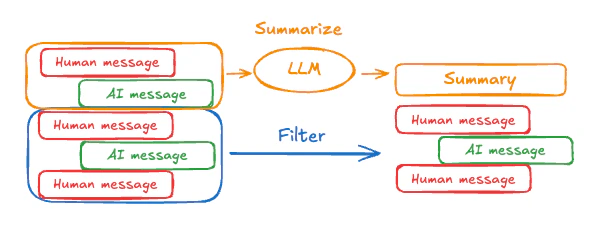 要在智能体中对消息历史进行摘要,使用内置的 [`SummarizationMiddleware`](/oss/python/langchain/middleware#summarization):
```python theme={"theme":{"light":"catppuccin-latte","dark":"catppuccin-mocha"}}
from langchain.agents import create_agent
from langchain.agents.middleware import SummarizationMiddleware
from langgraph.checkpoint.memory import InMemorySaver
from langchain_core.runnables import RunnableConfig
checkpointer = InMemorySaver()
agent = create_agent(
model="gpt-5.4",
tools=[],
middleware=[
SummarizationMiddleware(
model="gpt-5.4-mini",
trigger=("tokens", 4000),
keep=("messages", 20)
)
],
checkpointer=checkpointer,
)
config: RunnableConfig = {"configurable": {"thread_id": "1"}}
agent.invoke({"messages": "hi, my name is bob"}, config)
agent.invoke({"messages": "write a short poem about cats"}, config)
agent.invoke({"messages": "now do the same but for dogs"}, config)
final_response = agent.invoke({"messages": "what's my name?"}, config)
final_response["messages"][-1].pretty_print()
"""
================================== Ai Message ==================================
Your name is Bob!
"""
```
有关更多配置选项,请参阅 [`SummarizationMiddleware`](/oss/python/langchain/middleware#summarization)。
## 访问记忆
你可以通过多种方式访问和修改智能体的短期记忆(状态):
### 工具
#### 在工具中读取短期记忆
使用 `runtime` 参数(类型为 `ToolRuntime`)在工具中访问短期记忆(状态)。
`runtime` 参数对工具签名是隐藏的(模型看不到它),但工具可以通过它访问状态。
```python theme={"theme":{"light":"catppuccin-latte","dark":"catppuccin-mocha"}}
from langchain.agents import create_agent, AgentState
from langchain.tools import tool, ToolRuntime
class CustomState(AgentState):
user_id: str
@tool
def get_user_info(
runtime: ToolRuntime
) -> str:
"""Look up user info."""
user_id = runtime.state["user_id"]
return "User is John Smith" if user_id == "user_123" else "Unknown user"
agent = create_agent(
model="gpt-5-nano",
tools=[get_user_info],
state_schema=CustomState,
)
result = agent.invoke({
"messages": "look up user information",
"user_id": "user_123"
})
print(result["messages"][-1].content)
# > User is John Smith.
```
#### 从工具写入短期记忆
要在执行期间修改智能体的短期记忆(状态),你可以直接从工具返回状态更新。
这对于持久化中间结果或使信息可供后续工具或提示词访问非常有用。
```python theme={"theme":{"light":"catppuccin-latte","dark":"catppuccin-mocha"}}
from langchain.tools import tool, ToolRuntime
from langchain_core.runnables import RunnableConfig
from langchain.messages import ToolMessage
from langchain.agents import create_agent, AgentState
from langgraph.types import Command
from pydantic import BaseModel
class CustomState(AgentState): # [!code highlight]
user_name: str
class CustomContext(BaseModel):
user_id: str
@tool
def update_user_info(
runtime: ToolRuntime[CustomContext, CustomState],
) -> Command:
"""Look up and update user info."""
user_id = runtime.context.user_id
name = "John Smith" if user_id == "user_123" else "Unknown user"
return Command(update={ # [!code highlight]
"user_name": name,
# 更新消息历史
"messages": [
ToolMessage(
"Successfully looked up user information",
tool_call_id=runtime.tool_call_id
)
]
})
@tool
def greet(
runtime: ToolRuntime[CustomContext, CustomState]
) -> str | Command:
"""Use this to greet the user once you found their info."""
user_name = runtime.state.get("user_name", None)
if user_name is None:
return Command(update={
"messages": [
ToolMessage(
"Please call the 'update_user_info' tool it will get and update the user's name.",
tool_call_id=runtime.tool_call_id
)
]
})
return f"Hello {user_name}!"
agent = create_agent(
model="gpt-5-nano",
tools=[update_user_info, greet],
state_schema=CustomState, # [!code highlight]
context_schema=CustomContext,
)
agent.invoke(
{"messages": [{"role": "user", "content": "greet the user"}]},
context=CustomContext(user_id="user_123"),
)
```
### 提示词
在中间件中访问短期记忆(状态),根据对话历史或自定义状态字段创建动态提示词。
```python theme={"theme":{"light":"catppuccin-latte","dark":"catppuccin-mocha"}}
from langchain.agents import create_agent
from typing import TypedDict
from langchain.agents.middleware import dynamic_prompt, ModelRequest
class CustomContext(TypedDict):
user_name: str
def get_weather(city: str) -> str:
"""Get the weather in a city."""
return f"The weather in {city} is always sunny!"
@dynamic_prompt
def dynamic_system_prompt(request: ModelRequest) -> str:
user_name = request.runtime.context["user_name"]
system_prompt = f"You are a helpful assistant. Address the user as {user_name}."
return system_prompt
agent = create_agent(
model="gpt-5-nano",
tools=[get_weather],
middleware=[dynamic_system_prompt],
context_schema=CustomContext,
)
result = agent.invoke(
{"messages": [{"role": "user", "content": "What is the weather in SF?"}]},
context=CustomContext(user_name="John Smith"),
)
for msg in result["messages"]:
msg.pretty_print()
```
```shell title="输出" theme={"theme":{"light":"catppuccin-latte","dark":"catppuccin-mocha"}}
================================ Human Message =================================
What is the weather in SF?
================================== Ai Message ==================================
Tool Calls:
get_weather (call_WFQlOGn4b2yoJrv7cih342FG)
Call ID: call_WFQlOGn4b2yoJrv7cih342FG
Args:
city: San Francisco
================================= Tool Message =================================
Name: get_weather
The weather in San Francisco is always sunny!
================================== Ai Message ==================================
Hi John Smith, the weather in San Francisco is always sunny!
```
### 模型调用前
在 [`@before_model`](https://reference.langchain.com/python/langchain/agents/middleware/types/before_model) 中间件中访问短期记忆(状态),在模型调用之前处理消息。
```mermaid theme={"theme":{"light":"catppuccin-latte","dark":"catppuccin-mocha"}}
%%{
init: {
"fontFamily": "monospace",
"flowchart": {
"curve": "basis"
}
}
}%%
graph TD
S(["\_\_start\_\_"])
PRE(before_model)
MODEL(model)
TOOLS(tools)
END(["\_\_end\_\_"])
S --> PRE
PRE --> MODEL
MODEL -.-> TOOLS
MODEL -.-> END
TOOLS --> PRE
classDef blueHighlight fill:#E5F4FF,stroke:#006DDD,color:#030710;
classDef neutral fill:#F2FAFF,stroke:#40668D,stroke-width:2px,color:#2F4B68;
class S blueHighlight;
class END blueHighlight;
class PRE,MODEL,TOOLS neutral;
```
### 模型调用后
在 [`@after_model`](https://reference.langchain.com/python/langchain/agents/middleware/types/after_model) 中间件中访问短期记忆(状态),在模型调用之后处理消息。
```mermaid theme={"theme":{"light":"catppuccin-latte","dark":"catppuccin-mocha"}}
%%{
init: {
"fontFamily": "monospace",
"flowchart": {
"curve": "basis"
}
}
}%%
graph TD
S(["\_\_start\_\_"])
MODEL(model)
POST(after_model)
TOOLS(tools)
END(["\_\_end\_\_"])
S --> MODEL
MODEL --> POST
POST -.-> END
POST -.-> TOOLS
TOOLS --> MODEL
classDef blueHighlight fill:#E5F4FF,stroke:#006DDD,color:#030710;
classDef greenHighlight fill:#F6FFDB,stroke:#6E8900,color:#2E3900;
classDef neutral fill:#F2FAFF,stroke:#40668D,stroke-width:2px,color:#2F4B68;
class S blueHighlight;
class END blueHighlight;
class POST greenHighlight;
class MODEL,TOOLS neutral;
```
```python theme={"theme":{"light":"catppuccin-latte","dark":"catppuccin-mocha"}}
from langchain.messages import RemoveMessage
from langgraph.checkpoint.memory import InMemorySaver
from langchain.agents import create_agent, AgentState
from langchain.agents.middleware import after_model
from langgraph.runtime import Runtime
@after_model
def validate_response(state: AgentState, runtime: Runtime) -> dict | None:
"""移除包含敏感词的消息。"""
STOP_WORDS = ["password", "secret"]
last_message = state["messages"][-1]
if any(word in last_message.content for word in STOP_WORDS):
return {"messages": [RemoveMessage(id=last_message.id)]}
return None
agent = create_agent(
model="gpt-5-nano",
tools=[],
middleware=[validate_response],
checkpointer=InMemorySaver(),
)
```
***
要在智能体中对消息历史进行摘要,使用内置的 [`SummarizationMiddleware`](/oss/python/langchain/middleware#summarization):
```python theme={"theme":{"light":"catppuccin-latte","dark":"catppuccin-mocha"}}
from langchain.agents import create_agent
from langchain.agents.middleware import SummarizationMiddleware
from langgraph.checkpoint.memory import InMemorySaver
from langchain_core.runnables import RunnableConfig
checkpointer = InMemorySaver()
agent = create_agent(
model="gpt-5.4",
tools=[],
middleware=[
SummarizationMiddleware(
model="gpt-5.4-mini",
trigger=("tokens", 4000),
keep=("messages", 20)
)
],
checkpointer=checkpointer,
)
config: RunnableConfig = {"configurable": {"thread_id": "1"}}
agent.invoke({"messages": "hi, my name is bob"}, config)
agent.invoke({"messages": "write a short poem about cats"}, config)
agent.invoke({"messages": "now do the same but for dogs"}, config)
final_response = agent.invoke({"messages": "what's my name?"}, config)
final_response["messages"][-1].pretty_print()
"""
================================== Ai Message ==================================
Your name is Bob!
"""
```
有关更多配置选项,请参阅 [`SummarizationMiddleware`](/oss/python/langchain/middleware#summarization)。
## 访问记忆
你可以通过多种方式访问和修改智能体的短期记忆(状态):
### 工具
#### 在工具中读取短期记忆
使用 `runtime` 参数(类型为 `ToolRuntime`)在工具中访问短期记忆(状态)。
`runtime` 参数对工具签名是隐藏的(模型看不到它),但工具可以通过它访问状态。
```python theme={"theme":{"light":"catppuccin-latte","dark":"catppuccin-mocha"}}
from langchain.agents import create_agent, AgentState
from langchain.tools import tool, ToolRuntime
class CustomState(AgentState):
user_id: str
@tool
def get_user_info(
runtime: ToolRuntime
) -> str:
"""Look up user info."""
user_id = runtime.state["user_id"]
return "User is John Smith" if user_id == "user_123" else "Unknown user"
agent = create_agent(
model="gpt-5-nano",
tools=[get_user_info],
state_schema=CustomState,
)
result = agent.invoke({
"messages": "look up user information",
"user_id": "user_123"
})
print(result["messages"][-1].content)
# > User is John Smith.
```
#### 从工具写入短期记忆
要在执行期间修改智能体的短期记忆(状态),你可以直接从工具返回状态更新。
这对于持久化中间结果或使信息可供后续工具或提示词访问非常有用。
```python theme={"theme":{"light":"catppuccin-latte","dark":"catppuccin-mocha"}}
from langchain.tools import tool, ToolRuntime
from langchain_core.runnables import RunnableConfig
from langchain.messages import ToolMessage
from langchain.agents import create_agent, AgentState
from langgraph.types import Command
from pydantic import BaseModel
class CustomState(AgentState): # [!code highlight]
user_name: str
class CustomContext(BaseModel):
user_id: str
@tool
def update_user_info(
runtime: ToolRuntime[CustomContext, CustomState],
) -> Command:
"""Look up and update user info."""
user_id = runtime.context.user_id
name = "John Smith" if user_id == "user_123" else "Unknown user"
return Command(update={ # [!code highlight]
"user_name": name,
# 更新消息历史
"messages": [
ToolMessage(
"Successfully looked up user information",
tool_call_id=runtime.tool_call_id
)
]
})
@tool
def greet(
runtime: ToolRuntime[CustomContext, CustomState]
) -> str | Command:
"""Use this to greet the user once you found their info."""
user_name = runtime.state.get("user_name", None)
if user_name is None:
return Command(update={
"messages": [
ToolMessage(
"Please call the 'update_user_info' tool it will get and update the user's name.",
tool_call_id=runtime.tool_call_id
)
]
})
return f"Hello {user_name}!"
agent = create_agent(
model="gpt-5-nano",
tools=[update_user_info, greet],
state_schema=CustomState, # [!code highlight]
context_schema=CustomContext,
)
agent.invoke(
{"messages": [{"role": "user", "content": "greet the user"}]},
context=CustomContext(user_id="user_123"),
)
```
### 提示词
在中间件中访问短期记忆(状态),根据对话历史或自定义状态字段创建动态提示词。
```python theme={"theme":{"light":"catppuccin-latte","dark":"catppuccin-mocha"}}
from langchain.agents import create_agent
from typing import TypedDict
from langchain.agents.middleware import dynamic_prompt, ModelRequest
class CustomContext(TypedDict):
user_name: str
def get_weather(city: str) -> str:
"""Get the weather in a city."""
return f"The weather in {city} is always sunny!"
@dynamic_prompt
def dynamic_system_prompt(request: ModelRequest) -> str:
user_name = request.runtime.context["user_name"]
system_prompt = f"You are a helpful assistant. Address the user as {user_name}."
return system_prompt
agent = create_agent(
model="gpt-5-nano",
tools=[get_weather],
middleware=[dynamic_system_prompt],
context_schema=CustomContext,
)
result = agent.invoke(
{"messages": [{"role": "user", "content": "What is the weather in SF?"}]},
context=CustomContext(user_name="John Smith"),
)
for msg in result["messages"]:
msg.pretty_print()
```
```shell title="输出" theme={"theme":{"light":"catppuccin-latte","dark":"catppuccin-mocha"}}
================================ Human Message =================================
What is the weather in SF?
================================== Ai Message ==================================
Tool Calls:
get_weather (call_WFQlOGn4b2yoJrv7cih342FG)
Call ID: call_WFQlOGn4b2yoJrv7cih342FG
Args:
city: San Francisco
================================= Tool Message =================================
Name: get_weather
The weather in San Francisco is always sunny!
================================== Ai Message ==================================
Hi John Smith, the weather in San Francisco is always sunny!
```
### 模型调用前
在 [`@before_model`](https://reference.langchain.com/python/langchain/agents/middleware/types/before_model) 中间件中访问短期记忆(状态),在模型调用之前处理消息。
```mermaid theme={"theme":{"light":"catppuccin-latte","dark":"catppuccin-mocha"}}
%%{
init: {
"fontFamily": "monospace",
"flowchart": {
"curve": "basis"
}
}
}%%
graph TD
S(["\_\_start\_\_"])
PRE(before_model)
MODEL(model)
TOOLS(tools)
END(["\_\_end\_\_"])
S --> PRE
PRE --> MODEL
MODEL -.-> TOOLS
MODEL -.-> END
TOOLS --> PRE
classDef blueHighlight fill:#E5F4FF,stroke:#006DDD,color:#030710;
classDef neutral fill:#F2FAFF,stroke:#40668D,stroke-width:2px,color:#2F4B68;
class S blueHighlight;
class END blueHighlight;
class PRE,MODEL,TOOLS neutral;
```
### 模型调用后
在 [`@after_model`](https://reference.langchain.com/python/langchain/agents/middleware/types/after_model) 中间件中访问短期记忆(状态),在模型调用之后处理消息。
```mermaid theme={"theme":{"light":"catppuccin-latte","dark":"catppuccin-mocha"}}
%%{
init: {
"fontFamily": "monospace",
"flowchart": {
"curve": "basis"
}
}
}%%
graph TD
S(["\_\_start\_\_"])
MODEL(model)
POST(after_model)
TOOLS(tools)
END(["\_\_end\_\_"])
S --> MODEL
MODEL --> POST
POST -.-> END
POST -.-> TOOLS
TOOLS --> MODEL
classDef blueHighlight fill:#E5F4FF,stroke:#006DDD,color:#030710;
classDef greenHighlight fill:#F6FFDB,stroke:#6E8900,color:#2E3900;
classDef neutral fill:#F2FAFF,stroke:#40668D,stroke-width:2px,color:#2F4B68;
class S blueHighlight;
class END blueHighlight;
class POST greenHighlight;
class MODEL,TOOLS neutral;
```
```python theme={"theme":{"light":"catppuccin-latte","dark":"catppuccin-mocha"}}
from langchain.messages import RemoveMessage
from langgraph.checkpoint.memory import InMemorySaver
from langchain.agents import create_agent, AgentState
from langchain.agents.middleware import after_model
from langgraph.runtime import Runtime
@after_model
def validate_response(state: AgentState, runtime: Runtime) -> dict | None:
"""移除包含敏感词的消息。"""
STOP_WORDS = ["password", "secret"]
last_message = state["messages"][-1]
if any(word in last_message.content for word in STOP_WORDS):
return {"messages": [RemoveMessage(id=last_message.id)]}
return None
agent = create_agent(
model="gpt-5-nano",
tools=[],
middleware=[validate_response],
checkpointer=InMemorySaver(),
)
```
***
[连接这些文档](/use-these-docs)到 Claude、VSCode 等工具,通过 MCP 获取实时答案。
[在 GitHub 上编辑此页面](https://github.com/langchain-ai/docs/edit/main/src/oss/langchain/short-term-memory.mdx)或[提交 issue](https://github.com/langchain-ai/docs/issues/new/choose)。