> ## Documentation Index
> Fetch the complete documentation index at: https://nvd-54.mintlify.site/llms.txt
> Use this file to discover all available pages before exploring further.
# 概述
> 在每个步骤控制和自定义智能体执行
中间件提供了一种更精细控制智能体内部行为的方式。中间件适用于以下场景:
* 通过日志记录、分析和调试来追踪智能体行为。
* 转换提示词、[工具选择](/oss/python/langchain/middleware/built-in#llm-tool-selector)和输出格式化。
* 添加[重试](/oss/python/langchain/middleware/built-in#tool-retry)、[降级](/oss/python/langchain/middleware/built-in#model-fallback)和提前终止逻辑。
* 应用[速率限制](/oss/python/langchain/middleware/built-in#model-call-limit)、防护栏和 [PII 检测](/oss/python/langchain/middleware/built-in#pii-detection)。
通过将中间件传递给 [`create_agent`](https://reference.langchain.com/python/langchain/agents/factory/create_agent) 来添加中间件:
```python theme={"theme":{"light":"catppuccin-latte","dark":"catppuccin-mocha"}}
from langchain.agents import create_agent
from langchain.agents.middleware import SummarizationMiddleware, HumanInTheLoopMiddleware
agent = create_agent(
model="gpt-5.4",
tools=[...],
middleware=[
SummarizationMiddleware(...),
HumanInTheLoopMiddleware(...)
],
)
```
## 智能体循环
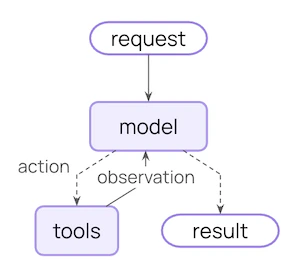
核心智能体循环包括调用模型、让模型选择要执行的工具,然后在不再调用工具时结束:
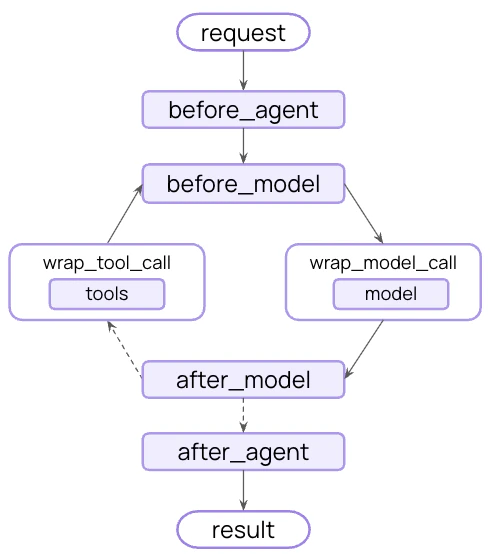
 中间件在这些步骤的前后暴露了钩子:
 ## 在 LangGraph 工作流中使用中间件
中间件不是一个独立的运行时:钩子运行在 [`create_agent`](https://reference.langchain.com/python/langchain/agents/factory/create_agent) 返回的已编译 [LangGraph](/oss/python/langgraph/overview) 内部。你可以将整个智能体(包括中间件)作为节点或子图放入更大的 [StateGraph](https://reference.langchain.com/python/langgraph/graph/state/StateGraph) 中,所有中间件钩子将继续运行。
当外围拓扑结构超出标准的"循环直到完成"模式时,可以使用这种模式:在路由到多个智能体之一之前对输入进行分类、并行分发工作,或者将智能体调用与确定性步骤串联起来。
`HumanInTheLoopMiddleware` 根据每个工具的 `.name` 进行匹配。在 Python 中,`@tool` 装饰的函数从函数名获取名称(因此下面的键是 `"send_email"`);在 TypeScript 中,键匹配你传递给 `tool({...}, { name })` 的 `name`。
```python theme={"theme":{"light":"catppuccin-latte","dark":"catppuccin-mocha"}}
from langchain.agents import AgentState, create_agent
from langchain.agents.middleware import HumanInTheLoopMiddleware
from langgraph.graph import START, StateGraph
# 假设 read_email、send_email、classify_node 和 route 已在其他地方定义。
email_agent = create_agent(
model="claude-sonnet-4-6",
tools=[read_email, send_email],
middleware=[HumanInTheLoopMiddleware(interrupt_on={"send_email": True})],
)
graph = (
StateGraph(AgentState)
.add_node("classify", classify_node)
.add_node("email_agent", email_agent)
.add_edge(START, "classify")
.add_conditional_edges("classify", route)
.compile()
)
```
人机协作中断、摘要、PII 脱敏、重试以及任何自定义钩子都会随智能体节点一起传递。有关完整的组合模式(包括子图检查点作用域——按调用还是按线程),请参阅[使用子图](/oss/python/langgraph/use-subgraphs)。
## 更多资源
探索常见用例的内置中间件。
使用钩子和装饰器构建你自己的中间件。
中间件的完整 API 参考。
Anthropic、AWS、OpenAI 等提供商特定的中间件。
使用 LangSmith 测试你的智能体。
***
## 在 LangGraph 工作流中使用中间件
中间件不是一个独立的运行时:钩子运行在 [`create_agent`](https://reference.langchain.com/python/langchain/agents/factory/create_agent) 返回的已编译 [LangGraph](/oss/python/langgraph/overview) 内部。你可以将整个智能体(包括中间件)作为节点或子图放入更大的 [StateGraph](https://reference.langchain.com/python/langgraph/graph/state/StateGraph) 中,所有中间件钩子将继续运行。
当外围拓扑结构超出标准的"循环直到完成"模式时,可以使用这种模式:在路由到多个智能体之一之前对输入进行分类、并行分发工作,或者将智能体调用与确定性步骤串联起来。
`HumanInTheLoopMiddleware` 根据每个工具的 `.name` 进行匹配。在 Python 中,`@tool` 装饰的函数从函数名获取名称(因此下面的键是 `"send_email"`);在 TypeScript 中,键匹配你传递给 `tool({...}, { name })` 的 `name`。
```python theme={"theme":{"light":"catppuccin-latte","dark":"catppuccin-mocha"}}
from langchain.agents import AgentState, create_agent
from langchain.agents.middleware import HumanInTheLoopMiddleware
from langgraph.graph import START, StateGraph
# 假设 read_email、send_email、classify_node 和 route 已在其他地方定义。
email_agent = create_agent(
model="claude-sonnet-4-6",
tools=[read_email, send_email],
middleware=[HumanInTheLoopMiddleware(interrupt_on={"send_email": True})],
)
graph = (
StateGraph(AgentState)
.add_node("classify", classify_node)
.add_node("email_agent", email_agent)
.add_edge(START, "classify")
.add_conditional_edges("classify", route)
.compile()
)
```
人机协作中断、摘要、PII 脱敏、重试以及任何自定义钩子都会随智能体节点一起传递。有关完整的组合模式(包括子图检查点作用域——按调用还是按线程),请参阅[使用子图](/oss/python/langgraph/use-subgraphs)。
## 更多资源
探索常见用例的内置中间件。
使用钩子和装饰器构建你自己的中间件。
中间件的完整 API 参考。
Anthropic、AWS、OpenAI 等提供商特定的中间件。
使用 LangSmith 测试你的智能体。
***
[将这些文档连接](/use-these-docs)到 Claude、VSCode 等工具,通过 MCP 获取实时答案。
[在 GitHub 上编辑此页面](https://github.com/langchain-ai/docs/edit/main/src/oss/langchain/middleware/overview.mdx)或[提交问题](https://github.com/langchain-ai/docs/issues/new/choose)。