> ## Documentation Index
> Fetch the complete documentation index at: https://nvd-54.mintlify.site/llms.txt
> Use this file to discover all available pages before exploring further.
# 智能体中的上下文工程
## 概述
构建智能体(或任何 LLM 应用)的难点在于使其足够可靠。虽然它们可能在原型阶段工作良好,但在实际使用场景中常常失败。
### 为什么智能体会失败?
当智能体失败时,通常是因为智能体内部的 LLM 调用执行了错误的操作/没有按预期执行。LLM 失败的原因有两个:
1. 底层 LLM 能力不足
2. 未向 LLM 传递"正确的"上下文
更多时候——实际上是第二个原因导致智能体不够可靠。
**上下文工程**是以正确的格式提供正确的信息和工具,使 LLM 能够完成任务。这是 AI 工程师的首要工作。缺乏"正确的"上下文是阻碍智能体更可靠的首要因素,而 LangChain 的智能体抽象是专门为促进上下文工程而设计的。
上下文工程新手?从[概念概述](/oss/python/concepts/context)开始,了解不同类型的上下文及其使用时机。
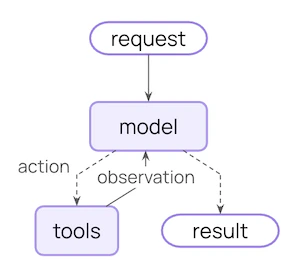
### 智能体循环
典型的智能体循环由两个主要步骤组成:
1. **模型调用** - 使用提示词和可用工具调用 LLM,返回响应或执行工具的请求
2. **工具执行** - 执行 LLM 请求的工具,返回工具结果
此循环持续进行,直到 LLM 决定结束。
### 你可以控制什么
要构建可靠的智能体,你需要控制智能体循环每一步发生的事情,以及步骤之间发生的事情。
| 上下文类型 | 你控制的内容 | 瞬时型还是持久型 |
| ----------------------- | ------------------------------ | -------- |
| **[模型上下文](#模型上下文)** | 进入模型调用的内容(指令、消息历史、工具、响应格式) | 瞬时型 |
| **[工具上下文](#工具上下文)** | 工具可以访问和产生的内容(对状态、存储、运行时上下文的读写) | 持久型 |
| **[生命周期上下文](#生命周期上下文)** | 模型调用和工具调用之间发生的事情(摘要、护栏、日志等) | 持久型 |
LLM 在单次调用中看到的内容。你可以修改消息、工具或提示词,而不改变状态中保存的内容。
跨轮次保存在状态中的内容。生命周期钩子和工具写入会永久修改这些内容。
### 数据源
在整个过程中,你的智能体访问(读取/写入)不同的数据源:
| 数据源 | 别名 | 范围 | 示例 |
| ---------- | ---- | ---- | -------------------------- |
| **运行时上下文** | 静态配置 | 会话范围 | 用户 ID、API 密钥、数据库连接、权限、环境设置 |
| **状态** | 短期记忆 | 会话范围 | 当前消息、上传的文件、认证状态、工具结果 |
| **存储** | 长期记忆 | 跨会话 | 用户偏好、提取的洞察、记忆、历史数据 |
### 工作原理
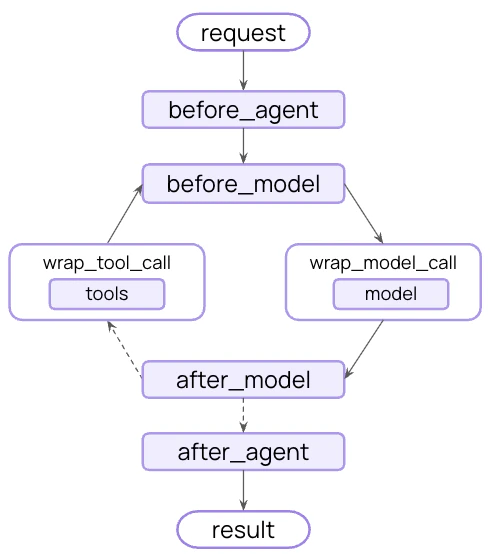
LangChain [中间件](/oss/python/langchain/middleware)是使上下文工程对使用 LangChain 的开发者变得实用的底层机制。
中间件允许你接入智能体生命周期的任何步骤并:
* 更新上下文
* 跳转到智能体生命周期的不同步骤
在本指南中,你将频繁看到中间件 API 作为实现上下文工程目标的手段。
## 模型上下文
控制每次模型调用的输入——指令、可用工具、使用哪个模型以及输出格式。这些决策直接影响可靠性和成本。
开发者给 LLM 的基础指令。
发送给 LLM 的完整消息列表(对话历史)。
智能体可用来执行操作的实用程序。
要调用的实际模型(包括配置)。
模型最终响应的模式规范。
所有这些类型的模型上下文都可以从**状态**(短期记忆)、**存储**(长期记忆)或**运行时上下文**(静态配置)中获取。
### 系统提示词
系统提示词设置 LLM 的行为和能力。不同的用户、上下文或对话阶段需要不同的指令。成功的智能体会利用记忆、偏好和配置来为当前对话状态提供正确的指令。
从状态访问消息数量或对话上下文:
```python theme={"theme":{"light":"catppuccin-latte","dark":"catppuccin-mocha"}}
from langchain.agents import create_agent
from langchain.agents.middleware import dynamic_prompt, ModelRequest
@dynamic_prompt
def state_aware_prompt(request: ModelRequest) -> str:
# request.messages 是 request.state["messages"] 的快捷方式
message_count = len(request.messages)
base = "You are a helpful assistant."
if message_count > 10:
base += "\nThis is a long conversation - be extra concise."
return base
agent = create_agent(
model="gpt-5.4",
tools=[...],
middleware=[state_aware_prompt]
)
```
从长期记忆访问用户偏好:
```python theme={"theme":{"light":"catppuccin-latte","dark":"catppuccin-mocha"}}
from dataclasses import dataclass
from langchain.agents import create_agent
from langchain.agents.middleware import dynamic_prompt, ModelRequest
from langgraph.store.memory import InMemoryStore
@dataclass
class Context:
user_id: str
@dynamic_prompt
def store_aware_prompt(request: ModelRequest) -> str:
user_id = request.runtime.context.user_id
# 从存储读取:获取用户偏好
store = request.runtime.store
user_prefs = store.get(("preferences",), user_id)
base = "You are a helpful assistant."
if user_prefs:
style = user_prefs.value.get("communication_style", "balanced")
base += f"\nUser prefers {style} responses."
return base
agent = create_agent(
model="gpt-5.4",
tools=[...],
middleware=[store_aware_prompt],
context_schema=Context,
store=InMemoryStore()
)
```
从运行时上下文访问用户 ID 或配置:
```python theme={"theme":{"light":"catppuccin-latte","dark":"catppuccin-mocha"}}
from dataclasses import dataclass
from langchain.agents import create_agent
from langchain.agents.middleware import dynamic_prompt, ModelRequest
@dataclass
class Context:
user_role: str
deployment_env: str
@dynamic_prompt
def context_aware_prompt(request: ModelRequest) -> str:
# 从运行时上下文读取:用户角色和环境
user_role = request.runtime.context.user_role
env = request.runtime.context.deployment_env
base = "You are a helpful assistant."
if user_role == "admin":
base += "\nYou have admin access. You can perform all operations."
elif user_role == "viewer":
base += "\nYou have read-only access. Guide users to read operations only."
if env == "production":
base += "\nBe extra careful with any data modifications."
return base
agent = create_agent(
model="gpt-5.4",
tools=[...],
middleware=[context_aware_prompt],
context_schema=Context
)
```
### 消息
消息构成了发送给 LLM 的提示词。
管理消息内容以确保 LLM 拥有正确的信息来做出良好的响应至关重要。
当与当前查询相关时,从状态注入上传的文件上下文:
```python theme={"theme":{"light":"catppuccin-latte","dark":"catppuccin-mocha"}}
from langchain.agents import create_agent
from langchain.agents.middleware import wrap_model_call, ModelRequest, ModelResponse
from typing import Callable
@wrap_model_call
def inject_file_context(
request: ModelRequest,
handler: Callable[[ModelRequest], ModelResponse]
) -> ModelResponse:
"""注入用户在此会话中上传的文件的上下文。"""
# 从状态读取:获取上传文件的元数据
uploaded_files = request.state.get("uploaded_files", []) # [!code highlight]
if uploaded_files:
# 构建关于可用文件的上下文
file_descriptions = []
for file in uploaded_files:
file_descriptions.append(
f"- {file['name']} ({file['type']}): {file['summary']}"
)
file_context = f"""Files you have access to in this conversation:
{chr(10).join(file_descriptions)}
Reference these files when answering questions."""
# 在最近的消息之前注入文件上下文
messages = [ # [!code highlight]
*request.messages,
{"role": "user", "content": file_context},
]
request = request.override(messages=messages) # [!code highlight]
return handler(request)
agent = create_agent(
model="gpt-5.4",
tools=[...],
middleware=[inject_file_context]
)
```
从存储注入用户的邮件写作风格以指导起草:
```python theme={"theme":{"light":"catppuccin-latte","dark":"catppuccin-mocha"}}
from dataclasses import dataclass
from langchain.agents import create_agent
from langchain.agents.middleware import wrap_model_call, ModelRequest, ModelResponse
from typing import Callable
from langgraph.store.memory import InMemoryStore
@dataclass
class Context:
user_id: str
@wrap_model_call
def inject_writing_style(
request: ModelRequest,
handler: Callable[[ModelRequest], ModelResponse]
) -> ModelResponse:
"""从存储注入用户的邮件写作风格。"""
user_id = request.runtime.context.user_id # [!code highlight]
# 从存储读取:获取用户的写作风格示例
store = request.runtime.store # [!code highlight]
writing_style = store.get(("writing_style",), user_id) # [!code highlight]
if writing_style:
style = writing_style.value
# 从存储的示例构建风格指南
style_context = f"""Your writing style:
- Tone: {style.get('tone', 'professional')}
- Typical greeting: "{style.get('greeting', 'Hi')}"
- Typical sign-off: "{style.get('sign_off', 'Best')}"
- Example email you've written:
{style.get('example_email', '')}"""
# 追加到末尾——模型更关注最后的消息
messages = [
*request.messages,
{"role": "user", "content": style_context}
]
request = request.override(messages=messages) # [!code highlight]
return handler(request)
agent = create_agent(
model="gpt-5.4",
tools=[...],
middleware=[inject_writing_style],
context_schema=Context,
store=InMemoryStore()
)
```
基于用户所在司法管辖区从运行时上下文注入合规规则:
```python theme={"theme":{"light":"catppuccin-latte","dark":"catppuccin-mocha"}}
from dataclasses import dataclass
from langchain.agents import create_agent
from langchain.agents.middleware import wrap_model_call, ModelRequest, ModelResponse
from typing import Callable
@dataclass
class Context:
user_jurisdiction: str
industry: str
compliance_frameworks: list[str]
@wrap_model_call
def inject_compliance_rules(
request: ModelRequest,
handler: Callable[[ModelRequest], ModelResponse]
) -> ModelResponse:
"""从运行时上下文注入合规约束。"""
# 从运行时上下文读取:获取合规要求
jurisdiction = request.runtime.context.user_jurisdiction # [!code highlight]
industry = request.runtime.context.industry # [!code highlight]
frameworks = request.runtime.context.compliance_frameworks # [!code highlight]
# 构建合规约束
rules = []
if "GDPR" in frameworks:
rules.append("- Must obtain explicit consent before processing personal data")
rules.append("- Users have right to data deletion")
if "HIPAA" in frameworks:
rules.append("- Cannot share patient health information without authorization")
rules.append("- Must use secure, encrypted communication")
if industry == "finance":
rules.append("- Cannot provide financial advice without proper disclaimers")
if rules:
compliance_context = f"""Compliance requirements for {jurisdiction}:
{chr(10).join(rules)}"""
# 追加到末尾——模型更关注最后的消息
messages = [
*request.messages,
{"role": "user", "content": compliance_context}
]
request = request.override(messages=messages) # [!code highlight]
return handler(request)
agent = create_agent(
model="gpt-5.4",
tools=[...],
middleware=[inject_compliance_rules],
context_schema=Context
)
```
**瞬时型与持久型消息更新:**
上面的示例使用 `wrap_model_call` 进行**瞬时**更新——修改发送给模型的单次调用的消息,而不改变状态中保存的内容。
对于修改状态的**持久**更新,你可以:
* 从 `wrap_model_call` 返回带有 [`Command`](https://reference.langchain.com/python/langgraph/types/Command) 的 [`ExtendedModelResponse`](https://reference.langchain.com/python/langchain/agents/middleware/types/ExtendedModelResponse) 来从模型调用层注入状态更新。
* 使用生命周期钩子如 `before_model`、`after_model` 或 `wrap_tool_call`(用于工具返回)来更新对话历史。详见[中间件文档](/oss/python/langchain/middleware)。
请参阅[状态更新](/oss/python/langchain/middleware/custom#state-updates)获取更多信息。
### 工具
工具让模型与数据库、API 和外部系统交互。你如何定义和选择工具直接影响模型是否能有效完成任务。
#### 定义工具
每个工具需要清晰的名称、描述、参数名称和参数描述。这些不仅仅是元数据——它们指导模型关于何时以及如何使用工具的推理。
```python theme={"theme":{"light":"catppuccin-latte","dark":"catppuccin-mocha"}}
from langchain.tools import tool
@tool(parse_docstring=True)
def search_orders(
user_id: str,
status: str,
limit: int = 10
) -> str:
"""按状态搜索用户订单。
当用户询问订单历史或想要检查订单状态时使用此工具。
始终按提供的状态进行过滤。
Args:
user_id: 用户的唯一标识符
status: 订单状态:'pending'、'shipped' 或 'delivered'
limit: 返回结果的最大数量
"""
# 此处为实现
pass
```
#### 选择工具
并非每个工具都适合每种情况。太多工具可能会压垮模型(上下文过载)并增加错误;太少则限制能力。动态工具选择根据认证状态、用户权限、功能标志或对话阶段来调整可用工具集。
仅在特定对话里程碑后启用高级工具:
```python theme={"theme":{"light":"catppuccin-latte","dark":"catppuccin-mocha"}}
from langchain.agents import create_agent
from langchain.agents.middleware import wrap_model_call, ModelRequest, ModelResponse
from typing import Callable
@wrap_model_call
def state_based_tools(
request: ModelRequest,
handler: Callable[[ModelRequest], ModelResponse]
) -> ModelResponse:
"""基于对话状态过滤工具。"""
# 从状态读取:检查用户是否已认证
state = request.state # [!code highlight]
is_authenticated = state.get("authenticated", False) # [!code highlight]
message_count = len(state["messages"])
# 仅在认证后启用敏感工具
if not is_authenticated:
tools = [t for t in request.tools if t.name.startswith("public_")]
request = request.override(tools=tools) # [!code highlight]
elif message_count < 5:
# 在对话早期限制工具
tools = [t for t in request.tools if t.name != "advanced_search"]
request = request.override(tools=tools) # [!code highlight]
return handler(request)
agent = create_agent(
model="gpt-5.4",
tools=[public_search, private_search, advanced_search],
middleware=[state_based_tools]
)
```
基于存储中的用户偏好或功能标志过滤工具:
```python theme={"theme":{"light":"catppuccin-latte","dark":"catppuccin-mocha"}}
from dataclasses import dataclass
from langchain.agents import create_agent
from langchain.agents.middleware import wrap_model_call, ModelRequest, ModelResponse
from typing import Callable
from langgraph.store.memory import InMemoryStore
@dataclass
class Context:
user_id: str
@wrap_model_call
def store_based_tools(
request: ModelRequest,
handler: Callable[[ModelRequest], ModelResponse]
) -> ModelResponse:
"""基于存储偏好过滤工具。"""
user_id = request.runtime.context.user_id
# 从存储读取:获取用户启用的功能
store = request.runtime.store
feature_flags = store.get(("features",), user_id)
if feature_flags:
enabled_features = feature_flags.value.get("enabled_tools", [])
# 仅包含为此用户启用的工具
tools = [t for t in request.tools if t.name in enabled_features]
request = request.override(tools=tools)
return handler(request)
agent = create_agent(
model="gpt-5.4",
tools=[search_tool, analysis_tool, export_tool],
middleware=[store_based_tools],
context_schema=Context,
store=InMemoryStore()
)
```
基于运行时上下文中的用户权限过滤工具:
```python theme={"theme":{"light":"catppuccin-latte","dark":"catppuccin-mocha"}}
from dataclasses import dataclass
from langchain.agents import create_agent
from langchain.agents.middleware import wrap_model_call, ModelRequest, ModelResponse
from typing import Callable
@dataclass
class Context:
user_role: str
@wrap_model_call
def context_based_tools(
request: ModelRequest,
handler: Callable[[ModelRequest], ModelResponse]
) -> ModelResponse:
"""基于运行时上下文权限过滤工具。"""
# 从运行时上下文读取:获取用户角色
user_role = request.runtime.context.user_role
if user_role == "admin":
# 管理员获得所有工具
pass
elif user_role == "editor":
# 编辑者不能删除
tools = [t for t in request.tools if t.name != "delete_data"]
request = request.override(tools=tools)
else:
# 查看者只获得只读工具
tools = [t for t in request.tools if t.name.startswith("read_")]
request = request.override(tools=tools)
return handler(request)
agent = create_agent(
model="gpt-5.4",
tools=[read_data, write_data, delete_data],
middleware=[context_based_tools],
context_schema=Context
)
```
请参阅[动态工具](/oss/python/langchain/agents#dynamic-tools)了解过滤预注册工具和在运行时注册工具(例如从 MCP 服务器)的方法。
### 模型
不同的模型有不同的优势、成本和上下文窗口。为当前任务选择合适的模型——这在智能体运行期间可能会变化。
基于状态中的对话长度使用不同模型:
```python theme={"theme":{"light":"catppuccin-latte","dark":"catppuccin-mocha"}}
from langchain.agents import create_agent
from langchain.agents.middleware import wrap_model_call, ModelRequest, ModelResponse
from langchain.chat_models import init_chat_model
from typing import Callable
# 在中间件外部一次性初始化模型
large_model = init_chat_model("claude-sonnet-4-6")
standard_model = init_chat_model("gpt-5.4")
efficient_model = init_chat_model("gpt-5.4-mini")
@wrap_model_call
def state_based_model(
request: ModelRequest,
handler: Callable[[ModelRequest], ModelResponse]
) -> ModelResponse:
"""基于状态中的对话长度选择模型。"""
# request.messages 是 request.state["messages"] 的快捷方式
message_count = len(request.messages) # [!code highlight]
if message_count > 20:
# 长对话——使用上下文窗口更大的模型
model = large_model
elif message_count > 10:
# 中等对话
model = standard_model
else:
# 短对话——使用高效模型
model = efficient_model
request = request.override(model=model) # [!code highlight]
return handler(request)
agent = create_agent(
model="gpt-5.4-mini",
tools=[...],
middleware=[state_based_model]
)
```
从存储使用用户偏好的模型:
```python theme={"theme":{"light":"catppuccin-latte","dark":"catppuccin-mocha"}}
from dataclasses import dataclass
from langchain.agents import create_agent
from langchain.agents.middleware import wrap_model_call, ModelRequest, ModelResponse
from langchain.chat_models import init_chat_model
from typing import Callable
from langgraph.store.memory import InMemoryStore
@dataclass
class Context:
user_id: str
# 一次性初始化可用模型
MODEL_MAP = {
"gpt-5.4": init_chat_model("gpt-5.4"),
"gpt-5.4-mini": init_chat_model("gpt-5.4-mini"),
"claude-sonnet": init_chat_model("claude-sonnet-4-6"),
}
@wrap_model_call
def store_based_model(
request: ModelRequest,
handler: Callable[[ModelRequest], ModelResponse]
) -> ModelResponse:
"""基于存储偏好选择模型。"""
user_id = request.runtime.context.user_id
# 从存储读取:获取用户偏好的模型
store = request.runtime.store
user_prefs = store.get(("preferences",), user_id)
if user_prefs:
preferred_model = user_prefs.value.get("preferred_model")
if preferred_model and preferred_model in MODEL_MAP:
request = request.override(model=MODEL_MAP[preferred_model])
return handler(request)
agent = create_agent(
model="gpt-5.4",
tools=[...],
middleware=[store_based_model],
context_schema=Context,
store=InMemoryStore()
)
```
基于运行时上下文中的成本限制或环境选择模型:
```python theme={"theme":{"light":"catppuccin-latte","dark":"catppuccin-mocha"}}
from dataclasses import dataclass
from langchain.agents import create_agent
from langchain.agents.middleware import wrap_model_call, ModelRequest, ModelResponse
from langchain.chat_models import init_chat_model
from typing import Callable
@dataclass
class Context:
cost_tier: str
environment: str
# 在中间件外部一次性初始化模型
premium_model = init_chat_model("claude-sonnet-4-6")
standard_model = init_chat_model("gpt-5.4")
budget_model = init_chat_model("gpt-5.4-mini")
@wrap_model_call
def context_based_model(
request: ModelRequest,
handler: Callable[[ModelRequest], ModelResponse]
) -> ModelResponse:
"""基于运行时上下文选择模型。"""
# 从运行时上下文读取:成本层级和环境
cost_tier = request.runtime.context.cost_tier
environment = request.runtime.context.environment
if environment == "production" and cost_tier == "premium":
# 生产环境高级用户获得最佳模型
model = premium_model
elif cost_tier == "budget":
# 经济层级获得高效模型
model = budget_model
else:
# 标准层级
model = standard_model
request = request.override(model=model)
return handler(request)
agent = create_agent(
model="gpt-5.4",
tools=[...],
middleware=[context_based_model],
context_schema=Context
)
```
请参阅[动态模型](/oss/python/langchain/agents#dynamic-model)获取更多示例。
### 响应格式
结构化输出将非结构化文本转换为经过验证的结构化数据。当提取特定字段或为下游系统返回数据时,自由格式文本是不够的。
\*\*工作原理:\*\*当你提供模式作为响应格式时,模型的最终响应保证符合该模式。智能体运行模型/工具调用循环直到模型完成工具调用,然后最终响应被强制转换为提供的格式。
#### 定义格式
模式定义指导模型。字段名、类型和描述精确指定输出应遵循的格式。
```python theme={"theme":{"light":"catppuccin-latte","dark":"catppuccin-mocha"}}
from pydantic import BaseModel, Field
class CustomerSupportTicket(BaseModel):
"""从客户消息中提取的结构化工单信息。"""
category: str = Field(
description="问题类别:'billing'、'technical'、'account' 或 'product'"
)
priority: str = Field(
description="紧急程度:'low'、'medium'、'high' 或 'critical'"
)
summary: str = Field(
description="客户问题的一句话摘要"
)
customer_sentiment: str = Field(
description="客户的情绪基调:'frustrated'、'neutral' 或 'satisfied'"
)
```
#### 选择格式
动态响应格式选择根据用户偏好、对话阶段或角色调整模式——在早期返回简单格式,随着复杂度增加返回详细格式。
基于对话状态配置结构化输出:
```python theme={"theme":{"light":"catppuccin-latte","dark":"catppuccin-mocha"}}
from langchain.agents import create_agent
from langchain.agents.middleware import wrap_model_call, ModelRequest, ModelResponse
from pydantic import BaseModel, Field
from typing import Callable
class SimpleResponse(BaseModel):
"""对话早期的简单响应。"""
answer: str = Field(description="简短回答")
class DetailedResponse(BaseModel):
"""对话建立后的详细响应。"""
answer: str = Field(description="详细回答")
reasoning: str = Field(description="推理解释")
confidence: float = Field(description="置信度分数 0-1")
@wrap_model_call
def state_based_output(
request: ModelRequest,
handler: Callable[[ModelRequest], ModelResponse]
) -> ModelResponse:
"""基于状态选择输出格式。"""
# request.messages 是 request.state["messages"] 的快捷方式
message_count = len(request.messages) # [!code highlight]
if message_count < 3:
# 对话早期——使用简单格式
request = request.override(response_format=SimpleResponse) # [!code highlight]
else:
# 对话建立后——使用详细格式
request = request.override(response_format=DetailedResponse) # [!code highlight]
return handler(request)
agent = create_agent(
model="gpt-5.4",
tools=[...],
middleware=[state_based_output]
)
```
基于存储中的用户偏好配置输出格式:
```python theme={"theme":{"light":"catppuccin-latte","dark":"catppuccin-mocha"}}
from dataclasses import dataclass
from langchain.agents import create_agent
from langchain.agents.middleware import wrap_model_call, ModelRequest, ModelResponse
from pydantic import BaseModel, Field
from typing import Callable
from langgraph.store.memory import InMemoryStore
@dataclass
class Context:
user_id: str
class VerboseResponse(BaseModel):
"""带详情的详细响应。"""
answer: str = Field(description="详细回答")
sources: list[str] = Field(description="使用的来源")
class ConciseResponse(BaseModel):
"""简洁响应。"""
answer: str = Field(description="简短回答")
@wrap_model_call
def store_based_output(
request: ModelRequest,
handler: Callable[[ModelRequest], ModelResponse]
) -> ModelResponse:
"""基于存储偏好选择输出格式。"""
user_id = request.runtime.context.user_id
# 从存储读取:获取用户偏好的响应风格
store = request.runtime.store
user_prefs = store.get(("preferences",), user_id)
if user_prefs:
style = user_prefs.value.get("response_style", "concise")
if style == "verbose":
request = request.override(response_format=VerboseResponse)
else:
request = request.override(response_format=ConciseResponse)
return handler(request)
agent = create_agent(
model="gpt-5.4",
tools=[...],
middleware=[store_based_output],
context_schema=Context,
store=InMemoryStore()
)
```
基于运行时上下文(如用户角色或环境)配置输出格式:
```python theme={"theme":{"light":"catppuccin-latte","dark":"catppuccin-mocha"}}
from dataclasses import dataclass
from langchain.agents import create_agent
from langchain.agents.middleware import wrap_model_call, ModelRequest, ModelResponse
from pydantic import BaseModel, Field
from typing import Callable
@dataclass
class Context:
user_role: str
environment: str
class AdminResponse(BaseModel):
"""带有技术细节的管理员响应。"""
answer: str = Field(description="回答")
debug_info: dict = Field(description="调试信息")
system_status: str = Field(description="系统状态")
class UserResponse(BaseModel):
"""普通用户的简单响应。"""
answer: str = Field(description="回答")
@wrap_model_call
def context_based_output(
request: ModelRequest,
handler: Callable[[ModelRequest], ModelResponse]
) -> ModelResponse:
"""基于运行时上下文选择输出格式。"""
# 从运行时上下文读取:用户角色和环境
user_role = request.runtime.context.user_role
environment = request.runtime.context.environment
if user_role == "admin" and environment == "production":
# 生产环境的管理员获得详细输出
request = request.override(response_format=AdminResponse)
else:
# 普通用户获得简单输出
request = request.override(response_format=UserResponse)
return handler(request)
agent = create_agent(
model="gpt-5.4",
tools=[...],
middleware=[context_based_output],
context_schema=Context
)
```
## 工具上下文
工具的特殊之处在于它们既读取又写入上下文。
在最基本的情况下,当工具执行时,它接收 LLM 的请求参数并返回一条工具消息。工具完成其工作并产生结果。
工具还可以为模型获取重要信息,使模型能够执行和完成任务。
### 读取
大多数实际工具需要的不仅仅是 LLM 的参数。它们需要用于数据库查询的用户 ID、用于外部服务的 API 密钥或当前会话状态来做出决策。工具从状态、存储和运行时上下文读取以访问这些信息。
从状态读取以检查当前会话信息:
```python theme={"theme":{"light":"catppuccin-latte","dark":"catppuccin-mocha"}}
from langchain.tools import tool, ToolRuntime
from langchain.agents import create_agent
@tool
def check_authentication(
runtime: ToolRuntime
) -> str:
"""检查用户是否已认证。"""
# 从状态读取:检查当前认证状态
current_state = runtime.state
is_authenticated = current_state.get("authenticated", False)
if is_authenticated:
return "User is authenticated"
else:
return "User is not authenticated"
agent = create_agent(
model="gpt-5.4",
tools=[check_authentication]
)
```
从存储读取以访问持久化的用户偏好:
```python theme={"theme":{"light":"catppuccin-latte","dark":"catppuccin-mocha"}}
from dataclasses import dataclass
from langchain.tools import tool, ToolRuntime
from langchain.agents import create_agent
from langgraph.store.memory import InMemoryStore
@dataclass
class Context:
user_id: str
@tool
def get_preference(
preference_key: str,
runtime: ToolRuntime[Context]
) -> str:
"""从存储获取用户偏好。"""
user_id = runtime.context.user_id
# 从存储读取:获取现有偏好
store = runtime.store
existing_prefs = store.get(("preferences",), user_id)
if existing_prefs:
value = existing_prefs.value.get(preference_key)
return f"{preference_key}: {value}" if value else f"No preference set for {preference_key}"
else:
return "No preferences found"
agent = create_agent(
model="gpt-5.4",
tools=[get_preference],
context_schema=Context,
store=InMemoryStore()
)
```
从运行时上下文读取配置(如 API 密钥和用户 ID):
```python theme={"theme":{"light":"catppuccin-latte","dark":"catppuccin-mocha"}}
from dataclasses import dataclass
from langchain.tools import tool, ToolRuntime
from langchain.agents import create_agent
@dataclass
class Context:
user_id: str
api_key: str
db_connection: str
@tool
def fetch_user_data(
query: str,
runtime: ToolRuntime[Context]
) -> str:
"""使用运行时上下文配置获取数据。"""
# 从运行时上下文读取:获取 API 密钥和数据库连接
user_id = runtime.context.user_id
api_key = runtime.context.api_key
db_connection = runtime.context.db_connection
# 使用配置获取数据
results = perform_database_query(db_connection, query, api_key)
return f"Found {len(results)} results for user {user_id}"
agent = create_agent(
model="gpt-5.4",
tools=[fetch_user_data],
context_schema=Context
)
# 使用运行时上下文调用
result = agent.invoke(
{"messages": [{"role": "user", "content": "Get my data"}]},
context=Context(
user_id="user_123",
api_key="sk-...",
db_connection="postgresql://..."
)
)
```
### 写入
工具结果可用于帮助智能体完成给定任务。工具既可以直接向模型返回结果,也可以更新智能体的记忆,使重要上下文在未来的步骤中可用。
使用 Command 写入状态以跟踪会话特定信息:
```python theme={"theme":{"light":"catppuccin-latte","dark":"catppuccin-mocha"}}
from langchain.tools import tool, ToolRuntime
from langchain.agents import create_agent
from langgraph.types import Command
@tool
def authenticate_user(
password: str,
runtime: ToolRuntime
) -> Command:
"""认证用户并更新状态。"""
# 执行认证(简化版)
if password == "correct":
# 写入状态:使用 Command 标记为已认证
return Command(
update={"authenticated": True},
)
else:
return Command(update={"authenticated": False})
agent = create_agent(
model="gpt-5.4",
tools=[authenticate_user]
)
```
写入存储以跨会话持久化数据:
```python theme={"theme":{"light":"catppuccin-latte","dark":"catppuccin-mocha"}}
from dataclasses import dataclass
from langchain.tools import tool, ToolRuntime
from langchain.agents import create_agent
from langgraph.store.memory import InMemoryStore
@dataclass
class Context:
user_id: str
@tool
def save_preference(
preference_key: str,
preference_value: str,
runtime: ToolRuntime[Context]
) -> str:
"""将用户偏好保存到存储。"""
user_id = runtime.context.user_id
# 读取现有偏好
store = runtime.store
existing_prefs = store.get(("preferences",), user_id)
# 与新偏好合并
prefs = existing_prefs.value if existing_prefs else {}
prefs[preference_key] = preference_value
# 写入存储:保存更新的偏好
store.put(("preferences",), user_id, prefs)
return f"Saved preference: {preference_key} = {preference_value}"
agent = create_agent(
model="gpt-5.4",
tools=[save_preference],
context_schema=Context,
store=InMemoryStore()
)
```
请参阅[工具](/oss/python/langchain/tools)获取在工具中访问状态、存储和运行时上下文的完整示例。
## 生命周期上下文
控制核心智能体步骤**之间**发生的事情——拦截数据流以实现横切关注点,如摘要、护栏和日志记录。
正如你在[模型上下文](#模型上下文)和[工具上下文](#工具上下文)中所看到的,[中间件](/oss/python/langchain/middleware)是使上下文工程变得实用的机制。中间件允许你接入智能体生命周期的任何步骤并:
1. **更新上下文** - 修改状态和存储以持久化变更、更新对话历史或保存洞察
2. **在生命周期中跳转** - 基于上下文移动到智能体循环的不同步骤(例如,如果条件满足则跳过工具执行,使用修改后的上下文重复模型调用)
### 示例:摘要
最常见的生命周期模式之一是在对话历史过长时自动压缩。与[模型上下文](#消息)中展示的瞬时消息修剪不同,摘要**持久更新状态**——永久地用摘要替换旧消息,保存供所有未来轮次使用。
LangChain 提供了内置的中间件:
```python theme={"theme":{"light":"catppuccin-latte","dark":"catppuccin-mocha"}}
from langchain.agents import create_agent
from langchain.agents.middleware import SummarizationMiddleware
agent = create_agent(
model="gpt-5.4",
tools=[...],
middleware=[
SummarizationMiddleware(
model="gpt-5.4-mini",
trigger={"tokens": 4000},
keep={"messages": 20},
),
],
)
```
当对话超过 Token 限制时,`SummarizationMiddleware` 自动:
1. 使用单独的 LLM 调用摘要较旧的消息
2. 在状态中用摘要消息替换它们(永久性)
3. 保持最近的消息完整以提供上下文
摘要后的对话历史被永久更新——未来的轮次将看到摘要而不是原始消息。
有关内置中间件的完整列表、可用钩子以及如何创建自定义中间件,请参阅[中间件文档](/oss/python/langchain/middleware)。
## 最佳实践
1. **从简单开始** - 先使用静态提示词和工具,仅在需要时添加动态功能
2. **增量测试** - 每次添加一个上下文工程功能
3. **监控性能** - 跟踪模型调用、Token 使用量和延迟
4. **使用内置中间件** - 利用 [`SummarizationMiddleware`](/oss/python/langchain/middleware#summarization)、[`LLMToolSelectorMiddleware`](/oss/python/langchain/middleware#llm-tool-selector) 等
5. **记录你的上下文策略** - 明确说明正在传递什么上下文以及为什么
6. **理解瞬时型与持久型的区别**:模型上下文更改是瞬时的(每次调用),而生命周期上下文更改持久化到状态
## 相关资源
* [上下文概念概述](/oss/python/concepts/context) - 了解上下文类型及其使用时机
* [中间件](/oss/python/langchain/middleware) - 完整的中间件指南
* [工具](/oss/python/langchain/tools) - 工具创建和上下文访问
* [记忆](/oss/python/concepts/memory) - 短期和长期记忆模式
* [智能体](/oss/python/langchain/agents) - 核心智能体概念
***
[将这些文档连接](/use-these-docs)到 Claude、VSCode 等工具,通过 MCP 获取实时回答。
[在 GitHub 上编辑此页面](https://github.com/langchain-ai/docs/edit/main/src/oss/langchain/context-engineering.mdx)或[提交问题](https://github.com/langchain-ai/docs/issues/new/choose)。