> ## Documentation Index
> Fetch the complete documentation index at: https://nvd-54.mintlify.site/llms.txt
> Use this file to discover all available pages before exploring further.

# 构建自定义 SQL 智能体

在本教程中，我们将使用 LangGraph 构建一个可以回答 SQL 数据库相关问题的自定义智能体。

LangChain 提供了内置的[智能体](/oss/javascript/langchain/agents)实现，使用 [LangGraph](/oss/javascript/langgraph/overview) 原语实现。如果需要更深度的自定义，可以直接在 LangGraph 中实现智能体。本指南演示了一个 SQL 智能体的示例实现。有关实用介绍，请参阅[使用更高层级的 LangChain 抽象构建 SQL 智能体](/oss/javascript/langchain/sql-agent)。

<Warning>
  构建 SQL 数据库的问答系统需要执行模型生成的 SQL 查询。这样做存在固有风险。请确保您的数据库连接权限始终尽可能窄地限定在智能体需要的范围内。这将减轻但不能完全消除构建模型驱动系统的风险。
</Warning>

[预构建智能体](/oss/javascript/langchain/sql-agent)让我们能够快速上手，但我们依赖系统提示来约束其行为——例如，我们指示智能体始终从"列出表"工具开始，并始终在执行查询之前运行查询检查工具。

我们可以在 LangGraph 中通过自定义智能体来实施更高程度的控制。在这里，我们实现一个简单的 ReAct 智能体设置，为特定的工具调用设置专用节点。我们将使用与预构建智能体相同的\[状态]。

### 概念

我们将涵盖以下概念：

* 用于读取 SQL 数据库的[工具](/oss/javascript/langchain/tools)
* LangGraph [图 API](/oss/javascript/langgraph/graph-api)，包括状态、节点、边和条件边
* [人机协作](/oss/javascript/langgraph/interrupts)流程

## 设置

### 安装

<CodeGroup>
  ```bash npm theme={"theme":{"light":"catppuccin-latte","dark":"catppuccin-mocha"}}
  npm i langchain @langchain/core @langchain/classic @langchain/langgraph @langchain/openai typeorm sqlite3 zod
  ```

  ```bash yarn theme={"theme":{"light":"catppuccin-latte","dark":"catppuccin-mocha"}}
  yarn add langchain @langchain/core @langchain/classic @langchain/langgraph @langchain/openai typeorm sqlite3 zod
  ```

  ```bash pnpm theme={"theme":{"light":"catppuccin-latte","dark":"catppuccin-mocha"}}
  pnpm add langchain @langchain/core @langchain/classic @langchain/langgraph @langchain/openai typeorm sqlite3 zod
  ```
</CodeGroup>

### LangSmith

设置 [LangSmith](https://smith.langchain.com?utm_source=docs\&utm_medium=cta\&utm_campaign=langsmith-signup\&utm_content=oss-langgraph-sql-agent) 以检查您的链或智能体内部发生了什么。然后设置以下环境变量：

```shell theme={"theme":{"light":"catppuccin-latte","dark":"catppuccin-mocha"}}
export LANGSMITH_TRACING="true"
export LANGSMITH_API_KEY="..."
```

## 1. 选择大语言模型(LLM)

选择一个支持[工具调用](/oss/javascript/integrations/providers/overview)的模型：

<Tabs>
  <Tab title="OpenAI">
    👉 Read the [OpenAI chat model integration docs](/oss/javascript/integrations/chat/openai/)

    <CodeGroup>
      ```bash npm theme={"theme":{"light":"catppuccin-latte","dark":"catppuccin-mocha"}}
      npm install @langchain/openai
      ```

      ```bash pnpm theme={"theme":{"light":"catppuccin-latte","dark":"catppuccin-mocha"}}
      pnpm install @langchain/openai
      ```

      ```bash yarn theme={"theme":{"light":"catppuccin-latte","dark":"catppuccin-mocha"}}
      yarn add @langchain/openai
      ```

      ```bash bun theme={"theme":{"light":"catppuccin-latte","dark":"catppuccin-mocha"}}
      bun add @langchain/openai
      ```
    </CodeGroup>

    <CodeGroup>
      ```typescript initChatModel theme={"theme":{"light":"catppuccin-latte","dark":"catppuccin-mocha"}}
      import { initChatModel } from "langchain";

      process.env.OPENAI_API_KEY = "your-api-key";

      const model = await initChatModel("gpt-5.4");
      ```

      ```typescript Model Class theme={"theme":{"light":"catppuccin-latte","dark":"catppuccin-mocha"}}
      import { ChatOpenAI } from "@langchain/openai";

      const model = new ChatOpenAI({
        model: "gpt-5.4",
        apiKey: "your-api-key"
      });
      ```
    </CodeGroup>
  </Tab>

  <Tab title="Anthropic">
    👉 Read the [Anthropic chat model integration docs](/oss/javascript/integrations/chat/anthropic/)

    <CodeGroup>
      ```bash npm theme={"theme":{"light":"catppuccin-latte","dark":"catppuccin-mocha"}}
      npm install @langchain/anthropic
      ```

      ```bash pnpm theme={"theme":{"light":"catppuccin-latte","dark":"catppuccin-mocha"}}
      pnpm install @langchain/anthropic
      ```

      ```bash yarn theme={"theme":{"light":"catppuccin-latte","dark":"catppuccin-mocha"}}
      yarn add @langchain/anthropic
      ```

      ```bash pnpm theme={"theme":{"light":"catppuccin-latte","dark":"catppuccin-mocha"}}
      pnpm add @langchain/anthropic
      ```
    </CodeGroup>

    <CodeGroup>
      ```typescript initChatModel theme={"theme":{"light":"catppuccin-latte","dark":"catppuccin-mocha"}}
      import { initChatModel } from "langchain";

      process.env.ANTHROPIC_API_KEY = "your-api-key";

      const model = await initChatModel("claude-sonnet-4-6");
      ```

      ```typescript Model Class theme={"theme":{"light":"catppuccin-latte","dark":"catppuccin-mocha"}}
      import { ChatAnthropic } from "@langchain/anthropic";

      const model = new ChatAnthropic({
        model: "claude-sonnet-4-6",
        apiKey: "your-api-key"
      });
      ```
    </CodeGroup>
  </Tab>

  <Tab title="Azure">
    👉 Read the [Azure chat model integration docs](/oss/javascript/integrations/chat/azure/)

    <CodeGroup>
      ```bash npm theme={"theme":{"light":"catppuccin-latte","dark":"catppuccin-mocha"}}
      npm install @langchain/azure
      ```

      ```bash pnpm theme={"theme":{"light":"catppuccin-latte","dark":"catppuccin-mocha"}}
      pnpm install @langchain/azure
      ```

      ```bash yarn theme={"theme":{"light":"catppuccin-latte","dark":"catppuccin-mocha"}}
      yarn add @langchain/azure
      ```

      ```bash bun theme={"theme":{"light":"catppuccin-latte","dark":"catppuccin-mocha"}}
      bun add @langchain/azure
      ```
    </CodeGroup>

    <CodeGroup>
      ```typescript initChatModel theme={"theme":{"light":"catppuccin-latte","dark":"catppuccin-mocha"}}
      import { initChatModel } from "langchain";

      process.env.AZURE_OPENAI_API_KEY = "your-api-key";
      process.env.AZURE_OPENAI_ENDPOINT = "your-endpoint";
      process.env.OPENAI_API_VERSION = "your-api-version";

      const model = await initChatModel("azure_openai:gpt-5.4");
      ```

      ```typescript Model Class theme={"theme":{"light":"catppuccin-latte","dark":"catppuccin-mocha"}}
      import { AzureChatOpenAI } from "@langchain/openai";

      const model = new AzureChatOpenAI({
        model: "gpt-5.4",
        azureOpenAIApiKey: "your-api-key",
        azureOpenAIApiEndpoint: "your-endpoint",
        azureOpenAIApiVersion: "your-api-version"
      });
      ```
    </CodeGroup>
  </Tab>

  <Tab title="Google Gemini">
    👉 Read the [Google GenAI chat model integration docs](/oss/javascript/integrations/chat/google_generative_ai/)

    <CodeGroup>
      ```bash npm theme={"theme":{"light":"catppuccin-latte","dark":"catppuccin-mocha"}}
      npm install @langchain/google-genai
      ```

      ```bash pnpm theme={"theme":{"light":"catppuccin-latte","dark":"catppuccin-mocha"}}
      pnpm install @langchain/google-genai
      ```

      ```bash yarn theme={"theme":{"light":"catppuccin-latte","dark":"catppuccin-mocha"}}
      yarn add @langchain/google-genai
      ```

      ```bash bun theme={"theme":{"light":"catppuccin-latte","dark":"catppuccin-mocha"}}
      bun add @langchain/google-genai
      ```
    </CodeGroup>

    <CodeGroup>
      ```typescript initChatModel theme={"theme":{"light":"catppuccin-latte","dark":"catppuccin-mocha"}}
      import { initChatModel } from "langchain";

      process.env.GOOGLE_API_KEY = "your-api-key";

      const model = await initChatModel("google-genai:gemini-2.5-flash-lite");
      ```

      ```typescript Model Class theme={"theme":{"light":"catppuccin-latte","dark":"catppuccin-mocha"}}
      import { ChatGoogleGenerativeAI } from "@langchain/google-genai";

      const model = new ChatGoogleGenerativeAI({
        model: "gemini-2.5-flash-lite",
        apiKey: "your-api-key"
      });
      ```
    </CodeGroup>
  </Tab>

  <Tab title="Bedrock Converse">
    👉 Read the [AWS Bedrock chat model integration docs](/oss/javascript/integrations/chat/bedrock_converse/)

    <CodeGroup>
      ```bash npm theme={"theme":{"light":"catppuccin-latte","dark":"catppuccin-mocha"}}
      npm install @langchain/aws
      ```

      ```bash pnpm theme={"theme":{"light":"catppuccin-latte","dark":"catppuccin-mocha"}}
      pnpm install @langchain/aws
      ```

      ```bash yarn theme={"theme":{"light":"catppuccin-latte","dark":"catppuccin-mocha"}}
      yarn add @langchain/aws
      ```

      ```bash bun theme={"theme":{"light":"catppuccin-latte","dark":"catppuccin-mocha"}}
      bun add @langchain/aws
      ```
    </CodeGroup>

    <CodeGroup>
      ```typescript initChatModel theme={"theme":{"light":"catppuccin-latte","dark":"catppuccin-mocha"}}
      import { initChatModel } from "langchain";

      // Follow the steps here to configure your credentials:
      // https://docs.aws.amazon.com/bedrock/latest/userguide/getting-started.html

      const model = await initChatModel("bedrock:gpt-5.4");
      ```

      ```typescript Model Class theme={"theme":{"light":"catppuccin-latte","dark":"catppuccin-mocha"}}
      import { ChatBedrockConverse } from "@langchain/aws";

      // Follow the steps here to configure your credentials:
      // https://docs.aws.amazon.com/bedrock/latest/userguide/getting-started.html

      const model = new ChatBedrockConverse({
        model: "gpt-5.4",
        region: "us-east-2"
      });
      ```
    </CodeGroup>
  </Tab>
</Tabs>

以下示例中显示的输出使用了 OpenAI。

## 2. 配置数据库

您将为本教程创建一个 [SQLite 数据库](https://www.sqlitetutorial.net/sqlite-sample-database/)。SQLite 是一个轻量级数据库，易于设置和使用。我们将加载 `chinook` 数据库，这是一个代表数字媒体商店的示例数据库。

为方便起见，我们已将数据库（`Chinook.db`）托管在公共 GCS 存储桶中。

```typescript theme={"theme":{"light":"catppuccin-latte","dark":"catppuccin-mocha"}}
import fs from "node:fs/promises";
import path from "node:path";

const url = "https://storage.googleapis.com/benchmarks-artifacts/chinook/Chinook.db";
const localPath = path.resolve("Chinook.db");

async function resolveDbPath() {
  const exists = await fs.access(localPath).then(() => true).catch(() => false);
  if (exists) {
    console.log(`${localPath} already exists, skipping download.`);
    return localPath;
  }
  const resp = await fetch(url);
  if (!resp.ok) throw new Error(`Failed to download DB. Status code: ${resp.status}`);
  const buf = Buffer.from(await resp.arrayBuffer());
  await fs.writeFile(localPath, buf);
  console.log(`File downloaded and saved as ${localPath}`);
  return localPath;
}
```

我们将使用 `@langchain/classic/sql_db` 模块中的便捷 SQL 数据库包装器来与数据库交互。该包装器提供了执行 SQL 查询和获取结果的简单接口：

```typescript theme={"theme":{"light":"catppuccin-latte","dark":"catppuccin-mocha"}}
import { SqlDatabase } from "@langchain/classic/sql_db";
import { DataSource } from "typeorm";

const dbPath = await resolveDbPath();
const datasource = new DataSource({ type: "sqlite", database: dbPath });
const db = await SqlDatabase.fromDataSourceParams({ appDataSource: datasource });
const dialect = db.appDataSourceOptions.type;

console.log(`Dialect: ${dialect}`);
const tableNames = db.allTables.map(t => t.tableName);
console.log(`Available tables: ${tableNames.join(", ")}`);
const sampleResults = await db.run("SELECT * FROM Artist LIMIT 5;");
console.log(`Sample output: ${sampleResults}`);
```

```
Dialect: sqlite
Available tables: Album, Artist, Customer, Employee, Genre, Invoice, InvoiceLine, MediaType, Playlist, PlaylistTrack, Track
Sample output: [{"ArtistId":1,"Name":"AC/DC"},{"ArtistId":2,"Name":"Accept"},{"ArtistId":3,"Name":"Aerosmith"},{"ArtistId":4,"Name":"Alanis Morissette"},{"ArtistId":5,"Name":"Alice In Chains"}]
```

## 3. 添加数据库交互工具

我们将创建自定义工具来与数据库交互：

```typescript theme={"theme":{"light":"catppuccin-latte","dark":"catppuccin-mocha"}}
import { tool } from "langchain";
import * as z from "zod";

// 列出所有表的工具
const listTablesTool = tool(
  async () => {
    const tableNames = db.allTables.map(t => t.tableName);
    return tableNames.join(", ");
  },
  {
    name: "sql_db_list_tables",
    description: "Input is an empty string, output is a comma-separated list of tables in the database.",
    schema: z.object({}),
  }
);

// 获取指定表的 schema 的工具
const getSchemaTool = tool(
  async ({ table_names }) => {
    const tables = table_names.split(",").map(t => t.trim());
    return await db.getTableInfo(tables);
  },
  {
    name: "sql_db_schema",
    description: "Input to this tool is a comma-separated list of tables, output is the schema and sample rows for those tables. Be sure that the tables actually exist by calling sql_db_list_tables first! Example Input: table1, table2, table3",
    schema: z.object({
      table_names: z.string().describe("Comma-separated list of table names"),
    }),
  }
);

// 执行 SQL 查询的工具
const queryTool = tool(
  async ({ query }) => {
    try {
      const result = await db.run(query);
      return typeof result === "string" ? result : JSON.stringify(result);
    } catch (error) {
      return `Error: ${error.message}`;
    }
  },
  {
    name: "sql_db_query",
    description: "Input to this tool is a detailed and correct SQL query, output is a result from the database. If the query is not correct, an error message will be returned. If an error is returned, rewrite the query, check the query, and try again.",
    schema: z.object({
      query: z.string().describe("SQL query to execute"),
    }),
  }
);

const tools = [listTablesTool, getSchemaTool, queryTool];

for (const tool of tools) {
  console.log(`${tool.name}: ${tool.description}\n`);
}
```

```
sql_db_list_tables: Input is an empty string, output is a comma-separated list of tables in the database.

sql_db_schema: Input to this tool is a comma-separated list of tables, output is the schema and sample rows for those tables. Be sure that the tables actually exist by calling sql_db_list_tables first! Example Input: table1, table2, table3

sql_db_query: Input to this tool is a detailed and correct SQL query, output is a result from the database. If the query is not correct, an error message will be returned. If an error is returned, rewrite the query, check the query, and try again.
```

## 4. 定义应用步骤

我们为以下步骤构建专用节点：

* 列出数据库表
* 调用"获取 schema"工具
* 生成查询
* 检查查询

将这些步骤放在专用节点中让我们能够 (1) 在需要时强制执行工具调用，以及 (2) 自定义与每个步骤关联的提示。

```typescript theme={"theme":{"light":"catppuccin-latte","dark":"catppuccin-mocha"}}
import { AIMessage, ToolMessage, SystemMessage, HumanMessage } from "@langchain/core/messages";
import { ToolNode } from "@langchain/langgraph/prebuilt";
import { StateSchema, MessagesValue, GraphNode, StateGraph, START, END } from "@langchain/langgraph";
import { z } from "zod/v4";

// 为 schema 和查询执行创建工具节点
const getSchemaNode = new ToolNode([getSchemaTool]);
const runQueryNode = new ToolNode([queryTool]);

// 定义状态 schema
const MessagesState = new StateSchema({
  messages: MessagesValue,
});

// 示例：创建一个预定义的工具调用
const listTables: GraphNode<typeof MessagesState> = async (state) => {
  const toolCall = {
    name: "sql_db_list_tables",
    args: {},
    id: "abc123",
    type: "tool_call" as const,
  };
  const toolCallMessage = new AIMessage({
    content: "",
    tool_calls: [toolCall],
  });

  const toolMessage = await listTablesTool.invoke({});
  const response = new AIMessage(`Available tables: ${toolMessage}`);

  return { messages: [toolCallMessage, new ToolMessage({ content: toolMessage, tool_call_id: "abc123" }), response] };
};

// 示例：强制模型创建工具调用
const callGetSchema: GraphNode<typeof MessagesState> = async (state) => {
  const llmWithTools = model.bindTools([getSchemaTool], {
    tool_choice: "any",
  });
  const response = await llmWithTools.invoke(state.messages);

  return { messages: [response] };
};

const topK = 5;

const generateQuerySystemPrompt = `
You are an agent designed to interact with a SQL database.
Given an input question, create a syntactically correct ${dialect}
query to run, then look at the results of the query and return the answer. Unless
the user specifies a specific number of examples they wish to obtain, always limit
your query to at most ${topK} results.

You can order the results by a relevant column to return the most interesting
examples in the database. Never query for all the columns from a specific table,
only ask for the relevant columns given the question.

DO NOT make any DML statements (INSERT, UPDATE, DELETE, DROP etc.) to the database.
`;

const generateQuery: GraphNode<typeof MessagesState> = async (state) => {
  const systemMessage = new SystemMessage(generateQuerySystemPrompt);
  // 我们这里不强制执行工具调用，以允许模型在
  // 获得解决方案时自然地响应。
  const llmWithTools = model.bindTools([queryTool]);
  const response = await llmWithTools.invoke([systemMessage, ...state.messages]);

  return { messages: [response] };
};

const checkQuerySystemPrompt = `
You are a SQL expert with a strong attention to detail.
Double check the ${dialect} query for common mistakes, including:
- Using NOT IN with NULL values
- Using UNION when UNION ALL should have been used
- Using BETWEEN for exclusive ranges
- Data type mismatch in predicates
- Properly quoting identifiers
- Using the correct number of arguments for functions
- Casting to the correct data type
- Using the proper columns for joins

If there are any of the above mistakes, rewrite the query. If there are no mistakes,
just reproduce the original query.

You will call the appropriate tool to execute the query after running this check.
`;

const checkQuery: GraphNode<typeof MessagesState> = async (state) => {
  const systemMessage = new SystemMessage(checkQuerySystemPrompt);

  // 生成一条人工用户消息来检查
  const lastMessage = state.messages[state.messages.length - 1];
  if (!lastMessage.tool_calls || lastMessage.tool_calls.length === 0) {
    throw new Error("No tool calls found in the last message");
  }
  const toolCall = lastMessage.tool_calls[0];
  const userMessage = new HumanMessage(toolCall.args.query);
  const llmWithTools = model.bindTools([queryTool], {
    tool_choice: "any",
  });
  const response = await llmWithTools.invoke([systemMessage, userMessage]);
  // 保留原始消息 ID
  response.id = lastMessage.id;

  return { messages: [response] };
};
```

## 5. 实现智能体

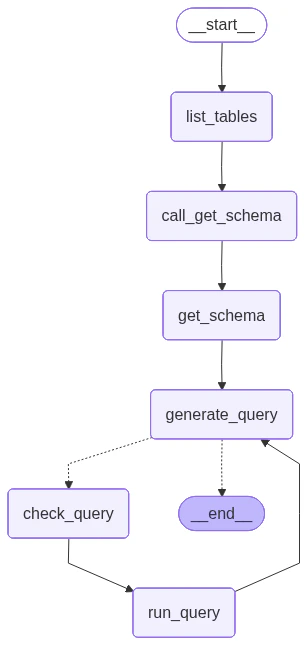
我们现在可以使用[图 API](/oss/javascript/langgraph/graph-api) 将这些步骤组装成工作流。我们在查询生成步骤定义一个[条件边](/oss/javascript/langgraph/graph-api#conditional-edges)，如果生成了查询则路由到查询检查器，如果没有工具调用则结束（即大语言模型(LLM)已经对查询给出了回答）。

```typescript theme={"theme":{"light":"catppuccin-latte","dark":"catppuccin-mocha"}}
import { StateGraph, ConditionalEdgeRouter } from "@langchain/langgraph";

const shouldContinue: ConditionalEdgeRouter<typeof MessagesState, "check_query"> = (state) => {
  const messages = state.messages;
  const lastMessage = messages[messages.length - 1];
  if (!lastMessage.tool_calls || lastMessage.tool_calls.length === 0) {
    return END;
  } else {
    return "check_query";
  }
};

const builder = new StateGraph(MessagesState)
  .addNode("list_tables", listTables)
  .addNode("call_get_schema", callGetSchema)
  .addNode("get_schema", getSchemaNode)
  .addNode("generate_query", generateQuery)
  .addNode("check_query", checkQuery)
  .addNode("run_query", runQueryNode)
  .addEdge(START, "list_tables")
  .addEdge("list_tables", "call_get_schema")
  .addEdge("call_get_schema", "get_schema")
  .addEdge("get_schema", "generate_query")
  .addConditionalEdges("generate_query", shouldContinue)
  .addEdge("check_query", "run_query")
  .addEdge("run_query", "generate_query");

const agent = builder.compile();
```

我们在下方可视化应用：

```typescript theme={"theme":{"light":"catppuccin-latte","dark":"catppuccin-mocha"}}
import * as fs from "node:fs/promises";

const drawableGraph = await agent.getGraphAsync();
const image = await drawableGraph.drawMermaidPng();
const imageBuffer = new Uint8Array(await image.arrayBuffer());

await fs.writeFile("graph.png", imageBuffer);
```

<img src="https://mintcdn.com/nvd-54/KKmYhbrpyTWf5iQl/oss/images/sql-agent-langgraph.png?fit=max&auto=format&n=KKmYhbrpyTWf5iQl&q=85&s=b56e4627e18afeb43039763079029f27" alt="SQL 智能体图" style={{ height: "800px" }} width="308" height="645" data-path="oss/images/sql-agent-langgraph.png" />

我们现在可以调用图：

```typescript theme={"theme":{"light":"catppuccin-latte","dark":"catppuccin-mocha"}}
const question = "Which genre on average has the longest tracks?";

const stream = await agent.stream(
  { messages: [{ role: "user", content: question }] },
  { streamMode: "values" }
);

for await (const step of stream) {
  if (step.messages && step.messages.length > 0) {
    const lastMessage = step.messages[step.messages.length - 1];
    console.log(lastMessage.toFormattedString());
  }
}
```

```
================================ Human Message =================================

Which genre on average has the longest tracks?
================================== Ai Message ==================================

Available tables: Album, Artist, Customer, Employee, Genre, Invoice, InvoiceLine, MediaType, Playlist, PlaylistTrack, Track
================================== Ai Message ==================================
Tool Calls:
  sql_db_schema (call_yzje0tj7JK3TEzDx4QnRR3lL)
 Call ID: call_yzje0tj7JK3TEzDx4QnRR3lL
  Args:
    table_names: Genre, Track
================================= Tool Message =================================
Name: sql_db_schema


CREATE TABLE "Genre" (
	"GenreId" INTEGER NOT NULL,
	"Name" NVARCHAR(120),
	PRIMARY KEY ("GenreId")
)

/*
3 rows from Genre table:
GenreId	Name
1	Rock
2	Jazz
3	Metal
*/


CREATE TABLE "Track" (
	"TrackId" INTEGER NOT NULL,
	"Name" NVARCHAR(200) NOT NULL,
	"AlbumId" INTEGER,
	"MediaTypeId" INTEGER NOT NULL,
	"GenreId" INTEGER,
	"Composer" NVARCHAR(220),
	"Milliseconds" INTEGER NOT NULL,
	"Bytes" INTEGER,
	"UnitPrice" NUMERIC(10, 2) NOT NULL,
	PRIMARY KEY ("TrackId"),
	FOREIGN KEY("MediaTypeId") REFERENCES "MediaType" ("MediaTypeId"),
	FOREIGN KEY("GenreId") REFERENCES "Genre" ("GenreId"),
	FOREIGN KEY("AlbumId") REFERENCES "Album" ("AlbumId")
)

/*
3 rows from Track table:
TrackId	Name	AlbumId	MediaTypeId	GenreId	Composer	Milliseconds	Bytes	UnitPrice
1	For Those About To Rock (We Salute You)	1	1	1	Angus Young, Malcolm Young, Brian Johnson	343719	11170334	0.99
2	Balls to the Wall	2	2	1	U. Dirkschneider, W. Hoffmann, H. Frank, P. Baltes, S. Kaufmann, G. Hoffmann	342562	5510424	0.99
3	Fast As a Shark	3	2	1	F. Baltes, S. Kaufman, U. Dirkscneider & W. Hoffman	230619	3990994	0.99
*/
================================== Ai Message ==================================
Tool Calls:
  sql_db_query (call_cb9ApLfZLSq7CWg6jd0im90b)
 Call ID: call_cb9ApLfZLSq7CWg6jd0im90b
  Args:
    query: SELECT Genre.Name, AVG(Track.Milliseconds) AS AvgMilliseconds FROM Track JOIN Genre ON Track.GenreId = Genre.GenreId GROUP BY Genre.GenreId ORDER BY AvgMilliseconds DESC LIMIT 5;
================================== Ai Message ==================================
Tool Calls:
  sql_db_query (call_DMVALfnQ4kJsuF3Yl6jxbeAU)
 Call ID: call_DMVALfnQ4kJsuF3Yl6jxbeAU
  Args:
    query: SELECT Genre.Name, AVG(Track.Milliseconds) AS AvgMilliseconds FROM Track JOIN Genre ON Track.GenreId = Genre.GenreId GROUP BY Genre.GenreId ORDER BY AvgMilliseconds DESC LIMIT 5;
================================= Tool Message =================================
Name: sql_db_query

[('Sci Fi & Fantasy', 2911783.0384615385), ('Science Fiction', 2625549.076923077), ('Drama', 2575283.78125), ('TV Shows', 2145041.0215053763), ('Comedy', 1585263.705882353)]
================================== Ai Message ==================================

The genre with the longest tracks on average is "Sci Fi & Fantasy," with an average track length of approximately 2,911,783 milliseconds. Other genres with relatively long tracks include "Science Fiction," "Drama," "TV Shows," and "Comedy."
```

<Tip>
  查看上述运行的 [LangSmith 追踪](https://smith.langchain.com/public/a6a96896-686a-4040-b9b5-28d701453d6f/r)。
</Tip>

## 6. 实现人机协作审查

在执行 SQL 查询之前检查智能体的查询是否存在意外操作或低效是很谨慎的做法。

这里我们利用 LangGraph 的[人机协作](/oss/javascript/langgraph/interrupts)功能，在执行 SQL 查询之前暂停运行并等待人工审查。使用 LangGraph 的[持久化层](/oss/javascript/langgraph/persistence)，我们可以无限期暂停运行（或者至少在持久化层存活的时间内）。

让我们用一个接收人工输入的节点来包装 `sql_db_query` 工具。我们可以使用 [interrupt](/oss/javascript/langgraph/interrupts) 函数来实现这一点。下面，我们允许输入来批准工具调用、编辑其参数或提供用户反馈。

```typescript theme={"theme":{"light":"catppuccin-latte","dark":"catppuccin-mocha"}}
import { RunnableConfig } from "@langchain/core/runnables";
import { tool } from "langchain";
import { interrupt } from "@langchain/langgraph";
import * as z from "zod";

const queryToolWithInterrupt = tool(
  async (input, config: RunnableConfig) => {
    const request = {
      action: queryTool.name,
      args: input,
      description: "Please review the tool call",
    };
    const response = interrupt([request]); // [!code highlight]
    // 批准工具调用
    if (response.type === "accept") {
      const toolResponse = await queryTool.invoke(input, config);
      return toolResponse;
    }
    // 更新工具调用参数
    else if (response.type === "edit") {
      const editedInput = response.args.args;
      const toolResponse = await queryTool.invoke(editedInput, config);
      return toolResponse;
    }
    // 用用户反馈回复大语言模型(LLM)
    else if (response.type === "response") {
      const userFeedback = response.args;
      return userFeedback;
    } else {
      throw new Error(`Unsupported interrupt response type: ${response.type}`);
    }
  },
  {
    name: queryTool.name,
    description: queryTool.description,
    schema: queryTool.schema,
  }
);
```

<Note>
  上述实现遵循更广泛的[人机协作](/oss/javascript/langgraph/interrupts)指南中的[工具中断示例](/oss/javascript/langgraph/interrupts#interrupts-in-tools)。请参阅该指南了解详情和替代方案。
</Note>

让我们现在重新组装图。我们将用人工审查替换程序化检查。注意，我们现在包含了一个[检查点器](/oss/javascript/langgraph/persistence)；这是暂停和恢复运行所必需的。

```typescript theme={"theme":{"light":"catppuccin-latte","dark":"catppuccin-mocha"}}
import { MemorySaver, ConditionalEdgeRouter } from "@langchain/langgraph";

const shouldContinueWithHuman: ConditionalEdgeRouter<typeof MessagesState, "run_query"> = (state) => {
  const messages = state.messages;
  const lastMessage = messages[messages.length - 1];
  if (!lastMessage.tool_calls || lastMessage.tool_calls.length === 0) {
    return END;
  } else {
    return "run_query";
  }
};

const runQueryNodeWithInterrupt = new ToolNode([queryToolWithInterrupt]);

const builderWithHuman = new StateGraph(MessagesState)
  .addNode("list_tables", listTables)
  .addNode("call_get_schema", callGetSchema)
  .addNode("get_schema", getSchemaNode)
  .addNode("generate_query", generateQuery)
  .addNode("run_query", runQueryNodeWithInterrupt)
  .addEdge(START, "list_tables")
  .addEdge("list_tables", "call_get_schema")
  .addEdge("call_get_schema", "get_schema")
  .addEdge("get_schema", "generate_query")
  .addConditionalEdges("generate_query", shouldContinueWithHuman)
  .addEdge("run_query", "generate_query");

const checkpointer = new MemorySaver(); // [!code highlight]
const agentWithHuman = builderWithHuman.compile({ checkpointer }); // [!code highlight]
```

我们可以像之前一样调用图。这次，执行会被中断：

```typescript theme={"theme":{"light":"catppuccin-latte","dark":"catppuccin-mocha"}}
const config = { configurable: { thread_id: "1" } };

const question = "Which genre on average has the longest tracks?";

const stream = await agentWithHuman.stream(
  { messages: [{ role: "user", content: question }] },
  { ...config, streamMode: "values" }
);

for await (const step of stream) {
  if (step.messages && step.messages.length > 0) {
    const lastMessage = step.messages[step.messages.length - 1];
    console.log(lastMessage.toFormattedString());
  }
}

// 检查中断
const state = await agentWithHuman.getState(config);
if (state.next.length > 0) {
  console.log("\nINTERRUPTED:");
  console.log(JSON.stringify(state.tasks[0].interrupts[0], null, 2));
}
```

```
...

INTERRUPTED:
{
  "action": "sql_db_query",
  "args": {
    "query": "SELECT Genre.Name, AVG(Track.Milliseconds) AS AvgLength FROM Track JOIN Genre ON Track.GenreId = Genre.GenreId GROUP BY Genre.Name ORDER BY AvgLength DESC LIMIT 5;"
  },
  "description": "Please review the tool call"
}
```

我们可以使用 [Command](/oss/javascript/langgraph/use-graph-api#combine-control-flow-and-state-updates-with-command) 来接受或编辑工具调用：

```typescript theme={"theme":{"light":"catppuccin-latte","dark":"catppuccin-mocha"}}
import { Command } from "@langchain/langgraph";

const resumeStream = await agentWithHuman.stream(
  new Command({ resume: { type: "accept" } }),
  // new Command({ resume: { type: "edit", args: { query: "..." } } }),
  { ...config, streamMode: "values" }
);

for await (const step of resumeStream) {
  if (step.messages && step.messages.length > 0) {
    const lastMessage = step.messages[step.messages.length - 1];
    console.log(lastMessage.toFormattedString());
  }
}
```

```
================================== Ai Message ==================================
Tool Calls:
  sql_db_query (call_t4yXkD6shwdTPuelXEmY3sAY)
 Call ID: call_t4yXkD6shwdTPuelXEmY3sAY
  Args:
    query: SELECT Genre.Name, AVG(Track.Milliseconds) AS AvgLength FROM Track JOIN Genre ON Track.GenreId = Genre.GenreId GROUP BY Genre.Name ORDER BY AvgLength DESC LIMIT 5;
================================= Tool Message =================================
Name: sql_db_query

[('Sci Fi & Fantasy', 2911783.0384615385), ('Science Fiction', 2625549.076923077), ('Drama', 2575283.78125), ('TV Shows', 2145041.0215053763), ('Comedy', 1585263.705882353)]
================================== Ai Message ==================================

The genre with the longest average track length is "Sci Fi & Fantasy" with an average length of about 2,911,783 milliseconds. Other genres with long average track lengths include "Science Fiction," "Drama," "TV Shows," and "Comedy."
```

请参阅[人机协作指南](/oss/javascript/langgraph/interrupts)了解详情。

## 下一步

查看[评估图](/langsmith/evaluate-graph)指南，了解如何使用 LangSmith 评估 LangGraph 应用，包括像这样的 SQL 智能体。

***

<div className="source-links">
  <Callout icon="terminal-2">
    [将这些文档连接](/use-these-docs)到 Claude、VSCode 等，通过 MCP 获取实时答案。
  </Callout>

  <Callout icon="edit">
    [在 GitHub 上编辑此页面](https://github.com/langchain-ai/docs/edit/main/src/oss/langgraph/sql-agent.mdx) 或 [提交 issue](https://github.com/langchain-ai/docs/issues/new/choose)。
  </Callout>
</div>
